Resetting the touch screen in your Jeep Wrangler can solve annoying issues like freezing, lag, or unresponsive menus. Many drivers face these problems, especially after software updates or when using Bluetooth and navigation frequently. Knowing how to reset your Wrangler’s touch screen can save time and avoid a trip to the dealership. This guide covers everything you need to know, from quick resets to deeper troubleshooting. You’ll also find answers to common questions and helpful comparisons, so you can handle most touch screen problems confidently.
When Should You Reset Your Jeep Wrangler Touch Screen?
Jeep Wrangler touch screens are reliable, but glitches happen. Here are situations when a reset is useful:
- The screen is frozen and does not respond to touch.
- Menus or icons are missing or lagging.
- Bluetooth or Apple CarPlay won’t connect.
- Navigation or radio functions stop working.
- The system restarts randomly.
These issues are usually software-related. A reset often fixes them without needing expensive repairs.
Types Of Touch Screen Reset Methods
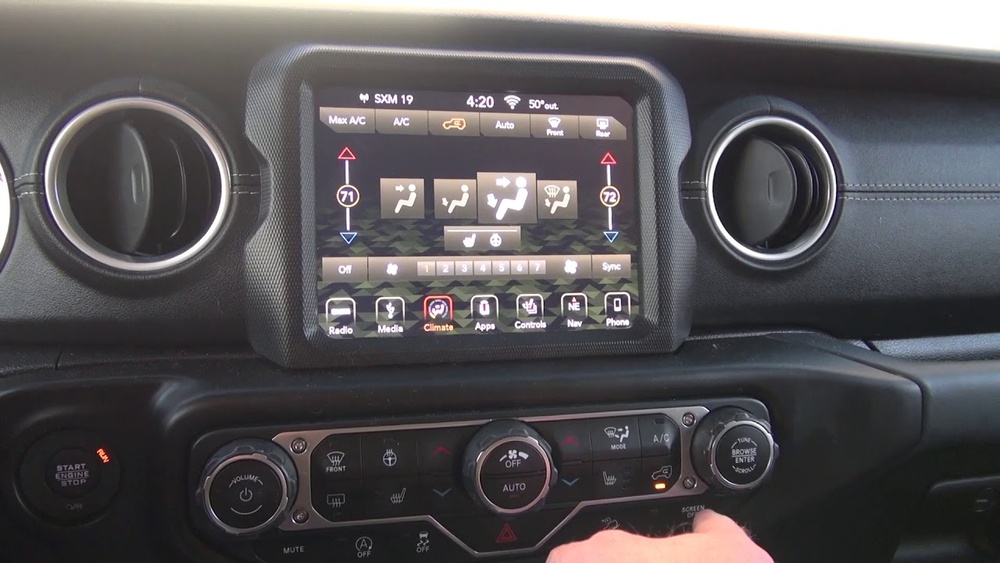
Wrangler models from 2018 and up use the Uconnect system. Depending on your issue, there are three main reset methods:
- Soft Reset (no data loss)
- Hard Reset (factory settings)
- Battery Disconnect Reset
Each method has its own pros and cons. Here’s a quick comparison:
| Reset Type | Difficulty | Data Loss | Best For |
|---|---|---|---|
| Soft Reset | Easy | No | Minor glitches |
| Hard Reset | Medium | Yes | Major issues |
| Battery Disconnect | Advanced | Possible | Persistent problems |
Most drivers only need a soft reset. For deeper issues, a hard reset or battery reset may be required.
Step-by-step: How To Reset Jeep Wrangler Touch Screen
Follow these steps to reset your screen. Start with the easiest method and move to advanced options if needed.
Soft Reset (most Common)
This method works for most Uconnect touch screens:
- Turn on your Jeep (engine running or in accessory mode).
- Press and hold the volume and tune buttons together for about 10 seconds.
- The screen will turn off, then restart with the Jeep logo.
Your settings (radio presets, Bluetooth, etc. ) Remain untouched. This quick reset solves most minor bugs.
Hard Reset (factory Settings)
If your screen is still acting up, a hard reset restores factory defaults:
- Go to Settings on the touch screen.
- Select System Information or Restore Settings (names may vary).
- Choose Factory Reset or Reset System.
- Confirm when prompted.
This wipes all user settings, so you’ll need to reconnect Bluetooth devices and re-enter presets. Use this only if a soft reset doesn’t fix the problem.
Battery Disconnect Reset
For persistent issues:
- Turn off your Jeep.
- Open the hood and locate the battery.
- Use a wrench to disconnect the negative terminal.
- Wait 10–15 minutes.
- Reconnect the terminal and start your Jeep.
This forces the entire vehicle’s electronic system to reset. Sometimes, this helps clear stubborn touch screen errors.
Common Mistakes When Resetting
Many drivers make simple mistakes that can make the reset process harder. Avoid these problems:
- Not holding the buttons long enough (must be 10 seconds).
- Performing a hard reset without backing up important presets.
- Disconnecting the battery without proper tools—risking damage.
- Trying to reset while driving (never do this).
Some Uconnect versions may have slightly different button locations. Check your owner’s manual if unsure.

What To Do If Reset Doesn’t Solve The Issue
If your touch screen still misbehaves after trying all resets:
- Check for software updates via the Uconnect menu or dealership.
- Inspect for loose wires behind the screen (only if you’re comfortable).
- Visit an authorized Jeep dealer for professional diagnostics.
According to Jeep forums, over 80% of touch screen issues are fixed by a soft reset or software update. Only about 10% need dealer repair for hardware faults.
Practical Tips For Preventing Touch Screen Glitches
Here are proven ways to keep your Wrangler’s touch screen running smoothly:
- Regularly update the Uconnect software.
- Avoid connecting multiple Bluetooth devices at the same time.
- Keep the screen clean (use a soft cloth, never harsh chemicals).
- Restart your system once a week to clear minor bugs.
An overlooked tip: If your screen freezes during extreme cold, let your Jeep warm up fully before resetting. Temperature changes can affect electronics.
Uconnect System Versions: Are All Resets The Same?
Different Wrangler models may use Uconnect 4, Uconnect 4C, or newer systems. Here’s a simple version comparison:
| Uconnect Version | Touch Screen Size | Reset Method |
|---|---|---|
| Uconnect 4 | 7-inch | Soft Reset (buttons) |
| Uconnect 4C | 8.4-inch | Soft/Hard Reset |
| Uconnect 5 | 8.4 or 10-inch | Soft Reset (screen menu) |
Always check your owner’s manual for exact reset instructions. Newer Uconnect systems may use a touch screen menu for resets instead of physical buttons.
Real-world Example: Solving A Touch Screen Freeze
Sarah, a 2021 Jeep Wrangler owner, noticed her screen froze during navigation. She tried turning the engine off and on, but nothing changed. After holding the volume and tune buttons for 10 seconds, her screen rebooted and worked perfectly. She avoided a costly dealer visit by knowing this simple trick.
External Resource For Uconnect Troubleshooting
For official troubleshooting guides and updates, visit the Jeep Uconnect Official Site.
Frequently Asked Questions
How Long Does A Soft Reset Take?
A soft reset takes about 30–60 seconds. The screen turns off and restarts automatically. Your personal settings remain safe.
A hard reset will remove user settings and presets, but the main map software stays. You may need to re-enter saved routes.
Is It Safe To Disconnect The Battery For A Reset?
Yes, but always use proper tools and disconnect the negative terminal first. Wait at least 10 minutes before reconnecting.
Can I Reset The Touch Screen While Driving?
Never attempt a reset while driving. The screen may go blank or restart, which can distract you and affect safety.
What If My Screen Still Doesn’t Work After All Resets?
If resets fail, check for updates or loose wiring. For hardware problems, visit a Jeep dealer for expert help.
Resetting your Jeep Wrangler touch screen is usually quick and easy. With these methods, you can fix most problems yourself and keep your vehicle’s tech running smoothly.