Programming the garage opener in your Jeep Cherokee can save you time and make life easier. Instead of carrying extra remotes, you simply press a button inside your SUV to open your garage door. But many people struggle with the setup, especially if English isn’t their first language. In this guide, you’ll learn step-by-step how to program the opener, what you need, and tips to make sure it works every time. You’ll also see comparisons between Jeep Cherokee models and garage opener types, so you know exactly what to expect.
Understanding The Jeep Cherokee Garage Opener
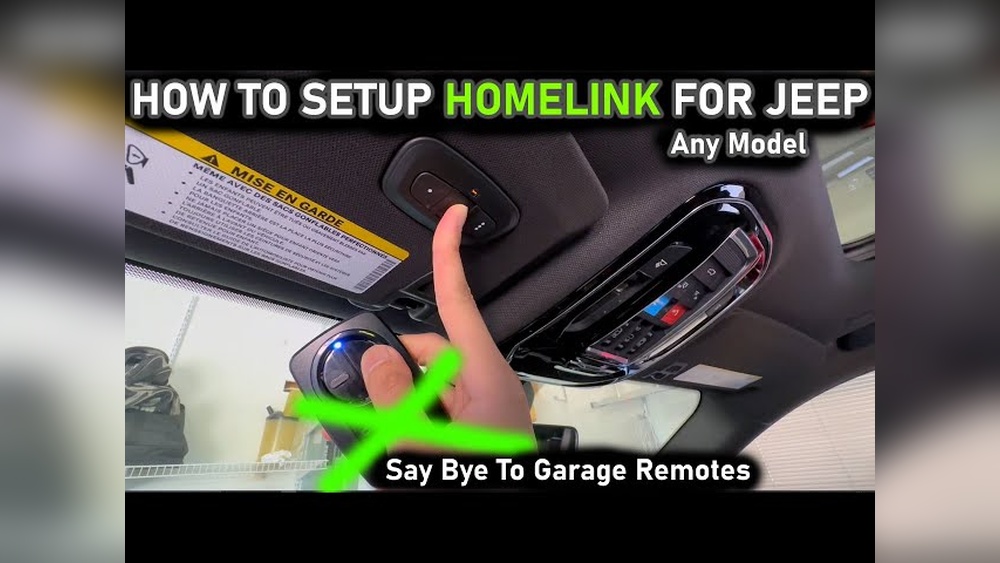
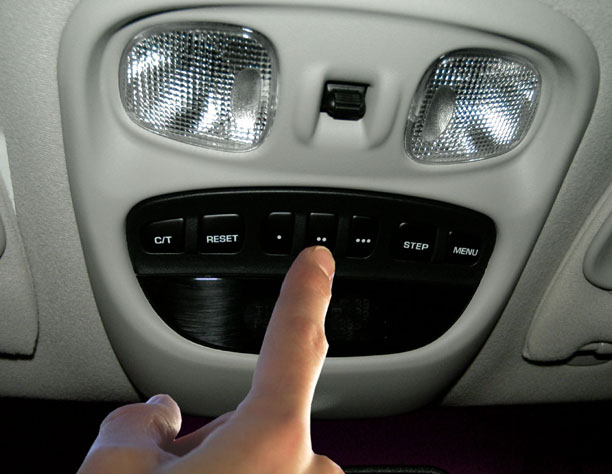
Most Jeep Cherokee models from recent years come with a built-in garage opener system called HomeLink. This system is usually found on the overhead console, near the interior lights. It lets you program up to three devices—so you can open multiple garage doors or gates.
Garage Opener Types
Your garage opener must be compatible with HomeLink. Most brands work, but some older openers may need extra steps. Here’s a quick comparison:
| Opener Type | Compatibility | Programming Steps |
|---|---|---|
| Rolling Code | Compatible | Extra “Learn” step required |
| Fixed Code | Compatible | Basic programming |
| Very Old Models | May need adapter | Check HomeLink site |
Rolling code systems are common after 1996. They use a changing signal for security, so you must press a “Learn” button on your garage unit. Fixed code systems use the same signal every time, making setup easier.
What You Need Before Programming
To avoid frustration, gather everything before you start:
- Your Jeep Cherokee parked outside, not in the garage (for safety).
- The garage door remote you want to program.
- Access to your garage opener unit (usually mounted on the ceiling).
- A step stool or ladder, if your garage opener is hard to reach.
Check your Jeep’s battery and remote battery—they must be strong for programming to work.
Step-by-step Programming Instructions
Follow these steps carefully. The process is simple, but missing a step can cause errors.
1. Clear Old Settings (optional):
If your HomeLink buttons were programmed before, clear them. Hold the two outer HomeLink buttons for about 20 seconds until the indicator light flashes rapidly.
Decide which HomeLink button you want to use (1, 2, or 3).
Hold your garage remote close (1–3 inches) to the HomeLink panel. Press and hold both the remote button and the chosen HomeLink button at the same time. Hold until the HomeLink indicator light changes from slow to fast blinking (usually 20–30 seconds).
If your garage opener uses rolling code (most models after 1996), go to the opener unit in your garage. Press its “Learn” or “Smart” button (usually on the back or side). You have 30 seconds to return to your Jeep.
Within those 30 seconds, go back to your Jeep and press the programmed HomeLink button for 2 seconds. Repeat up to three times.
6. Test:
Press the HomeLink button to see if your garage door opens. If it doesn’t, restart the steps.
Here’s a quick summary of the main steps:
| Step | Action | Time Needed |
|---|---|---|
| Clear Old Settings | Hold two outer buttons | 20 seconds |
| Program Button | Hold remote & HomeLink | 30 seconds |
| Learn Button | Press on garage unit | 30 seconds |
| Test | Press HomeLink | 2 seconds |
Jeep Cherokee Models: Differences In Garage Opener Setup
Not all Jeep Cherokee models have the same HomeLink system. Here’s a comparison of some common models:
| Model Year | HomeLink Location | Programming Steps |
|---|---|---|
| 2014–2018 | Overhead console | Standard |
| 2019–2023 | Near interior lights | Standard |
| Older Models | May not have HomeLink | Use external remote |
If your Cherokee doesn’t have HomeLink, you can buy a universal remote for your visor.
Common Mistakes And How To Avoid Them
Many people make small errors that stop the opener from working. Here are mistakes to watch for:
1. Weak Batteries:
If your remote or Jeep battery is low, signals can fail.
2. Distance Issues:
Hold the remote close to the HomeLink panel—too far and programming won’t work.
Make sure you choose the correct HomeLink button each time.
4. Missed “learn” Window:
For rolling code openers, you must press the HomeLink button within 30 seconds of pressing the “Learn” button.
5. Garage Opener Compatibility:
Some very old garage openers won’t work. Check your opener model on the HomeLink official site.
Practical Tips For Success
- Try programming during daylight so you can see indicator lights.
- If programming fails, restart from the beginning—don’t skip steps.
- After setup, label your HomeLink buttons so you remember which one opens which door.
- If you move homes, clear old codes for security.
Many owners don’t realize that clearing previous codes is important. Old codes can let someone else open your garage if you sell your Jeep. Also, some garage openers need you to wait before using the programmed button, so check your opener’s manual.
Frequently Asked Questions
Can I Program Multiple Garage Doors With My Jeep Cherokee?
Yes, you can program up to three devices using the HomeLink system. Each button can control a different garage door or gate.
What If The Garage Door Doesn’t Open After Programming?
Check your batteries, repeat the steps, and make sure you pressed the “Learn” button if your opener uses rolling code. Also, check your garage opener’s compatibility with HomeLink.
Do I Need To Clear Old Codes Before Programming?
It’s not required, but strongly recommended. Clearing old codes prevents confusion and ensures your HomeLink system is ready for new programming.
Is Homelink Available In All Jeep Cherokee Models?
Most models from 2014 and newer have HomeLink. Older or base models may not include it. Check your owner’s manual or overhead console for the HomeLink buttons.
Can I Use Homelink With Gate Openers Or Other Devices?
Yes, HomeLink can control most gate openers, security lights, and other compatible devices. Always check compatibility with your device’s manual.
Programming your Jeep Cherokee garage opener is a quick process once you understand the steps and what you need. With the right preparation and careful attention, your garage door will open at the touch of a button. Enjoy the convenience and added security—no more lost remotes or extra steps.
If you face any issues, checking your opener’s compatibility or seeking help from your dealer can solve most problems.