If your Uconnect system in a 2021 Jeep isn’t working right, it can be frustrating. Maybe the screen freezes, Bluetooth won’t connect, or navigation keeps crashing. You’re not alone—many Jeep owners face these issues. The good news is, most Uconnect problems can be fixed by a simple reset. But how do you actually reset Uconnect in a 2021 Jeep, and what should you watch out for? This guide explains the steps, gives practical tips, and helps you avoid mistakes that often make things worse.
Why Resetting Uconnect Helps
The Uconnect system controls your Jeep’s navigation, music, phone, and even climate settings. Like any computer, it can glitch or slow down over time. A reset clears out temporary bugs, software errors, and stuck processes. This often fixes issues without a trip to the dealership.
But don’t confuse a reset with a factory reset. A regular reset is like restarting your phone—it doesn’t erase your saved data or settings. A factory reset wipes everything and returns your system to its original state.
Quick Ways To Reset Uconnect Jeep 2021
There are two main ways to reset Uconnect in your 2021 Jeep: a soft reset and a factory reset. Here’s how they compare:
| Reset Type | What It Does | Data Loss | When To Use |
|---|---|---|---|
| Soft Reset | Restarts Uconnect system | No | Minor glitches (screen freeze, Bluetooth issue) |
| Factory Reset | Restores Uconnect to factory settings | Yes (erases all data) | Major issues (system crash, persistent errors) |
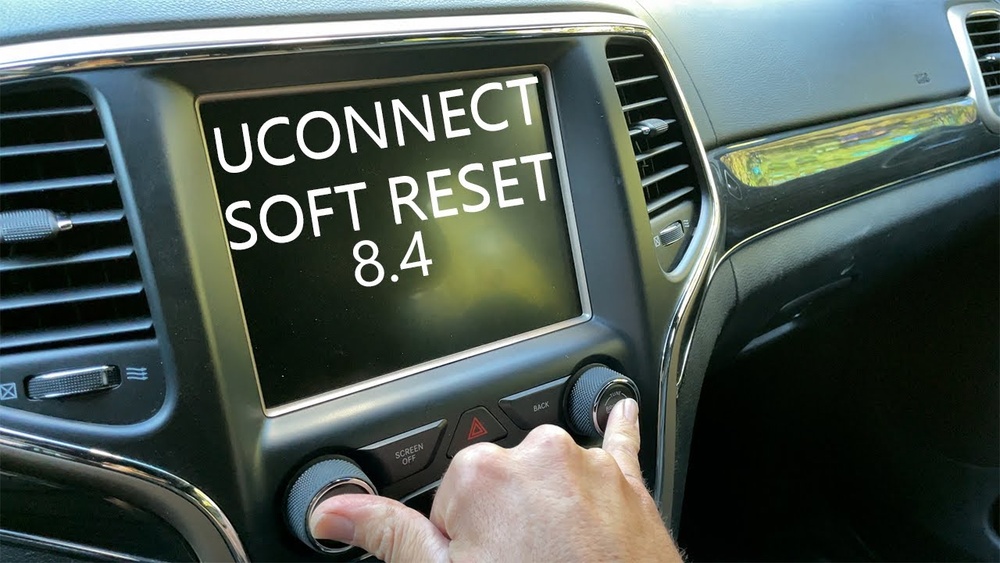
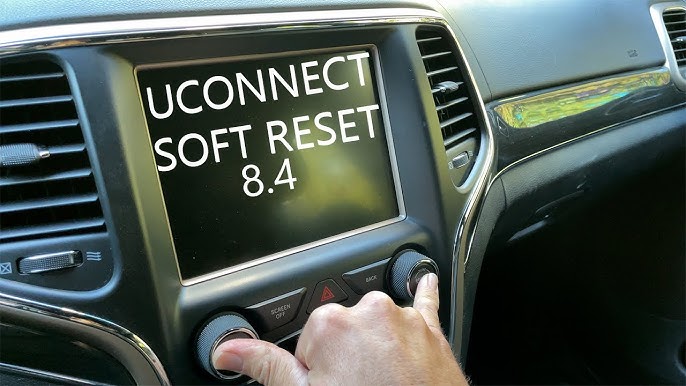
Soft Reset (no Data Loss)
Follow these steps for a soft reset:
- With the engine running, make sure the vehicle is in PARK.
- On the Uconnect screen, press and hold both the Volume and Tune/Browse knobs at the same time.
- Hold for about 10-20 seconds. The screen will go dark and then reboot.
- Release the knobs when the Jeep logo appears.
This simple reset fixes most common issues—especially if the screen is frozen or apps won’t load.
Factory Reset (erases All Data)
A factory reset is more powerful but erases your saved data, like paired phones and radio presets. Only use this if the soft reset doesn’t work.
- Press the Settings icon on your Uconnect screen.
- Scroll down and select Restore Settings or Reset.
- Tap Factory Reset (sometimes called “Clear Personal Data”).
- Confirm your choice. The system will restart and return to default settings.
Tip: Write down your favorite radio stations and re-pair your phone afterward.

What To Do If Uconnect Won’t Reset
Sometimes, the screen stays black or the system won’t restart. Here’s what to try next:
- Turn off your Jeep, open and close the driver’s door, and wait for a few minutes. This lets Uconnect shut down fully.
- Disconnect the battery for 10-15 minutes. Reconnect and start your Jeep. This forces a hard reset.
- If nothing works, contact your Jeep dealership or a certified technician. There may be a deeper software or hardware problem.
Common Problems Fixed By Resetting
Resetting Uconnect often solves:
- Bluetooth pairing errors
- Navigation not loading
- Frozen or blank screen
- Slow response to touch
- Audio cutting out
- App crashes
But a reset won’t fix hardware issues, like a broken screen or faulty wiring. If problems keep coming back, your system might need a software update or repair.
Real-world Example
Maria owns a 2021 Jeep Grand Cherokee. Her Uconnect screen froze every time she tried to use navigation. After a soft reset, the system restarted and worked perfectly. She avoided a trip to the dealer and saved time.
But when her friend tried the same on a 2021 Jeep Wrangler and nothing changed, a factory reset was needed. Afterward, everything worked—but all personal settings had to be re-entered.
Quick Troubleshooting: Is It A Software Or Hardware Issue?
Not sure if you need a reset or repair? Use this simple comparison:
| Symptom | Likely Cause | Recommended Action |
|---|---|---|
| Screen frozen, apps won’t open | Software glitch | Try soft reset |
| No sound from speakers | Software or wiring issue | Reset, then check fuses |
| Screen stays black after reset | Possible hardware failure | Contact dealership |
| Backup camera not working | Software or camera fault | Reset, then inspect camera |
If you try a reset and the problem returns quickly, it’s often a sign of a bigger issue. Consider getting your Uconnect software updated—dealers sometimes offer free updates for known bugs.

Extra Tips For A Smooth Reset
- Always keep your Jeep in PARK with the engine running during a reset.
- Don’t press random buttons—follow the correct sequence.
- Back up contacts and important info before a factory reset.
- If you see the “Software Update Available” message, update your system. Outdated software causes many problems.
- After a reset, re-pair your phone and check all settings.
When To Seek Professional Help
If your Uconnect keeps glitching even after multiple resets, or if you see error messages that won’t go away, it’s time to visit the dealer. Modern Jeep vehicles rely on complex computer systems, so some problems need special tools to fix.
It’s also smart to check for recalls. Sometimes, Jeep issues a recall for Uconnect problems. You can look up recalls using your Vehicle Identification Number (VIN) on the official NHTSA website.
Frequently Asked Questions
How Long Does A Uconnect Reset Take?
A soft reset usually takes less than a minute. The system reboots and is ready to use. A factory reset may take a few minutes, as it erases data and reboots the system.
A soft reset does not erase favorites. A factory reset will delete all saved data, including navigation addresses and radio presets.
Why Does My Uconnect Keep Freezing?
Frequent freezing is often caused by software bugs or an outdated system. Try resetting and then updating your Uconnect software.
Can I Reset Uconnect While Driving?
It’s not safe. Always reset your Uconnect system when the vehicle is stopped and in PARK. Some functions may not work while driving.
Where Can I Find Software Updates For Uconnect?
Jeep owners can check for updates on the official Uconnect website or at their dealership. Some updates are delivered automatically, but others may need to be installed manually.
Resetting your 2021 Jeep Uconnect system is simple and can solve many problems. Start with a soft reset, and only use a factory reset if needed. If problems continue, don’t hesitate to seek professional help or check for system updates.
A well-working Uconnect makes driving your Jeep safer and more enjoyable.