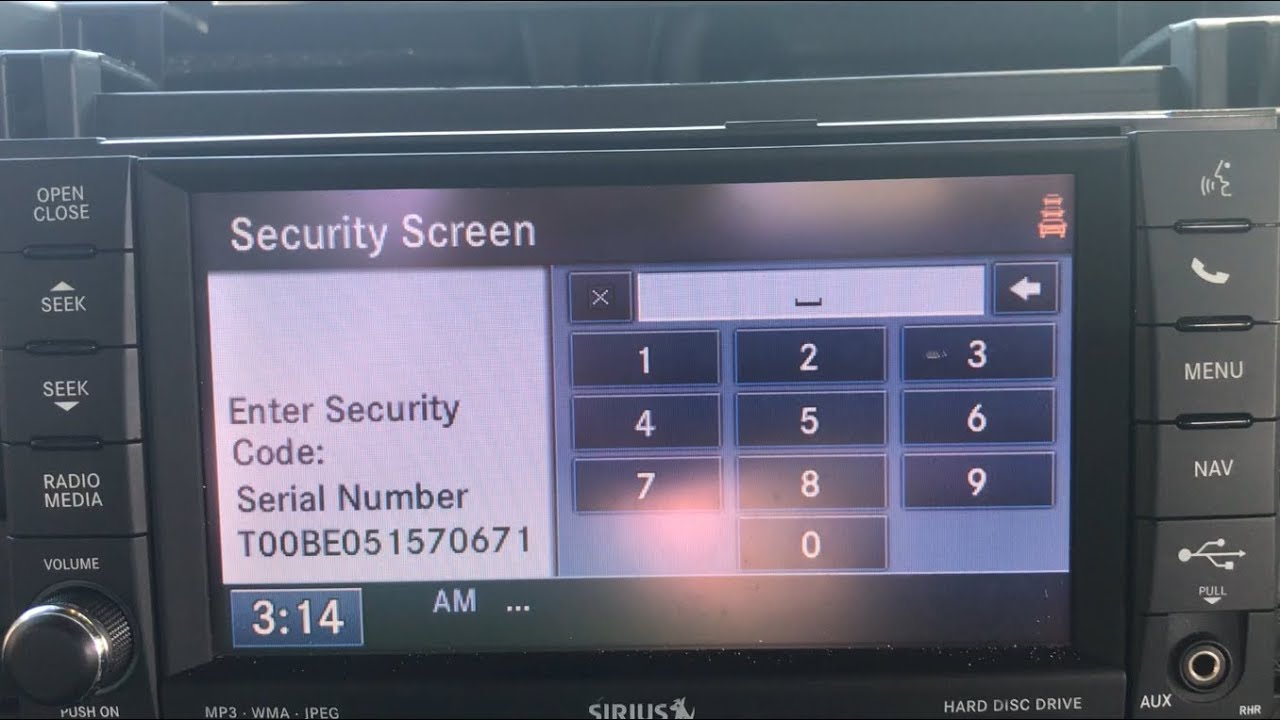
Many Jeep owners face a sudden problem: the radio locks and asks for a code. This can happen after changing the battery, doing repairs, or sometimes for no clear reason. When your Jeep radio is locked, you lose access to music, navigation, and hands-free calling. Unlocking it may sound technical, but with a few steps, you can do it yourself and avoid a trip to the dealership.
This guide explains exactly how to unlock your Jeep radio, why it happens, and what to do if you hit common roadblocks. You’ll also learn how to avoid mistakes that can make things harder, and how different Jeep models may have unique steps.
Why Jeep Radios Get Locked
Jeep radios have a security feature to prevent theft. If the radio loses power (like after disconnecting the battery), it thinks it might have been stolen. It then locks itself and asks for a security code. This code is unique to your vehicle. Entering the wrong code too many times can make the radio lock up longer or require a dealer reset.
Getting Your Jeep Radio Code
You need the right code to unlock the radio. There are several ways to find it:
- Check your owner’s manual. Many Jeeps have the radio code written on a card or sticker inside the manual.
- Look inside the glove box. Sometimes the code is on a sticker there.
- Visit the official Jeep website. With your Vehicle Identification Number (VIN) and radio serial number, you can often request the code online.
- Call or visit a Jeep dealer. If you can’t find the code, the dealer can provide it (sometimes for a fee).
- Use a trusted third-party service. Some websites offer code recovery, but always check reviews and avoid scams.
Here’s a quick comparison of the most common ways to get your Jeep radio code:
| Method | Cost | Speed | Reliability |
|---|---|---|---|
| Owner’s Manual | Free | Instant | High |
| Glove Box Sticker | Free | Instant | High |
| Jeep Website | Free | 1-2 Days | High |
| Dealer Visit | $0-$50 | Same Day | Very High |
| Third-Party Site | $10-$20 | Same Day | Varies |
Pro Tip: Some owners miss the code because it’s hidden under another sticker or written in small print. Always double-check your paperwork.

How To Enter The Jeep Radio Code
Once you have the code, you need to enter it correctly. The steps can vary by model, but here’s the general process:
- Turn on the radio. You’ll see “CODE” or “Enter Code” on the display.
- Input the code using the radio buttons. Each button (1-6) matches a number. Press each button until the correct digit shows.
- Confirm the code. Some radios need you to press and hold a specific button (like “Enter” or the right arrow). Others unlock automatically after the last digit.
- Radio unlocks. You’ll hear a beep, and the regular display should return.
Here’s an example for a 4-digit code (e.g., 1234):
- Press button 1 until “1” appears.
- Press button 2 until “2” appears.
- Press button 3 until “3” appears.
- Press button 4 until “4” appears.
If you enter the wrong code, don’t keep guessing. Too many wrong attempts may lock the radio for up to an hour.
What If You Don’t Have The Code?
If you can’t find the code, don’t panic. Here’s what you can do:
- Locate the radio serial number. You may need to remove the radio to see it on the back. This is a common step for older Jeeps.
- Contact a dealer or use the Jeep website. Provide your VIN and radio serial number.
- Use a code recovery service. Make sure it’s reputable. Avoid any service that asks for unusual information or high fees.
Some radios show the serial number on the screen if you press certain button combinations. For example, holding down buttons 1 and 6 or 2 and 6 together when turning on the radio can display the serial number on some Jeep models.
| Model | Serial Number Location |
|---|---|
| Jeep Wrangler (2010-2017) | Back of radio unit |
| Jeep Grand Cherokee (2011-2018) | Back of radio, or screen with button combo |
| Jeep Renegade | Back of radio unit |
Real-life example: Many Jeep owners on forums found their code by calling the dealership with their VIN and radio serial, and got the code in minutes. Some paid a small fee, but it was much faster than waiting for a mailed card.
Avoiding Common Mistakes
Unlocking your Jeep radio is usually simple, but these mistakes can cause problems:
- Guessing the code repeatedly. This can lock the radio for longer or require a dealer reset.
- Not writing down the code. Always save it in your phone or glove box for next time.
- Using untrusted websites. Some sites may promise a code but ask for high payments or personal data.
- Disconnecting the battery again. If you unlock the radio and then disconnect the battery, you’ll need the code again.
If your radio won’t accept the code or stays locked, check your owner’s manual or contact a dealer. Sometimes, a software update or a reset tool is needed for newer radios.
How To Prevent Future Lockouts
To avoid getting locked out again:
- Keep the radio code in a safe place.
- If you need to disconnect the battery, have the code ready first.
- Ask your mechanic to keep the radio powered during repairs if possible.
Some newer Jeeps have radios linked to the VIN, so after a battery change, they unlock automatically. But many models still need the manual code entry.
Frequently Asked Questions
How Many Times Can I Enter The Jeep Radio Code?
Most Jeep radios allow 3 to 5 tries. After that, the radio may lock for up to an hour, even if you have the correct code.
Can I Unlock My Jeep Radio For Free?
Yes, if you have the code in your manual or on a sticker. Many dealers also provide the code for free if you show proof of ownership.
Will Disconnecting The Battery Again Lock The Radio?
Yes, unless your radio is linked to the VIN (some newer models). Otherwise, you’ll need the code each time the radio loses power.
Can I Use A Universal Code To Unlock My Jeep Radio?
No, each Jeep radio code is unique. Universal codes do not work and can cause the radio to lock longer.
Where Can I Find More Help If I’m Stuck?
You can visit the official Jeep support page at Mopar Support for more guidance and code recovery options.
Unlocking your Jeep radio is a straightforward process if you follow these steps and avoid common mistakes. Keep your code safe, and you’ll have your radio working again in no time.