Connecting your phone to your Jeep Patriot opens up a world of convenience and safety. You can play music, use hands-free calling, and navigate with GPS—all while keeping your attention on the road. While the process may seem confusing at first, you only need a few steps to get set up.
Whether your Patriot has Uconnect, basic Bluetooth, or just an auxiliary port, you can find a way to connect your device. This guide explains every method, shows you how to avoid common mistakes, and points out a few features most owners don’t realize they have.
Understanding Your Jeep Patriot’s Connectivity Options
Before you start, it’s important to check what features your Jeep Patriot supports. The Patriot models from 2011 onwards typically offer Bluetooth and auxiliary input, while older models may have only a basic AUX port. Some trims come with Uconnect, Chrysler’s infotainment system, which gives more options for media and calls.
Here’s a quick comparison of the main connection methods:
| Connection Type | Features Supported | Ease of Use |
|---|---|---|
| Bluetooth | Calls, Music, Voice Commands | Easy (wireless, once paired) |
| Auxiliary Cable | Music Only | Very Easy (plug and play) |
| USB Port | Music, Charging, Some Calls | Easy (wired, sometimes limited features) |
| Uconnect | Calls, Music, Voice Commands, Navigation (if equipped) | Moderate (requires setup) |
If you’re not sure what your model supports, check your owner’s manual or look at the dashboard for Bluetooth, USB, or AUX symbols.
How To Connect Phone To Jeep Patriot Via Bluetooth
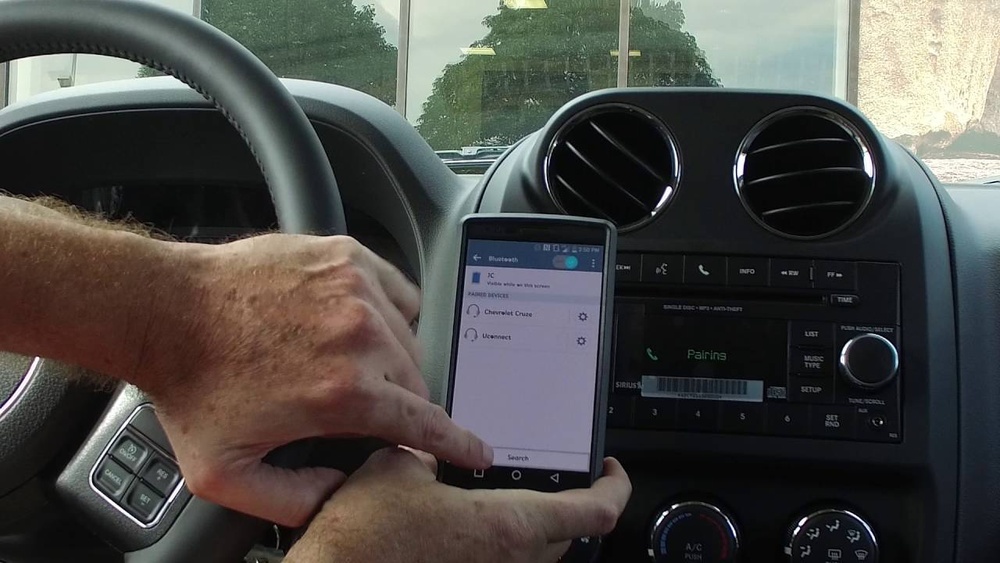
Most drivers prefer Bluetooth because it’s wireless and supports both calls and music. Here’s how to do it:
- Turn on your Jeep Patriot and keep it in Park.
- Enable Bluetooth on your phone. You’ll usually find this in your phone’s settings.
- On your Jeep’s stereo or Uconnect system, press the ‘Phone’ or ‘Uconnect’ button.
- Select ‘Add Device’ or ‘Pair a Device’. Your car will begin searching for devices.
- On your phone, look for the device name (often ‘Uconnect’ or ‘Jeep’) in the Bluetooth list.
- Tap on the car’s Bluetooth name to connect. Enter the PIN shown on your Jeep’s display, or accept the pairing request.
- Wait for the confirmation message. Your phone should now be connected.
Pro Tip: If the connection fails, try restarting your phone or turning the car off and on. Make sure you’re not already paired with another car or device.
Common Bluetooth Issues And Fixes
- Pairing Not Showing Up: Make sure your phone is visible to other devices. Sometimes, older Patriots need you to start the pairing process from the car, not the phone.
- Music Not Playing: Confirm your phone’s media audio is enabled under Bluetooth settings. Some phones pair for calls only by default.
- Calls Not Coming Through Speakers: Check the Uconnect settings and ensure your phone is set as the active device.

Using Uconnect For Advanced Features
If your Jeep Patriot has Uconnect, you can do more than just connect by Bluetooth. Uconnect offers voice commands, contact syncing, text message reading, and sometimes navigation.
Here’s how to set it up:
- Follow the Bluetooth pairing steps above.
- After connecting, Uconnect may ask for permission to access contacts and messages. Approve these on your phone.
- Try pressing the voice command button on your steering wheel. Say commands like “Call John Smith” or “Play music.”
Non-Obvious Insight: Many users don’t realize Uconnect can read incoming text messages aloud and let you reply with preset responses. Check the Uconnect settings under “Messaging” to enable this.
Connecting With Auxiliary Cable Or Usb
If your Jeep Patriot does not support Bluetooth or Uconnect, or if you want better sound quality, use an auxiliary cable or USB port. This is also helpful if your Bluetooth isn’t working.
| Connection | Needed Items | Audio Quality |
|---|---|---|
| Auxiliary (AUX) | 3.5mm audio cable | Good |
| USB | USB cable (depends on phone) | Very Good |
To use an AUX cable:
- Plug one end into your phone’s headphone jack (or adapter).
- Plug the other end into the AUX port, usually found near the stereo or center console.
- Set your stereo to AUX mode.
- Play music from your phone.
For USB:
- Connect the USB cable to your phone and the car’s USB port.
- Switch your stereo to USB mode.
- Some phones require you to select “Media Transfer” or “Audio Source” when connected.
Non-Obvious Insight: Some newer Patriots let you control music tracks from the car’s stereo when connected by USB, but only if your phone is set to the right mode.

Tips For A Smooth Connection Experience
- Update your phone and Uconnect software for best compatibility. Outdated software can cause connection drops.
- Clear old devices: If your Jeep remembers too many phones, delete unused pairings to avoid confusion.
- Use voice commands safely: Practice using voice features for calls and navigation before driving.
Connection Method Comparison
Here’s a quick overview to help you choose the best way to connect:
| Method | Pros | Cons |
|---|---|---|
| Bluetooth | Wireless, supports calls/music | May have audio lag |
| Uconnect | Voice commands, texting, more features | Complex setup, not in all models |
| Auxiliary | Simple, reliable sound | No calls, wired connection |
| USB | High quality, charges phone | Not always available, limited control |
Final Thoughts
Connecting your phone to your Jeep Patriot can be simple when you know what to look for. Take a few minutes to check your car’s features, pick the right method, and follow the steps above. Enjoy safe driving, easy calls, and your favorite music—without distractions. If you want to learn more about the Uconnect system, the official Jeep Uconnect Guide is a great place to start.
Frequently Asked Questions
How Many Phones Can I Pair With My Jeep Patriot At Once?
Most Jeep Patriots with Uconnect allow you to pair up to seven phones, but only one can be active at a time.
Can I Use Apple Carplay Or Android Auto In My Patriot?
The factory system in most Jeep Patriots does not support Apple CarPlay or Android Auto. Aftermarket stereos may add this feature.
Why Isn’t My Phone Connecting After An Update?
Software updates can reset Bluetooth settings. Try deleting your car from your phone’s paired devices list and reconnect.
Does Connecting By Usb Charge My Phone?
Yes, the USB port in your Jeep Patriot will charge your phone, but charging speed may be slower than a wall charger.
Can I Play Music From Youtube Through My Car Speakers?
If you use Bluetooth or AUX, you can play any audio from your phone, including YouTube, through your Jeep’s speakers.