If your Jeep Grand Cherokee’s radio is acting up—freezing, glitching, or refusing to play sound—it can be frustrating. Modern radio units are more than just music boxes. They control navigation, Bluetooth, apps, and even some vehicle settings. Knowing how to reset your radio can save you a trip to the dealership and get your system working smoothly again.
Let’s walk through the best ways to reset your Jeep Grand Cherokee radio, what to watch out for, and a few tips to avoid common mistakes.
When Should You Reset Your Jeep Grand Cherokee Radio?
You might need a radio reset if you notice:
- Unresponsive touchscreen
- Bluetooth problems
- No sound or distorted audio
- System not starting up
- Apps crashing or freezing
Sometimes, updates or electrical issues can cause these problems. A reset often fixes minor glitches and restores normal function.
Quick Soft Reset Methods
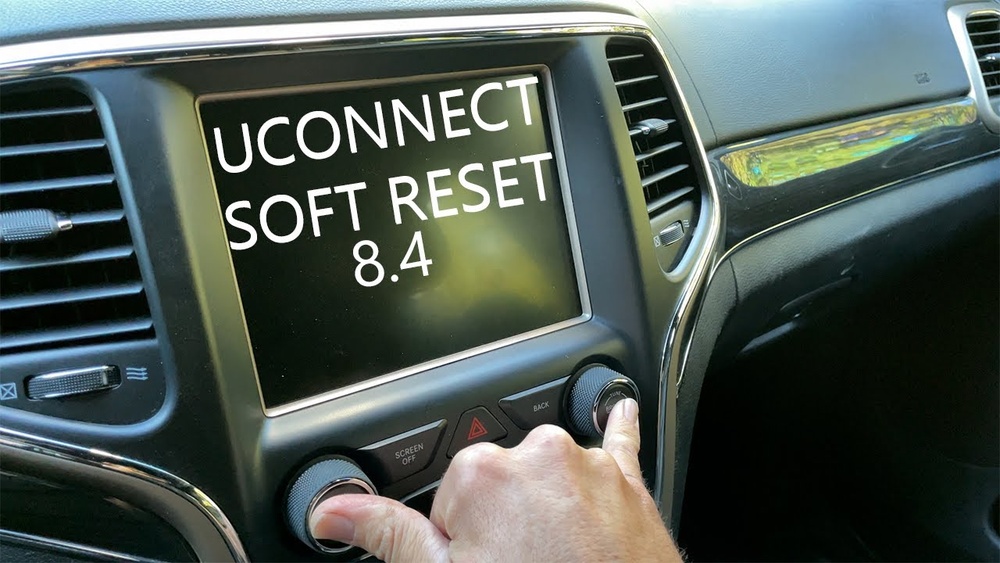
Most Jeep Grand Cherokees (especially from 2014 onward) use the Uconnect system. Here’s how to do a simple soft reset without any tools:
1. Engine Running
Start your Jeep and keep it in Park.
On the radio console, press and hold both the volume and tuner knobs at the same time.
3. Wait For Screen Blackout
Hold the buttons for about 10-20 seconds. The display will turn off and restart. Release the buttons.
4. System Reboots
The Uconnect logo appears as the system boots back up. Wait for it to reload fully.
In most cases, this fixes minor bugs and resets the radio without affecting your saved settings.
Hard Reset: Factory Resetting Your Uconnect Radio
If the soft reset doesn’t work, a factory reset can help. This wipes your radio’s memory, including paired devices and custom settings, so only use this if necessary.
Steps to factory reset:
1. Access Radio Settings
Tap the ‘Settings’ icon on your Uconnect touchscreen.
2. Find System Information
Scroll down and look for ‘System Information’ or ‘Reset’ (wording varies by model).
3. Select Factory Reset
Tap ‘Restore Settings’ or ‘Reset to Factory Default. ’ Confirm when prompted.
4. Wait For Reboot
The radio will restart, and all settings return to default.
Remember to re-pair your phone and re-enter radio presets after a factory reset.
Disconnecting The Car Battery
If the radio is totally frozen or won’t boot, a power cycle can force a reset.
1. Turn Off The Jeep
Ensure the ignition is completely off.
2. Open The Hood
Use a wrench to disconnect the negative battery terminal (black cable).
3. Wait 5-10 Minutes
This lets all electronics reset.
4. Reconnect The Cable
Tighten the terminal, close the hood, and restart your Jeep.
This method resets more than just the radio—it can clear other minor electronic glitches, too.
Comparing Reset Methods
Below is a quick comparison of the three main reset methods:
| Reset Method | Difficulty | What It Fixes | Data Loss |
|---|---|---|---|
| Soft Reset | Easy | Minor glitches, freezes | No |
| Factory Reset | Medium | Software bugs, persistent issues | Yes |
| Battery Disconnect | Medium | Major freezes, power issues | Possible clock reset |
Common Mistakes To Avoid
Resetting your Jeep radio is simple, but a few mistakes can make things worse:
- Resetting too often: Frequent resets can hide bigger issues. If the radio keeps failing, get it checked.
- Ignoring software updates: Outdated Uconnect software causes glitches. Check for updates on the Jeep website.
- Skipping battery safety: Always disconnect the negative terminal first to avoid electrical shorts.

How To Check For Uconnect Software Updates
Sometimes, a reset isn’t enough. Jeep often releases updates that solve bugs and add features. Here’s how to check if your radio needs an update:
1. Find System Version
Go to your radio’s ‘System Information’ menu and note the software version.
2. Visit Official Site
Go to the Uconnect update page and enter your Vehicle Identification Number (VIN).
3. Download And Install
If an update is available, follow the instructions to install it using a USB drive.
Many owners miss out on fixes by skipping this step. Updated software can resolve problems without a reset.
Troubleshooting: When Reset Doesn’t Work
If your radio is still acting up after a reset, try these steps:
- Check fuses: A blown fuse can stop the radio from working. The fuse box is usually under the dash or hood. Replace only with the same rating.
- Inspect wiring: Loose or damaged cables behind the unit can cause failures.
- Consult a dealer: Some issues need special tools or software only available at authorized service centers.

Model Differences: Which Reset Works For Your Jeep?
Jeep Grand Cherokee radios differ by year and trim. Here’s a quick look at the most common systems:
| Model Year | Radio System | Reset Method |
|---|---|---|
| 2011–2013 | Basic Uconnect | Battery reset, soft reset |
| 2014–2021 | Uconnect 4/5 | Soft & factory reset |
| 2022+ | Uconnect 5+ (large screen) | Menu-based reset |
Check your owner’s manual for exact steps, as menu layouts and button functions can vary.
Practical Tips For Smooth Radio Operation
- Keep software updated
- Avoid using wet hands on the touchscreen
- Don’t overload the system with too many paired devices
- Regularly restart the radio to clear minor memory glitches
One non-obvious tip: If your radio keeps freezing after a reset, check for interference from USB chargers or phone mounts. Cheap accessories sometimes create electrical noise that confuses the system.
Another beginner mistake is ignoring battery health. A weak car battery can cause the radio and other electronics to behave strangely, especially in cold weather.
Frequently Asked Questions
How Do I Reset My Jeep Grand Cherokee Radio Without Losing Settings?
A soft reset (pressing both volume and tuner knobs) usually works and won’t erase your presets or Bluetooth devices. Only a factory reset deletes all saved data.
Will Resetting The Radio Fix Bluetooth Problems?
Yes, a reset often solves Bluetooth connectivity issues. If problems continue, delete your phone from the paired devices list and reconnect.
My Radio Won’t Turn On After A Reset. What Should I Do?
Check your car’s fuses and battery. If both are fine, the radio may need professional service or a software update.
Can I Update Uconnect Software Myself?
Yes, you can download updates from the official Uconnect site and install them using a USB drive. Always follow Jeep’s instructions carefully.
Is There A Risk In Disconnecting The Battery For A Reset?
Disconnecting the battery is safe if you follow the correct steps. Always remove the negative cable first and reconnect it securely. Some settings like the clock or radio presets may reset.
Resetting your Jeep Grand Cherokee radio is usually quick and safe. With these steps, you can fix most issues yourself and keep your infotainment system running smoothly. If problems continue, don’t hesitate to contact a Jeep dealer for expert help.