Changing the time on your Jeep Wrangler might seem like a small task, but it can be confusing if you’re not familiar with the dashboard controls or the specific model year. Whether you’re adjusting for daylight saving time or just correcting the clock, knowing the right steps can save you frustration.
Let’s explore how to change the time on different Jeep Wrangler models, what to expect with various systems, and helpful tips that even experienced owners sometimes overlook.
Understanding Your Jeep Wrangler’s Clock System
The way you set the clock depends on your Wrangler’s model year and the infotainment system it uses. Newer models (2018 and later) often use a touchscreen system, while older ones rely on manual buttons. Here’s a quick comparison:
| Model Year | Clock Type | Setting Method |
|---|---|---|
| 2018 and newer | Uconnect Touchscreen | On-screen menus |
| 2011-2017 | Basic Digital Clock | Physical buttons |
| 2010 and older | Manual Clock/Radio | Knobs or buttons |
It’s important to know your exact model year. Features can change even within the same generation.
How To Change Time On 2018+ Jeep Wrangler (uconnect)
Most recent Jeep Wranglers use the Uconnect infotainment system. The process is simple if you know where to look.
- Turn on the ignition but the engine does not need to run.
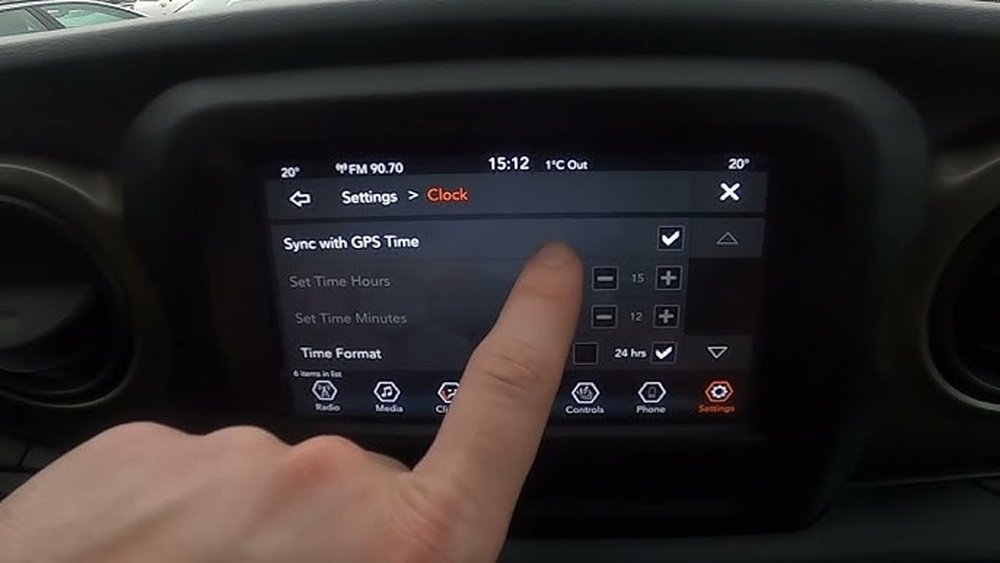
- On the touchscreen, press “Settings.”
- Tap “Clock & Date.”
- Disable “Sync with GPS” if it’s active. If you want to set time manually, this must be off. If you leave it on, the clock adjusts itself using satellite signals.
- Tap “Set Time” and use the plus (+) and minus (–) icons to adjust hours and minutes.
- Tap “AM/PM” to toggle if needed.
- Hit “Save” or back out to apply changes.
Pro Tip: The Uconnect system updates automatically if “Sync with GPS” is on, but this only works if your area observes daylight saving time correctly in the system settings. If you travel across time zones, check the time after each long trip.

Setting Time On 2011–2017 Jeep Wrangler
For these years, you’ll often see a small digital clock on the radio or dashboard.
- Turn the key to ON.
- On your radio, press and hold the “Time” or “Clock” button (sometimes marked as “SETUP”) until the time blinks.
- Use the tuning knob to change the hours.
- Press the “Time” button again to switch to minutes.
- Adjust minutes with the tuning knob.
- Wait a few seconds, or press “Time” once more to confirm.
Some radios let you use seek/scan buttons to set hours and minutes instead of a knob. If you’re unsure, check your owner’s manual for your specific radio model.
Changing The Time On 2010 And Older Jeep Wrangler
Older models use a more manual process, sometimes even an analog clock.
- For analog clocks, press and hold a small pin or turn a dial near the clock face.
- For basic digital radios, press and hold “Clock” or “Set,” then use preset buttons (1–6) or tune/seek to adjust the time.
These older systems don’t sync automatically, so you need to set the time after every battery change or daylight saving switch.

Comparing Time Setting Methods By Model Year
To make it easier, here’s a side-by-side look at the most common Jeep Wrangler clock adjustment methods:
| Year Range | Control | Automatic Sync | Manual Setting |
|---|---|---|---|
| 2018+ | Touchscreen (Uconnect) | Yes | Yes |
| 2011-2017 | Radio/Physical Buttons | No | Yes |
| 2010 and older | Knob/Button/Analog | No | Yes |
Common Problems And How To Fix Them
Some owners find their clock keeps resetting or won’t save the new time. Here are the most frequent causes:
- Weak battery: If your battery is dying, the clock may reset every time you start the car.
- Software glitches: For touchscreen models, try a system reset if settings won’t save.
- Radio fuse: If the radio or clock doesn’t work at all, check the fuse box. A blown fuse is often the problem.
Hidden Insight: On some older Wranglers, disconnecting the battery for repairs can erase the clock setting. Always recheck the time after any electrical work.
When To Use Gps Sync Vs. Manual Time
If your Wrangler offers GPS sync, it’s usually best to keep it on for automatic accuracy. However, there are situations where manual is better:
- Traveling in areas with poor GPS reception
- Regions with non-standard daylight saving rules
- If you prefer a different time zone (for business or travel)
Example: Some owners in Arizona turn off GPS sync because the state does not observe daylight saving time, while the system might try to adjust automatically.
Useful Tips For Accurate Timekeeping
- Double-check AM/PM: This is a common mistake, especially when setting the time quickly.
- Sync with your phone: Use your smartphone as a reference to avoid errors.
- Update after battery changes: The clock will likely reset.
- Check after software updates: Sometimes, system updates reset the infotainment settings.
- Read the manual: Features can change between trims and years.
Advanced Tip: If your Uconnect system lags or freezes during setting, try shutting off the vehicle, waiting a minute, and restarting. This often resolves minor glitches.
Frequently Asked Questions
How Do I Set The Clock On A 2022 Jeep Wrangler?
On the 2022 model, use the Uconnect touchscreen. Go to Settings > Clock & Date, turn off GPS Sync if you want manual control, then adjust the time using the on-screen buttons.
Why Does My Jeep Wrangler Clock Keep Resetting?
This usually means a weak battery or a blown fuse. In rare cases, a software bug could cause the issue. Check your electrical system first.
Can I Set The Jeep Wrangler Clock To 24-hour (military) Time?
Yes, on most Uconnect systems, you can switch between 12-hour and 24-hour formats in the Clock & Date menu. Some older systems may not offer this option.
Is There A Way To Set The Clock Using The Jeep Mobile App?
As of now, the Jeep mobile app does not let you set the vehicle’s clock. You must do it through the in-car touchscreen or radio controls.
Where Can I Find More Details For My Exact Wrangler Model?
Your owner’s manual has model-specific instructions. You can also visit the official Jeep Owners site for more resources.
Adjusting your Jeep Wrangler’s clock is a simple task when you know the steps for your specific model. With these instructions and tips, you’ll keep your dashboard accurate all year round—no matter where the road takes you.