Removing the dashboard from a Jeep Wrangler is a task that requires patience, care, and the right approach. Whether you need to fix electrical issues, install new components, or simply want to clean hard-to-reach areas, understanding the correct steps is essential. Many owners are surprised at how many screws and connectors are involved, and small mistakes can lead to rattles or electrical problems later. This guide will help you remove your Wrangler’s dashboard safely, with practical tips and expert insights to make the process smooth—even for first-timers.
Tools And Preparation
Before starting, gather the necessary tools and clear your workspace. Jeep Wranglers vary by model year, but most use similar fasteners and clips. Here’s what you’ll need:
- Phillips and flathead screwdrivers
- 7mm, 10mm, and 13mm sockets with ratchet
- Trim removal tool (plastic preferred)
- Needle-nose pliers
- Labeling tape or bags for screws and clips
Disconnect the negative battery terminal to avoid electrical shorts. Set aside at least 2–3 hours, especially if this is your first time. Take photos as you go; this will help during reinstallation.
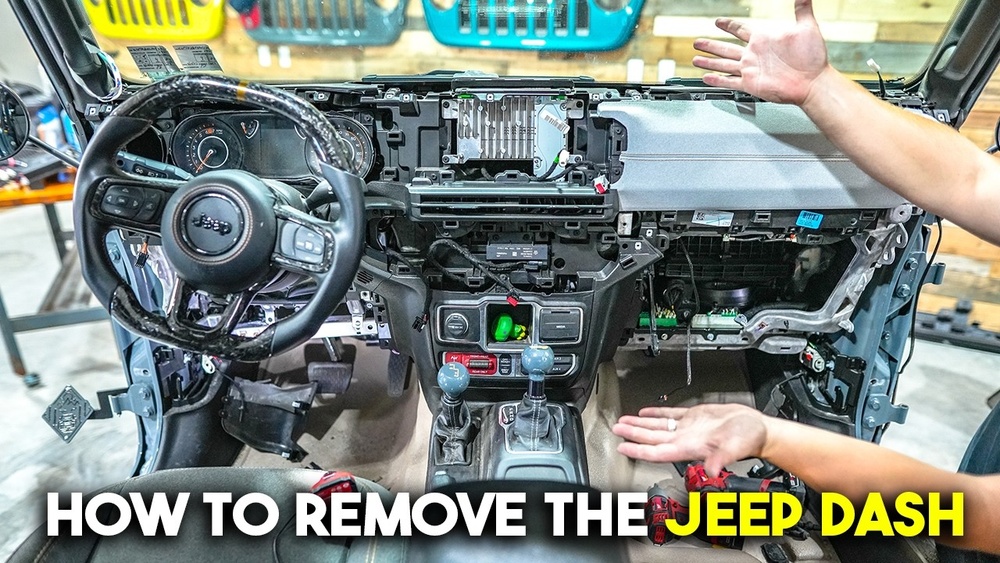
Step-by-step Dashboard Removal
1. Remove Trim Panels
Start with the side trim panels on each end of the dashboard. Use a trim tool to gently pry them off—these are usually held by clips. Next, remove the trim above the glove box and around the instrument cluster. Some models have a long accent piece that runs across the dash; this will need to come out as well.
2. Remove Center Console (if Equipped)
If your Wrangler has a center console, open it and remove any items. Locate and remove screws inside the console and along its base. Carefully lift the console out and disconnect any electrical connectors for USB ports or power outlets.
3. Remove Lower Dashboard Bolts And Panels
Find and remove the bolts under the steering column and glove box. There are typically 7mm or 10mm bolts here. Remove the lower knee panels by gently pulling them out after removing their screws. Don’t force panels—check for hidden screws.
4. Disconnect Electrical Connectors
Behind the panels, you’ll find several wiring connectors. Carefully unplug these by pressing the release tabs. It’s helpful to label each connector with tape so you remember where each one goes later. Some connectors are delicate, so avoid pulling on the wires.
5. Remove Main Dashboard Bolts
With most trim and panels out, you’ll see the main dashboard mounting bolts. These are usually 13mm bolts along the base of the windshield and near the doors. Remove all visible bolts, keeping them in labeled bags.
Here’s a summary of typical bolt sizes found in Jeep Wrangler dashboards:
| Location | Typical Size | Notes |
|---|---|---|
| Side panels | 7mm | Small screws |
| Lower dash | 10mm | Often hidden by panels |
| Main mounts | 13mm | Heavy bolts, support dash weight |
6. Free The Dashboard
The dashboard should now be loose. With a helper, gently pull the dash back and out. Watch for any remaining connectors or clips. If the dash resists, double-check for missed screws or fasteners. Lay the dash on a padded surface to avoid scratches.
Reinstallation Tips
Putting the dashboard back is just as important as removal. Here are a few key points to avoid common mistakes:
- Reconnect every electrical connector. Missing one can cause warning lights or nonworking features.
- Hand-tighten all bolts first. This ensures alignment before final tightening.
- Reinstall trim panels last. If you hear rattles after reassembly, check for missing clips or improperly seated panels.
A simple checklist can help keep your reinstallation on track:
| Step | Check |
|---|---|
| Electrical connectors | All reconnected and secure |
| Bolts | Torqued to spec, none missing |
| Trim panels | Properly seated, no gaps |
Common Problems And How To Avoid Them
Many first-timers run into similar issues:
- Losing screws or clips: Use labeled containers.
- Forgetting connectors: Label and photograph each one.
- Cracked trim: Use a plastic trim tool, never metal.
One less obvious tip: Check the HVAC ducts for debris before reassembly. Often, dust or tools fall inside during removal, which can cause noise later.
When To Seek Professional Help
If your Jeep Wrangler has advanced features like airbags or complex wiring, consider consulting a mechanic. Airbag connectors are sensitive and can trigger warning lights if not handled correctly. If you feel unsure at any step, stopping to ask for help can prevent costly mistakes.
Estimated Time And Difficulty
The table below offers a realistic time estimate for each stage:
| Stage | Time (Minutes) | Difficulty |
|---|---|---|
| Trim removal | 20–30 | Easy |
| Console & lower panels | 30–40 | Medium |
| Main dash removal | 40–60 | Challenging |
Removing a Wrangler dashboard is not quick, but it’s manageable with planning.
Helpful Resources
For more technical diagrams or torque specs, the official Jeep Wrangler service manual is a reliable source. You can also find community advice at Wrangler Forum, where owners share their experiences and photos.
Frequently Asked Questions
How Long Does It Take To Remove A Jeep Wrangler Dashboard?
Most DIYers need 2–3 hours for a full removal, especially if it’s their first time. Experience and having the right tools can cut this down.
Do I Need To Remove The Steering Wheel?
No, the steering wheel usually stays in place. Only the column covers and lower panels around it need removal.
Will Removing The Dashboard Affect My Airbag System?
If you disconnect or damage airbag connectors, warning lights may appear. Always disconnect the battery, and if unsure, consult a professional.
Can I Drive Without The Dashboard Installed?
You can move the Jeep short distances, but many controls and safety features will not work. It’s not recommended for regular driving.
What’s The Biggest Mistake To Avoid?
The most common error is forgetting connectors during reassembly. Always label and photograph each one to avoid electrical problems.
Removing your Jeep Wrangler’s dashboard is a rewarding project if done carefully. The key is patience, labeling, and using the right tools. With these steps, you can complete the job successfully and avoid common pitfalls.