Programming your 2018 Jeep garage door opener can be simple, but only if you know the right steps. Many Jeep owners feel confused by the process or worry about making mistakes that require another reset. This guide gives you clear instructions, practical tips, and answers to common questions so you can link your garage remote to your Jeep’s built-in system with confidence.
Understanding The Jeep Garage Door Opener System
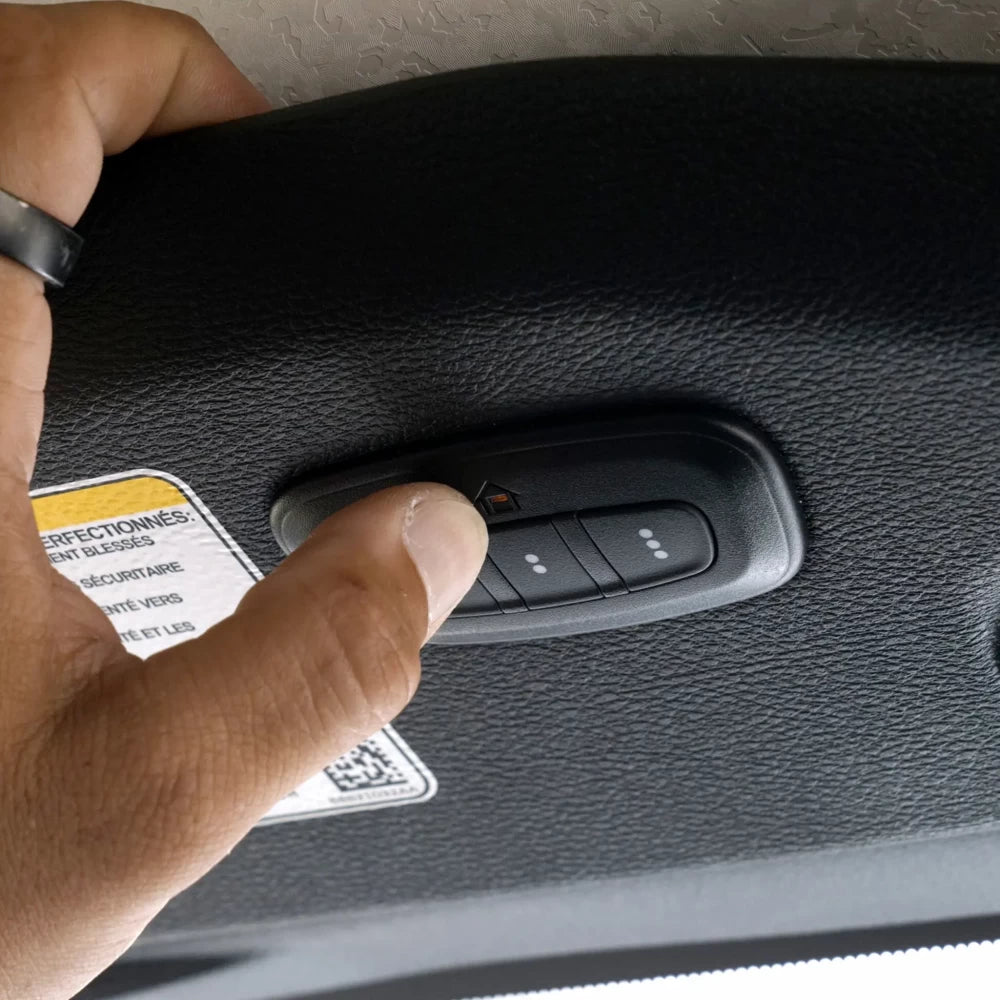
Most 2018 Jeep models feature the HomeLink system. This technology allows you to control garage doors, gates, and even home lighting directly from the buttons built into your Jeep’s overhead console. HomeLink works with most garage openers, but there are a few exceptions—especially with older or unusual systems. Always check your garage opener’s manual if you are unsure.
Preparing To Program Your Opener
Before you start, make sure you have:

- Your garage door remote (with fresh batteries)
- Your Jeep parked outside the garage
- The ignition in “Run” mode (engine on or in accessory position)
- A step ladder if your garage door opener has a “Learn” or “Smart” button
Some newer openers use rolling code technology. These require one extra step, which we’ll cover below.
Step-by-step Programming Instructions
- Clear Previous Settings (if needed):
- Press and hold the two outer HomeLink buttons (usually the first and third) for about 20 seconds until the indicator light begins to flash rapidly.
- Release the buttons. This erases any previous codes. You only need to do this if you are programming HomeLink for the first time or want to reset it.
- Choose a HomeLink Button:
- Decide which of the three HomeLink buttons you want to use for your garage door.
- Hold your garage remote control 1–3 inches from the chosen HomeLink button.
- Programming the Button:
- At the same time, press and hold both the HomeLink button and the button on your garage remote.
- Keep holding until the indicator light on the HomeLink system changes from slow flashing to rapidly flashing (usually within 30 seconds).
- Release both buttons.
- Test the Button:
- Press the programmed HomeLink button.
- If your garage door moves, programming is complete.
- Programming for Rolling Code Openers:
- If your door does not move, you likely have a rolling code system.
- Locate the “Learn” or “Smart” button on your garage door motor (usually on the back or side of the opener unit).
- Press this button (a ladder may be needed), then return to your Jeep and press the programmed HomeLink button for 2 seconds, then release. Repeat this step up to three times.
- The door should now operate with the HomeLink button.
Non-obvious tip: Some HomeLink systems require you to press the programmed button multiple times after pressing the “Learn” button to sync properly.
Comparison: Homelink Vs. Standard Garage Remotes
Here’s a quick look at how your Jeep’s built-in system compares to a traditional garage remote:
| Feature | HomeLink (Jeep) | Standard Remote |
|---|---|---|
| Battery Required | No | Yes |
| Always in Car | Yes | No |
| Number of Devices Supported | Up to 3 | Usually 1 |
| Rolling Code Compatible | Yes | Sometimes |

What If It Doesn’t Work?
If the system doesn’t program on your first try, here are some common issues:
- Weak remote battery: Replace batteries and try again.
- Distance from opener: Always program with your Jeep outside and clear of the garage door.
- Rolling code not synced: Double-check your opener’s “Learn” button sequence.
- Interference: Move away from large metal objects that could block the signal.
Advanced tip: Some openers require holding the “Learn” button until a light flashes, while others need only a quick press. Check your opener’s manual for the correct method.
Safety And Security Considerations
Programming your Jeep’s garage door opener can make life easier, but it’s important to consider security:
- Don’t leave your vehicle unlocked with programmed access, especially if parked outside.
- Reprogram or erase HomeLink buttons if you sell or loan your Jeep.
- If your garage opener is older than 1996, it may not support rolling code technology, making it less secure.
| Opener Year | Rolling Code Support | Security Level |
|---|---|---|
| Before 1996 | No | Basic |
| 1996–2018 | Usually | High |
| 2018 & Newer | Yes | Highest |
Troubleshooting: Real-world Examples
- Example 1: You press the HomeLink button, but nothing happens. Try reprogramming with a new remote battery and ensure you’re holding the buttons long enough.
- Example 2: The HomeLink light flashes, but the door doesn’t move. Use the “Learn” button on your opener to sync rolling codes.
- Example 3: The door opens but won’t close. Some openers require you to repeat the programming sequence for both open and close functions.
Pro insight: If your system still fails, some garage openers need a “compatibility bridge” accessory. Check your opener brand’s website for details.
Table: Steps And Time Estimates
For a quick overview, here’s how long each stage usually takes:
| Step | Estimated Time |
|---|---|
| Clearing Old Codes | 1 minute |
| Programming Button | 2 minutes |
| Rolling Code Sync | 3–5 minutes |

Frequently Asked Questions
How Do I Know If My Jeep Has The Homelink System?
Most 2018 Jeep models include HomeLink. Look for three small buttons on your overhead console, usually labeled with a house icon.
What If My Garage Door Opener Is Very Old?
Older openers may use fixed codes and might not work with HomeLink. Check if your opener is compatible. You might need a new opener or an adapter.
Can I Program More Than One Garage Door?
Yes, you can program up to three different devices (garage doors, gates, lights) using the three HomeLink buttons.
Is It Safe To Program My Jeep Garage Door Opener?
Yes, as long as you protect your vehicle and reset HomeLink when selling. Rolling code technology adds extra security.
Where Can I Find More Details About Homelink And Compatible Openers?
Visit the official HomeLink website for more information, compatibility lists, and video guides.
Programming your 2018 Jeep garage door opener is a quick process that adds real convenience to daily life. With the right steps, a little patience, and the tips above, you’ll enjoy seamless entry and peace of mind.