Connecting your phone to a Jeep Wrangler 2013 unlocks new features and improves your driving experience. You can enjoy hands-free calls, stream music, and use navigation apps on the go. Many owners are unsure how to set up their phone with the Jeep’s Uconnect system, or what to do if things don’t work smoothly. This guide gives clear, step-by-step instructions, practical advice, and useful tips tailored for the 2013 model. Whether you use an Android or iPhone, you’ll learn how to make the most of your Jeep’s connectivity.
Understanding Jeep Wrangler 2013 Connectivity
The Jeep Wrangler 2013 comes with the Uconnect system in most trims, offering Bluetooth connectivity for phones. Uconnect lets you make calls, listen to music, and use voice commands. If your Jeep lacks Uconnect, connecting your phone is limited to auxiliary input or aftermarket solutions.
Most owners use Bluetooth for wireless connection. For older phones or if Bluetooth is not available, the auxiliary (AUX) port is a simple alternative. It’s important to know which version of Uconnect you have, since features can vary.
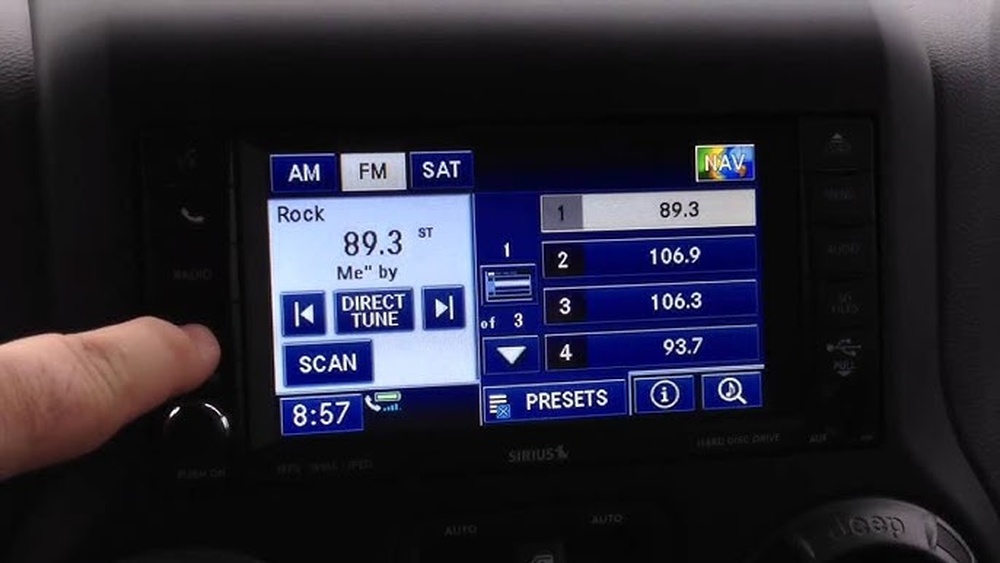
Uconnect System Features
- Hands-free calling: Answer and make calls safely.
- Audio streaming: Play music from your phone.
- Voice commands: Control features without touching buttons.
The standard Uconnect in Jeep Wrangler 2013 supports most phones, but compatibility depends on your phone’s software version.
Step-by-step: Connecting Your Phone Via Bluetooth
Connecting your phone is usually quick, but some users face problems like failed pairing or audio glitches. Here’s how to connect smoothly:
- Start your Jeep: Turn on the ignition. The Uconnect system needs to be active.
- Enable Bluetooth on your phone: Go to your phone’s settings and switch Bluetooth on.
- Access Uconnect’s phone menu: Press the ‘Phone’ button on the Jeep’s dashboard or touchscreen.
- Select ‘Add Device’ or ‘Pair New Device’: The system will search for nearby phones.
- Choose your Jeep on your phone: Look for ‘Uconnect’ or ‘Jeep’ in your phone’s Bluetooth list.
- Enter the PIN: Uconnect shows a PIN on the display. Enter this on your phone if prompted.
- Confirm pairing: Both devices should now be paired. Accept any prompts to sync contacts.
If pairing fails, restart both your phone and Uconnect. Sometimes, deleting old paired devices helps.
Common Pairing Issues
- Bluetooth not visible: Make sure your phone is set to ‘discoverable’.
- PIN mismatch: Enter the correct PIN shown by Uconnect.
- Outdated software: Update your phone and Uconnect firmware if possible.
Using The Aux Port: Wired Connection
If your phone does not support Bluetooth, or you prefer a wired connection, the AUX port is a reliable option.
- Locate the AUX port: It’s usually below the radio or on the center console.
- Connect your phone with a 3.5mm cable: Plug one end into your phone, the other into the Jeep’s AUX port.
- Select AUX input on Uconnect: Press ‘Media’ and choose ‘AUX’.
- Play audio on your phone: Music and other audio will play through the Jeep’s speakers.
This method does not allow hands-free calls, but it works for music and podcasts.
Comparing Connectivity Options
Here’s a quick comparison of Bluetooth and AUX for the Jeep Wrangler 2013:
| Feature | Bluetooth | AUX Port |
|---|---|---|
| Hands-free calls | Yes | No |
| Audio streaming | Yes | Yes |
| Voice commands | Yes | No |
| Setup time | 2-5 minutes | Instant |
| Compatibility | Most smartphones | All devices with headphone jack |
Bluetooth offers more features, but AUX is easier and more universal.

Troubleshooting Connection Problems
Even with the right steps, some users face issues. Here are solutions for common problems:
- Poor audio quality: Check your phone’s volume and Uconnect settings. Sometimes, interference causes crackling sounds.
- Dropped connections: Move your phone closer to the dashboard. Bluetooth works best within 10 feet.
- Contacts not syncing: Make sure your phone allows Uconnect access to contacts. Restart pairing if needed.
Many users miss the fact that Uconnect can only handle a limited number of paired devices. If the system is full, delete unused devices to avoid errors. Also, some aftermarket phone cases block Bluetooth signals, so remove thick cases if pairing fails.
Upgrading For Advanced Features
Some owners want extra features like Apple CarPlay or Android Auto. The 2013 Wrangler’s Uconnect system doesn’t support these out-of-the-box. However, you can add them with aftermarket head units.
Here’s how different solutions compare:
| Solution | Cost | Features | Installation |
|---|---|---|---|
| Uconnect (stock) | Free | Bluetooth, AUX | Factory installed |
| Aftermarket head unit | $250-$600 | CarPlay, Android Auto | Professional or DIY |
| Bluetooth adapter | $30-$80 | Bluetooth audio | Plug-and-play |
Upgrading can boost your connectivity, but costs vary. It’s wise to check compatibility before buying.
Practical Tips For Smooth Connectivity
- Keep your Bluetooth turned on and updated.
- Delete old paired devices on Uconnect to prevent confusion.
- Use high-quality AUX cables for better sound.
- Restart your phone and Uconnect if problems persist.
- For advanced features, consider professional installation of aftermarket units.
A non-obvious tip: Uconnect remembers only a set number of phones—usually up to seven. If you switch phones often, clear the device list every few months. Also, Uconnect works best when your phone’s Bluetooth is set to ‘visible’ before pairing.
Real-life Example
Sarah, a Jeep Wrangler owner, struggled with Bluetooth pairing until she realized her phone’s operating system was outdated. After updating her phone, pairing succeeded instantly. Many users overlook the importance of software updates for both phone and Uconnect.

Frequently Asked Questions
How Many Phones Can I Pair With Uconnect?
You can pair up to seven phones. If you reach the limit, delete unused devices from the list.
Does Jeep Wrangler 2013 Support Apple Carplay?
No, the 2013 Uconnect system doesn’t support CarPlay. You need an aftermarket head unit for this feature.
What Should I Do If Bluetooth Fails To Connect?
Restart both your phone and the Uconnect system. Delete previous pairings and try again. Make sure your phone is ‘visible’ in Bluetooth settings.
The 2013 Uconnect supports basic voice commands for calls and music, but not full navigation. For advanced navigation, use your phone’s app and play audio through Bluetooth or AUX.
Where Can I Find Official Uconnect Support?
You can visit the official Jeep Uconnect website for manuals, troubleshooting, and updates.
Connecting your phone to a Jeep Wrangler 2013 brings convenience and safety. With the right setup, you can enjoy hands-free driving, music, and more. If you run into problems, try the troubleshooting tips above. For greater functionality, consider upgrading your system. Take the time to set up your phone properly, and your Jeep will be ready for smarter journeys.