If your Jeep Cherokee screen freezes, glitches, or stops responding, you’re not alone. Many drivers experience issues with the Uconnect touchscreen system—especially after software updates or long use. Resetting the screen can solve problems like a blank display, unresponsive controls, or system lag. But, knowing the right way to reset your Jeep’s screen is important. Doing it wrong can cause more trouble or even erase your settings.
This guide explains how to safely reset your Jeep Cherokee screen, step by step. Whether you drive a 2014 or a newer model, you’ll find solutions here. Let’s help you get your infotainment system working like new again.
Understanding Your Jeep Cherokee Screen
Most Jeep Cherokees use the Uconnect system—a touch-based infotainment center. It controls music, navigation, climate, and phone connections. Common screen sizes are 7-inch, 8.4-inch, or 10.1-inch, depending on model year and trim.
Jeep upgraded Uconnect software several times. Here’s a quick look at major versions:
| Uconnect Version | Common Model Years | Main Features |
|---|---|---|
| Uconnect 4 | 2017–2021 | Apple CarPlay, Android Auto, 8.4″ screen |
| Uconnect 5 | 2021–present | Faster processor, 10.1″ screen, Alexa |
Knowing your system version helps you follow the right reset steps.
When Should You Reset The Screen?
You should reset your Jeep Cherokee screen if you notice:
- The display is frozen or black
- Touch controls don’t respond
- Audio or navigation stops working
- Bluetooth or phone connection fails
A reset does not fix problems with physical hardware, like a cracked screen or loose wiring. If your screen stays blank after trying all resets, you may need a dealer’s help.
Quick Soft Reset: The Fastest Method
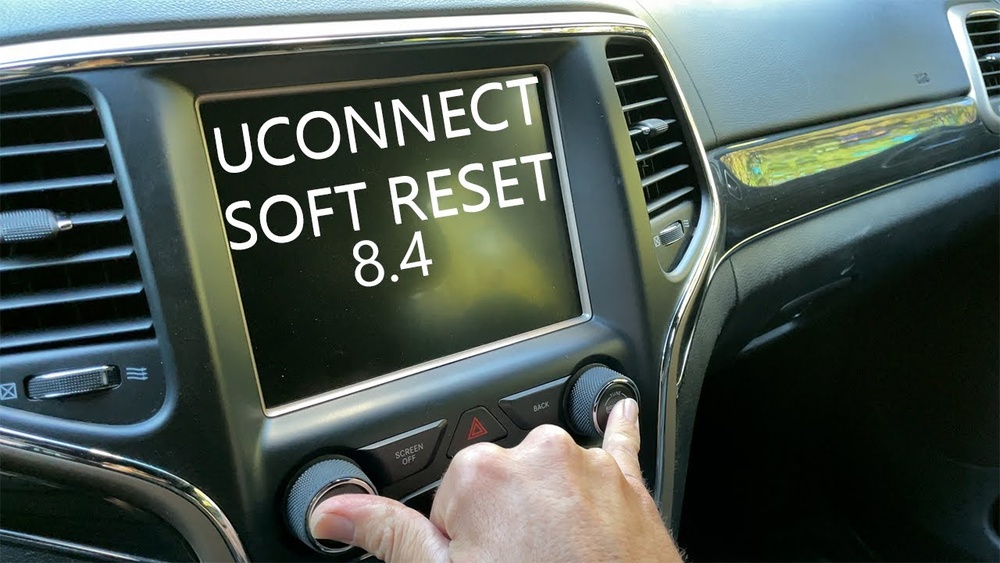
A soft reset is safe and won’t erase your radio presets or paired devices. Here’s how to perform a soft reset on most Jeep Cherokees:
- Turn your vehicle to “Run” mode (engine on or just press the start button without starting the engine).
- Press and hold both the volume knob and tune/browse knob at the same time.
- Keep holding for 10–20 seconds. The Uconnect screen will go black and then reboot.
- Release the knobs when the Jeep logo appears.
This method works for Uconnect 4 and Uconnect 5 systems. For older models, the process may vary slightly.
Why Soft Resets Work
A soft reset restarts the infotainment computer, clearing minor software glitches. It’s like restarting your phone when an app freezes.
Hard Reset: Restoring To Factory Settings
If a soft reset doesn’t solve the issue, a hard reset (factory reset) might help. This erases all settings, paired phones, and saved radio stations—so use with caution.
To do a hard reset on a Jeep Cherokee:
- Go to the Settings menu on your Uconnect screen.
- Scroll to System Information or Restore Settings (wording can vary).
- Tap Restore Factory Defaults or Reset to Factory Settings.
- Confirm your choice when asked.
The system will restart and clear all personal data. After this, you’ll need to set up Bluetooth, navigation, and other preferences again.
| Reset Type | What It Fixes | Data Loss |
|---|---|---|
| Soft Reset | Freezing, lag, minor bugs | No |
| Hard Reset | Severe software errors | Yes (all user data) |

Disconnecting The Battery: A Last Resort
If your Jeep’s screen remains unresponsive after both resets, you can try disconnecting the car battery. This method is more advanced and should be used only if you’re comfortable working with vehicles.
Steps:
- Turn off the ignition and remove the key.
- Open the hood and locate the battery.
- Use a wrench to loosen and disconnect the negative battery cable.
- Wait 5–10 minutes.
- Reconnect the cable and tighten it.
- Start the vehicle and check the screen.
Warning: Disconnecting the battery may reset other settings, like the clock or window controls. If you’re unsure, ask a mechanic for help.
Common Problems And Troubleshooting Tips
Many drivers make simple mistakes when resetting their Jeep Cherokee screen. Here’s what to watch for:
- Don’t turn off the ignition during a reset.
- Make sure both knobs are pressed firmly and at the same time.
- After a hard reset, allow several minutes for the system to reboot.
- If the screen remains black, check your fuses—sometimes a blown fuse is the real problem.
It’s also smart to check for software updates. Jeep often releases patches to fix bugs. You can find update information on the official Jeep Uconnect Support page.
How To Prevent Future Screen Problems
A few easy habits can keep your Uconnect screen running smoothly:
- Don’t overload the system with too many Bluetooth devices.
- Update your Uconnect software when new versions are released.
- Avoid using wet or dirty fingers on the touchscreen.
- Keep the area around the screen clean and dry.
Also, don’t ignore minor glitches. Early resets can prevent bigger failures later.
Frequently Asked Questions
How Do I Know Which Uconnect Version My Jeep Cherokee Has?
Go to the Settings menu on your screen and look for “System Information.” The Uconnect version number will be shown there. You can also check your owner’s manual.
A soft reset will not erase personal data. A hard reset (factory reset) will delete all saved addresses, radio stations, and paired devices. Back up important info before a hard reset.
My Screen Is Still Black After All Resets. What Should I Do?
If the screen does not turn on after trying both resets and disconnecting the battery, it may be a hardware problem. Visit a Jeep dealer or certified auto technician for diagnosis.
Can I Update Uconnect Software Myself?
Some updates can be done with a USB stick, but not all. Check the official Jeep website for instructions. If you’re unsure, let a dealer handle the update.
Is It Safe To Disconnect The Battery For A Reset?
Yes, but always turn off the car first and disconnect the negative cable only. Be aware that this may reset other vehicle systems, so consult your manual if needed.
Restoring your Jeep Cherokee screen usually takes only a few minutes. With the right reset method, you can quickly fix most common infotainment problems—no tools or dealer visit needed. If issues persist, don’t hesitate to get expert help. Your Jeep’s technology should work as hard as you do on the road.