This BlueDriver Bluetooth OBD2 Scanner Review covers the real strengths, limits, features, and buyer value of the BlueDriver scan tool.
The goal is simple: help you decide whether this compact Bluetooth scanner is the right choice for checking engine codes, viewing live data, and understanding common car problems from your phone.

BlueDriver Bluetooth Professional OBDII Scan Tool for iPhone, iPad, and Android
- Compatibility: iPhone, iPad, and Android Devices
- Connection Type: Bluetooth Wireless
- Dimensions: 1.0 x 1.9 x 2.2 inches
- App Integration: BlueDriver App with Code Reading, Live Data, Reports, and Updates
- Certification: Officially Licensed for Apple and Android Devices
- Functionality: Professional OBD2 Diagnostics with Live Data and Graphs
The BlueDriver Bluetooth Professional OBDII Scan Tool is one of the most popular app-based OBD2 scanners for everyday car owners, DIY mechanics, and drivers who want clearer answers before paying a repair shop.
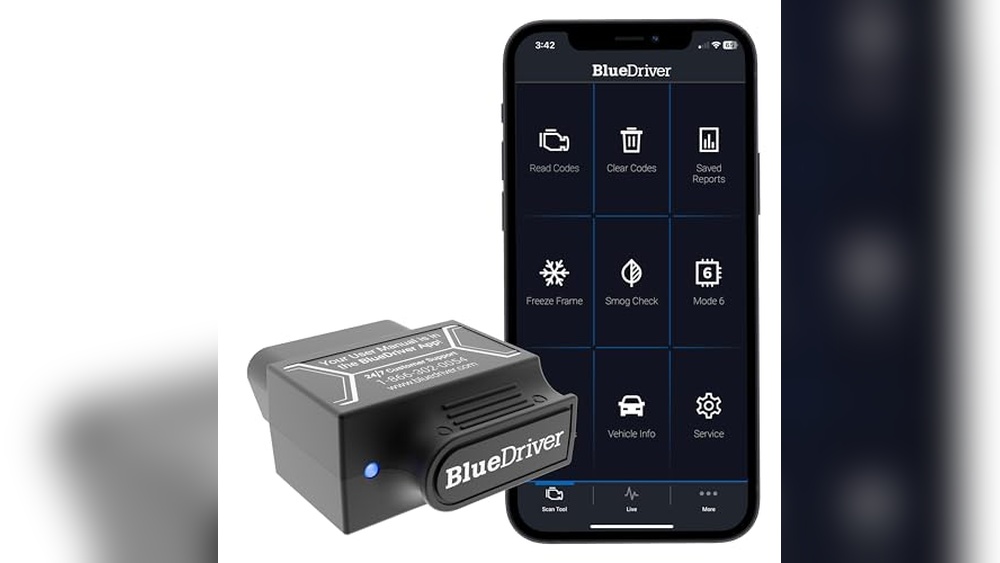
In this BlueDriver Bluetooth OBD2 Scan Review, we look at how it performs in normal use, how the app helps explain trouble codes, and whether it gives enough value for the price.
It connects to your phone or tablet through Bluetooth, then works through the BlueDriver app to read vehicle trouble codes, show live data, create diagnostic reports, and help you understand what might be wrong with your car.
This review takes a practical buyer-focused approach. Instead of only listing features, we will look at how the BlueDriver feels in real use, what problems it helps solve, where it performs well, and where it may not be enough.
If your check engine light is on, your car failed an emissions test, or you simply want a better way to monitor vehicle health, this guide will help you decide if BlueDriver is the right OBD2 scan tool for your needs.
BlueDriver Bluetooth OBD2 Scan Review
The BlueDriver OBD2 scanner is a strong choice if you want a clean mobile app experience, professional-style reports, and better information than a cheap code reader usually provides.
It is especially useful for reading and clearing check engine codes, checking live sensor data, viewing freeze-frame data, and understanding possible causes before you buy parts or visit a mechanic.
The main reason to choose BlueDriver is the software experience. Many low-cost Bluetooth adapters depend on third-party apps, which can feel confusing or inconsistent.
BlueDriver keeps the sensor and app together, so the setup feels smoother. The trade-off is that you need to use the BlueDriver app, and the price is higher than that of basic OBD2 adapters.
| Best For | DIY car owners, used-car buyers, weekend mechanics, and drivers who want simple app-based diagnostics |
| Not Best For | Users who need advanced bidirectional controls, programming, coding, or dealer-level service functions |
| Main Strength | Easy Bluetooth setup, helpful diagnostic reports, live data, and a polished mobile app |
| Main Limitation | Advanced system coverage depends on vehicle make, model, year, and supported modules |
What We Loved
- Easy Bluetooth setup with iPhone, iPad, and Android devices
- Clean app interface that explains diagnostic trouble codes in plain language
- Professional-style repair reports help narrow down likely causes
- Live data and graphing make it easier to monitor sensor behavior
- Compact design is easy to store in the glove box
- No separate handheld screen, cables, or bulky scanner body
- Useful for checking engine lights, emissions readiness, and quick vehicle checks
What Could Be Better
- Works only with the BlueDriver app
- Costs more than basic ELM327-style Bluetooth adapters
- Bluetooth range is limited, so you need to stay near the vehicle
- Advanced diagnostics vary by vehicle brand and model year
- Does not replace a full professional shop scan tool for coding, programming, or complex service work
Who Should Buy the BlueDriver Bluetooth OBD2 Scanner?
The BlueDriver Bluetooth OBDII Scan Tool is a good fit for drivers who want more control over basic car diagnostics. If you often see a check engine light and feel unsure whether the problem is urgent, this scanner gives you a better starting point.
It lets you read trouble codes at home, review possible fixes, and decide whether the issue is simple enough to handle yourself.
It also makes sense for used-car buyers. Before buying a used vehicle, you can plug in the scanner, check stored codes, look for pending codes, and review emissions readiness monitors.
This does not replace a full pre-purchase inspection, but it can reveal warning signs before you spend money on a mechanic or commit to the car.
DIY mechanics will like it because it offers more context than a basic code reader. Instead of only showing a code like P0420 or P0301, the app helps explain what the code means and what repairs are commonly linked to that problem. That makes troubleshooting less random and helps reduce unnecessary parts replacement.
Buy It If
- You want to read and clear OBD2 trouble codes from your phone.
- You prefer a polished app instead of a small handheld scanner screen.
- You want repair reports, possible causes, and live sensor data in one place.
- You own a gas vehicle with an OBD2 port and want quick diagnostics at home.
- You want a portable scanner for road trips, used-car checks, or family vehicles.
Skip It If
- You only need the cheapest possible scanner to read basic engine codes.
- You want bidirectional control, ECU coding, key programming, or module programming.
- You do not want to use a phone app for vehicle diagnostics.
- Your vehicle is older and does not support OBD2.
- You need a dedicated shop scanner for daily professional repair work.
Technical Specifications
| Brand | BlueDriver |
| Model | LSB2 |
| Product Type | Bluetooth OBDII Scan Tool |
| Connection | Bluetooth Wireless |
| Supported Devices | iPhone, iPad, and Android Devices |
| App | BlueDriver Mobile App |
| Size | 1.0″ x 1.9″ x 2.2″ |
| Weight | 0.13 lbs |
| Color | Black |
| Main Functions | Read and clear codes, live data, freeze-frame data, smog check, diagnostic reports, repair suggestions, and vehicle health monitoring |
| Best Use Case | Everyday diagnostics, check engine light checks, emissions readiness, and DIY troubleshooting |

Real-World BlueDriver Bluetooth OBD2 Scan Review Format
To make this BlueDriver Bluetooth OBD2 Scan Review easier to follow, we are using a real-world performance format. Each section focuses on how the BlueDriver works during normal use, not only what the product box says. This gives you a clearer idea of what to expect after plugging it into your vehicle.
1. Setup and App Experience
BlueDriver is simple to set up. Plug the small adapter into the OBD2 port, open the BlueDriver app, pair the sensor, and start scanning. Most OBD2 ports sit under the dashboard near the steering wheel, so installation takes only a few seconds once you locate the port.
The app-based design is the biggest difference between BlueDriver and a traditional handheld scanner. You do not need to scroll through a small screen with stiff buttons.
Instead, you use your phone or tablet, which makes menus, graphs, and reports easier to read. This is useful when you want to save screenshots, review results later, or explain a problem to a mechanic.
2. Code Reading and Clearing
The most common reason to buy this scanner is to check a warning light. BlueDriver can read diagnostic trouble codes and clear them after repairs.
This helps you understand whether a check engine light is linked to a loose gas cap, oxygen sensor issue, misfire, catalytic converter code, EVAP leak, or another OBD2 related problem.
The scanner is also helpful for pending codes. A pending code may not turn on the check engine light yet, but it can show an issue the vehicle computer has noticed.
Finding pending codes early can help you catch small problems before they become more expensive.
3. Repair Reports and Code Explanations
BlueDriver’s repair report feature is one of its strongest selling points. Instead of showing only a code number, the app explains the likely issue, common causes, and possible fixes.
This makes the scanner more useful for regular drivers who do not understand diagnostic trouble codes by memory.
For example, if your vehicle shows a misfire code, the app may help you think through spark plugs, ignition coils, fuel delivery, vacuum leaks, or related causes. You still need proper testing before replacing parts, but the report gives you a smarter starting point.
4. Live Data and Graphs
Live data is useful when a problem does not show up as a simple code. BlueDriver lets you monitor selected vehicle data in real time, such as RPM, coolant temperature, fuel trim, oxygen sensor readings, and other supported parameters.
This helps when diagnosing rough idle, poor fuel economy, overheating concerns, or intermittent issues.
The graphing feature makes live data easier to understand. Instead of watching numbers move up and down, you can see trends.
This is helpful when comparing sensor behavior before and after a repair or when checking how the vehicle responds during idle, acceleration, or warm-up.
5. Smog Check and Emissions Readiness
BlueDriver can help you check emissions readiness before an inspection. Readiness monitors show whether the vehicle computer has completed required self-tests.
If the monitors are not ready, your vehicle may fail an emissions test even if the check engine light is off.
This feature is useful after clearing codes or disconnecting the battery. It helps you know whether your car has completed enough drive cycles before you go for inspection.
That can save time, especially in areas where emissions testing is strict.
6. Advanced Diagnostics
BlueDriver supports enhanced diagnostics on many vehicles, including systems beyond the engine on supported makes and models.
This may include ABS, airbag, transmission, or other vehicle systems, depending on coverage. This is one area where BlueDriver can feel more valuable than a basic OBD2 code reader.
The important point is compatibility. Enhanced diagnostics are not identical for every vehicle. Your exact make, model, year, and onboard modules decide what the scanner can access.
Before buying any scanner for a specific ABS, SRS, or transmission issue, it is smart to check vehicle coverage first.
7. Portability and Daily Convenience
The adapter is small enough to keep in a glove box, center console, or tool bag. That makes it useful for road trips, family vehicles, or quick checks before long drives.
Since it uses your phone as the display, you do not need to carry a separate handheld scanner.
For casual users, this matters a lot. A bulky scanner often stays in the garage. A small Bluetooth adapter is easier to keep nearby, which means you are more likely to use it when a warning light appears.
What BlueDriver Can Help Diagnose
BlueDriver works best as a diagnostic starting point. It helps you see what your vehicle computer is reporting, then gives you clues for the next step. It does not physically test parts by itself, but it helps you avoid blind guessing.
- Check engine light: Read and clear trouble codes after diagnosis or repair.
- Misfire symptoms: Review misfire codes and related freeze-frame data.
- Emissions problems: Check readiness monitors before inspection.
- Fuel economy issues: Look at fuel trim and sensor data if supported.
- Intermittent problems: Use live data and saved reports to track patterns.
- Used-car checks: Scan for stored, pending, or recently cleared trouble codes.
- ABS or airbag lights: Access enhanced diagnostics on supported vehicles.
What BlueDriver Does Not Do
BlueDriver is powerful for its size, but it is not the same as a high-end bidirectional diagnostic tablet. It is mainly designed for reading codes, clearing codes, showing data, and giving repair guidance.
If you need active tests, module coding, ECU programming, key programming, injector coding, or advanced relearn functions, you may need a more expensive professional scanner.
This is not a weakness if you understand the product category. BlueDriver is best for drivers who want better information, not for technicians who need complete shop-level control over every vehicle system.
How It Compares
| Feature | BlueDriver – Bluetooth professional OBDII Scan Tool | vLinker BM+ OBD2 Bluetooth Diagnostic Scan Tool | Allstric® OBD2 Auto Diagnostic ELM327 Bluetooth |
|---|---|---|---|
| Price | See Price | See Price | See Price |
| Quality | Professional OBD2 diagnostic tool with dedicated app and sensor pairing; built for users who want a cleaner diagnostic experience than basic Bluetooth adapters. | Professional-level Bluetooth diagnostic tool for iOS, Android, and Windows users; often chosen by BMW owners who use apps such as BimmerCode. | Standard ELM327-style Bluetooth diagnostic tool for basic OBD2 code reading and simple sensor data checks. |
| Features | Read and clear codes, live data, freeze-frame data, smog check, repair reports, enhanced diagnostics on supported vehicles, and app-based graphing. | Wireless diagnostics, app compatibility, secure communication, and stronger appeal for users focused on supported BMW coding apps. | Reads and clears basic engine fault codes, resets check engine light, and shows selected real-time sensor data through compatible apps. |
| Best For | Drivers who want a polished all-in-one app experience with helpful reports and better guidance than basic scanners. | BMW-focused users who want app compatibility for diagnostics and coding-related workflows. | Budget buyers who only need basic engine code checks and do not need advanced reports or a polished app. |
| Main Limitation | Not a full bidirectional shop scanner, and advanced diagnostics vary by vehicle. | Best value depends heavily on the app and vehicle brand you plan to use it with. | Limited diagnostics and less guidance compared with higher-quality scanner apps. |
In this comparison, the BlueDriver – Bluetooth professional OBDII Scan Tool stands out because it focuses on the complete user experience. You get the adapter, the app, reports, data, and code explanations in one system.
The vLinker BM+ may make more sense for BMW owners who already know exactly which third-party app they want to use. The Allstric option is better for budget users who only need basic OBD2 reading.
Customer Feedback
Customer feedback around BlueDriver is usually positive because it makes car diagnostics easier for non-professionals.
Buyers often like that the app explains codes clearly, stores information in a readable format, and feels easier than old handheld scan tools. Many users also appreciate that it works with phones they already own.
What Buyers Like Most
- Simple setup: Most users can plug it in, pair it, and scan without a long learning curve.
- Clear reports: Code explanations and repair information make the results easier to understand.
- Good app design: Menus, graphs, and saved reports feel cleaner than many basic scanner apps.
- Portability: The small adapter is easy to keep in the car for quick checks.
- Useful for DIY decisions: Users like knowing whether a warning light looks urgent before visiting a shop.
Common Complaints
- Price: Some buyers feel it costs more than simple Bluetooth adapters.
- Vehicle coverage limits: Advanced diagnostics are not the same for every make and model.
- App dependency: Users who prefer third-party apps may not like being tied to the BlueDriver app.
- No bidirectional controls: Some advanced users want active tests and service functions.
Who Loves It Most?
BlueDriver is most popular with drivers who want professional-style answers without buying a bulky professional scanner.
It works well for car owners, used-car shoppers, and DIY mechanics who need more than a $20 code reader but do not need a full repair-shop diagnostic tablet.
Is BlueDriver Worth the Price?
BlueDriver is worth the price if you value the app, repair reports, and smoother user experience.
A cheap scanner may read a basic engine code, but it often leaves you searching online to understand what the code means. BlueDriver saves time by bringing code information, live data, and repair guidance into one app.
It is not the cheapest option, so budget buyers should think carefully. If you only need to clear a simple check engine light once or twice a year, a basic handheld scanner may be enough.
But if you maintain your own vehicle, check family cars, buy used cars, or want better data before visiting a mechanic, BlueDriver offers stronger value.
Value Features
- Repair Reports: Helps explain possible causes and common fixes for trouble codes.
- Live Data: Lets you monitor real-time sensor values and compare vehicle behavior.
- Smog Check: Helps confirm emissions readiness before inspection.
- App-Based Design: Uses your phone as a large, familiar display.
- Compact Size: Easy to store, carry, and use when needed.
Final Verdict
The BlueDriver Bluetooth Professional OBDII Scan Tool is a strong buy for drivers who want a simple but capable diagnostic tool. It offers a better app experience than many cheaper Bluetooth adapters and gives clearer guidance than a basic code reader.
This BlueDriver Bluetooth OBD2 Scan Review shows that it is best for checking engine lights, emissions readiness, live data, and everyday troubleshooting.
For advanced programming or bidirectional shop functions, choose a higher-end scanner instead.
Frequently Asked Questions
Does BlueDriver work with iPhone and Android?
Yes. BlueDriver is designed to work with iPhone, iPad, and Android devices through the BlueDriver app.
Can BlueDriver clear the check engine light?
Yes. BlueDriver can read and clear check engine codes after you diagnose or repair the issue. Clearing a code without fixing the cause may make the light come back.
Does BlueDriver read ABS and airbag codes?
BlueDriver supports enhanced diagnostics on many vehicles, including some ABS and airbag systems. Coverage depends on your vehicle make, model, year, and supported modules.
Does BlueDriver need a subscription?
The scanner is designed around the BlueDriver app and sensor. Always check the latest seller or manufacturer details before buying, because app policies and product bundles can change over time.
Is BlueDriver better than a cheap Bluetooth OBD2 adapter?
BlueDriver is usually better for users who want a polished app, repair reports, code explanations, and a smoother experience. A cheap adapter may be enough if you only need basic engine code reading.
Can BlueDriver program keys or code modules?
No. BlueDriver is not designed for key programming, ECU programming, or advanced coding. For those jobs, you need a professional diagnostic tool built for that purpose.
If you want a compact OBD2 scanner that turns your phone into a practical diagnostic tool, BlueDriver is one of the easiest options to recommend. It gives you clear reports, useful live data, and quick access to vehicle codes without the bulk of a traditional scanner.