Is your Jeep key fob acting sluggish or completely unresponsive? Before you panic or head straight to the dealership, there’s a simple fix you can do yourself—replace the key fob battery.
It’s quick, easy, and doesn’t require any special tools. Imagine regaining full control of your Jeep’s locks and ignition in just a few minutes. In this guide, you’ll learn exactly how to replace your Jeep key fob battery step-by-step, so you can get back on the road without hassle.
Ready to save time and money? Let’s dive in and bring your key fob back to life!
Jeep Key Fob Battery Types
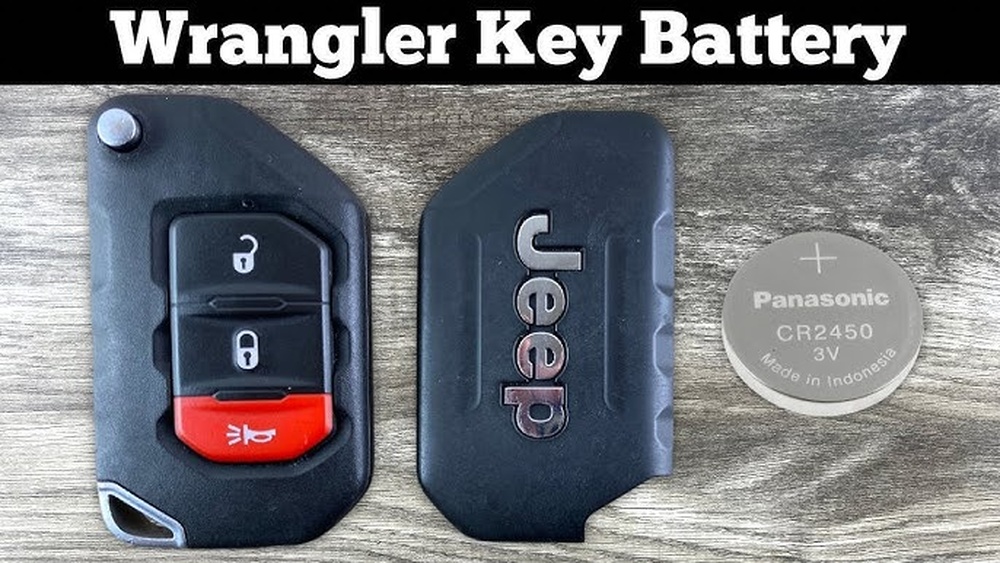
Jeep key fobs use specific battery types to keep your remote working. Knowing the right battery helps you replace it fast. Most Jeep key fobs use coin cell batteries. These batteries are small, round, and flat. They fit neatly inside the fob case.
Battery type depends on your Jeep model and year. Always check your owner’s manual or the back of your key fob. The common types include CR2032 and CR2450. Both provide long-lasting power for your key fob.
Cr2032 Battery
The CR2032 is the most common key fob battery. It measures 20mm in diameter and 3.2mm thick. This battery offers about three to five years of life. It fits many Jeep models, including Jeep Wrangler and Jeep Grand Cherokee.
Cr2450 Battery
The CR2450 is thicker and has a longer life. It measures 24mm in diameter and 5mm thick. This battery suits newer Jeep models or larger key fobs. It lasts longer due to a bigger size and capacity.
How To Identify Your Battery Type
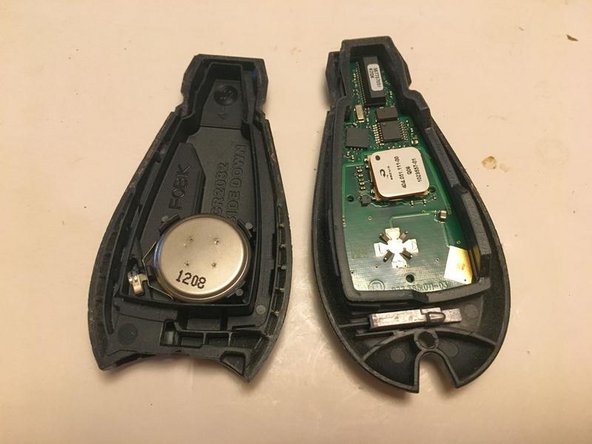
Look inside the key fob after opening it. The battery will have a code printed on it. Match this code with the replacement battery. Use a clean cloth to handle the battery to avoid damage.
Signs Of A Dead Battery
Knowing the signs of a dead Jeep key fob battery helps avoid getting stranded. The key fob controls your Jeep remotely. It locks, unlocks, and starts your vehicle. When the battery dies, these functions stop working. Early detection saves time and frustration.
Watch for changes in your key fob’s behavior. These signs clearly show the battery needs replacing. Recognizing them is the first step to fixing the issue quickly.
The most obvious sign is when your key fob buttons do nothing. Pressing lock or unlock may produce no reaction. The LED light on the fob might not blink either. This signals the battery is likely dead or very weak.
Inconsistent Operation
Sometimes the key fob works only intermittently. You might have to press the buttons multiple times. The remote may work close to the Jeep but fail at longer distances. This inconsistency often points to a fading battery charge.
Warning Message On Dashboard
Many modern Jeeps show a key fob warning on the dashboard screen. The message can say “Key Fob Battery Low” or similar. This alert appears during ignition or while driving. It is a clear sign to replace the battery soon.
Physical Signs On The Key Fob
Check the key fob itself for damage or corrosion. Battery leakage can cause sticky or rusty contacts inside. If the fob feels unusually warm or the buttons stick, the battery may be failing. These signs mean it is time for a battery change.
Tools Needed For Replacement
Replacing a Jeep key fob battery requires a few simple tools. Having the right tools makes the process quick and easy. Most tools are common and easy to find around the house or buy at a store.
Gathering all necessary tools before starting helps avoid interruptions. It also protects the key fob from damage during battery replacement. Below are the essential tools you need for a smooth replacement.
Small Flathead Screwdriver
This tool is perfect for prying open the key fob case. Its thin blade fits into the small seam of the fob. Use it gently to avoid breaking the plastic.
Replacement Battery
Choose the correct battery type for your Jeep key fob. Most models use CR2032 or CR2025 coin batteries. Check your owner’s manual or the old battery for the exact type.
Clean Cloth Or Soft Surface
Place the key fob on a clean cloth or soft surface. It prevents scratches and keeps small parts from getting lost. This simple step protects your key fob during the process.
Tweezers (optional)
Tweezers help remove and place the small battery inside the fob. They provide better grip and control. Use them carefully to avoid damaging battery contacts.

Removing The Mechanical Key
Removing the mechanical key is the first step in replacing your Jeep key fob battery. This key is hidden inside the fob and allows manual entry to your vehicle. It also helps open the key fob to access the battery compartment.
Knowing how to remove the mechanical key saves time and prevents damage to your key fob. The process is simple and requires no special tools.
Look carefully on the back or side of the key fob. You will see a small release button or a slide pin. This mechanism holds the mechanical key securely inside the fob.
Press or slide this button gently. Then pull the metal mechanical key out slowly. Avoid using force to prevent breaking the key or fob.
Use The Mechanical Key To Pry Open The Fob
After removing the mechanical key, find the notch or seam at the base of the fob. Insert the key tip or a flathead screwdriver into this gap.
Twist or pry gently upwards. This action separates the two halves of the plastic casing. Be careful not to crack or damage the plastic while doing this.
Opening The Key Fob Case
Opening the key fob case is the first step in replacing your Jeep key fob battery. The case protects the battery and the internal electronics. You need to open it carefully to avoid damage. Use the right tools and follow simple steps. This makes the process easy and safe.
Look for a small release button or slide pin on the back or side of the key fob. Press or slide this button. Pull out the hidden metal mechanical key gently. This key helps you open the fob case safely.
Insert A Tool To Pry Open The Fob
Use the mechanical key tip or a small flathead screwdriver. Find the notch or seam at the base of the key fob. Insert the tool there and twist or pry gently. The two halves of the plastic casing will start to separate.
Open The Case Carefully
Work slowly to avoid cracking the plastic. Do not force it open too hard. Once the halves start to come apart, continue to separate them with your fingers. You now have access to the battery inside the key fob.
Removing The Old Battery
Removing the old battery from your Jeep key fob is the first step in the replacement process. It requires care and attention to avoid damaging the key fob. Follow these simple steps to open the fob and take out the old battery safely.
Locate And Remove The Mechanical Key
Find the small release button or slide pin on the back or side of the key fob. Press or slide it to release the hidden metal mechanical key. Pull the key out gently and set it aside.
Open The Key Fob Casing
Insert the tip of the mechanical key or a flathead screwdriver into the notch or seam at the base of the key fob. Twist or pry upward carefully. Separate the two halves of the plastic casing without breaking it.
Remove The Old Battery
Use a small flathead screwdriver to pop the old battery out of its clip. Be gentle to avoid damage. Remember the battery’s position and orientation before removing it.
Inserting The New Battery
Inserting the new battery into your Jeep key fob is a simple yet important step. Proper placement ensures your key fob works correctly and lasts longer. Follow these instructions carefully to avoid damaging the fob or battery.
Check The Battery Orientation
Look inside the key fob to find the battery compartment. Notice the battery’s positive (+) and negative (-) sides. The new battery must be placed the same way as the old one. Usually, the positive side faces down, but check the markings inside the fob to be sure.
Place The Battery Carefully
Hold the new battery with clean, dry hands or use gloves. Gently set the battery into the clip or holder inside the fob. Do not force it in. It should fit snugly without bending or pressing too hard. This keeps the battery secure and prevents damage.
Test The Battery Before Closing
Before snapping the key fob back together, press the buttons to test the battery. The LED light should turn on, or the fob should respond. If it does not, remove the battery and check the position again. Adjust as needed until it works properly.
Reassembling The Key Fob
Reassembling the key fob is the final step after replacing the battery. This step ensures your Jeep key fob works properly again. Handle the parts gently to avoid damage. Align the fob parts carefully for a perfect fit.
Aligning The Key Fob Halves
Place the front and back halves of the fob close together. Make sure the buttons line up correctly. Check that the battery stays in place inside. Hold the pieces firmly but gently.
Snapping The Key Fob Together
Press the two halves firmly until you hear a click. The snap sound means the fob is securely closed. Avoid forcing the pieces to prevent cracking the plastic. Check all edges to ensure they are sealed.
Reinserting The Mechanical Key
Slide the metal mechanical key back into its slot. Push it in until it clicks or fits snugly. This key is for emergencies and must be easy to remove. Test the key by pulling it out gently.
Testing Your Key Fob Functions
Press the lock and unlock buttons to check response. Your Jeep should lock and unlock as expected. Test the panic button and other features. Confirm the key fob battery replacement was successful.
Testing The Key Fob Functions
Test all key fob buttons after replacing the battery to ensure they work properly. Check the lock, unlock, and panic functions. Confirm the Jeep responds to each command before finishing.
After replacing the battery, testing the key fob functions is essential. This step confirms the new battery works correctly. It ensures your Jeep responds properly to the fob commands.
Start by standing near your Jeep. Press the lock button and listen for the locking sound. If the doors lock, the battery replacement was successful.
Next, press the unlock button. The doors should unlock immediately. This test shows the signal reaches the vehicle without delay.
Try the panic button only for a few seconds. The horn should sound, signaling the alarm system is active. Press it again to stop the alarm.
Finally, test the remote start if your Jeep has this feature. Press the start button on the fob and see if the engine starts. This confirms all functions work properly.
If any button does not respond, check the battery placement. Make sure the battery is facing the correct direction. Also, ensure the fob casing is snapped tightly closed.
Testing your key fob after battery replacement avoids surprises. It saves time and prevents lockout situations. Always complete this step to keep your Jeep secure and ready.
Where To Buy Replacement Batteries
Finding the right replacement battery for your Jeep key fob is simple. Several options exist for buying a battery that fits perfectly and works reliably. Choose based on convenience, price, or trust in the retailer.
Many Jeep owners prefer to buy batteries from places that specialize in automotive parts. These stores often stock the exact type of battery your key fob needs. They also offer advice on the best battery brands.
Online shopping is another popular choice. It provides a wide range of battery options at competitive prices. Plus, you can compare customer reviews to ensure quality before purchasing.
Automotive Stores
Auto parts stores carry key fob batteries in store and online. Staff usually help confirm battery size and type. Popular chains like AutoZone, O’Reilly, and Advance Auto Parts are reliable sources. Buying here lets you get the battery quickly and with expert help.
Hardware Stores
Hardware stores such as Home Depot and Lowe’s offer key fob batteries too. They stock common sizes used in many car keys. These stores are convenient if you want to pick up a battery while running other errands.
Online Retailers
Websites like Amazon and Walmart provide a large selection of key fob batteries. You can check details and reviews for each product. Online shopping delivers the battery to your door, saving time and effort.
Jeep Dealerships
Jeep dealerships sell replacement batteries that match your key fob exactly. They ensure full compatibility with your model. This option may cost more but guarantees the right fit and quality.
Starting Your Jeep With A Dead Battery
Starting your Jeep with a dead key fob battery can feel frustrating. Your key fob may not unlock the doors or start the engine remotely. Yet, your Jeep still has ways to start even without a working fob battery. Knowing these methods helps you avoid being stranded. Follow these simple steps to get your Jeep running until you replace the battery.
Use The Mechanical Key Inside Your Key Fob
Most Jeep key fobs contain a small mechanical key inside. Find the release button or slide on your fob. Press or slide it to pull out the metal key. Use this key to unlock your Jeep’s door manually. This step lets you enter your vehicle when the fob battery dies.
Even with a dead battery, your Jeep can detect the key fob if it is very close to the start button. Hold the fob against the start button on the dashboard. Press the brake and then push the start button. The Jeep should start as if the fob battery was working. This method works because the car senses the fob’s signal directly.
Replace The Key Fob Battery As Soon As Possible
Once your Jeep is running, replace the key fob battery quickly. A fresh battery restores full remote control functions. It also prevents future starting problems. Carry a spare battery to avoid unexpected issues. Follow instructions carefully to open the fob and swap the battery safely.

Frequently Asked Questions
What Battery Is Used In A Jeep Key Fob?
Jeep key fobs typically use a CR2032 3-volt lithium coin battery. This battery is widely available and easy to replace.
Can I Replace A Key Fob Battery Myself?
Yes, you can replace a key fob battery yourself by carefully opening the fob and swapping the old battery for a new one. Follow instructions to avoid damage and ensure correct battery orientation.
What Happens When A Jeep Key Fob Battery Dies?
When a Jeep key fob battery dies, remote functions stop working. Use the mechanical key to unlock doors and start the engine by pressing the fob against the start button with your foot on the brake. Replace the battery promptly for full functionality.
How Do I Pop Open A Jeep Key Fob?
Locate the small release button or slide pin on the fob’s side or back. Press it to remove the mechanical key. Insert a flathead screwdriver into the seam and gently twist to open the fob. Replace the battery, then snap the fob back together securely.
Conclusion
Replacing your Jeep key fob battery is simple and saves time. Use a small tool to open the fob carefully. Insert the new battery with the correct side facing down. Snap the case back together and test the buttons. A fresh battery keeps your key fob working well.
Doing this yourself avoids extra trips to the dealer. Keep a spare battery on hand for quick changes. This quick fix ensures your Jeep stays ready to go.