If you drive a Jeep Grand Cherokee, you probably want to make the most of its safety features. One of the most helpful is ParkSense, a system that helps you park and avoid hitting objects around your vehicle.
But many drivers aren’t sure how to turn ParkSense on or use it properly. This guide will show you, step by step, how to activate ParkSense, explain how it works, and offer tips to get the best results.
You’ll also learn how to avoid common mistakes and understand what each ParkSense alert means.
What Is Parksense?
ParkSense is Jeep’s parking assistance technology. It uses ultrasonic sensors (usually in the rear bumper, sometimes in the front) to detect objects when you’re parking or reversing. If you get too close to something, ParkSense gives you audible beeps and sometimes a visual warning on your dashboard. This helps you park safely, even in tight spaces.
Here’s a quick look at what ParkSense can do:
- Alerts you to objects behind or in front of your Jeep
- Increases beeping frequency as you get closer to an obstacle
- Can provide visual cues on your dashboard or infotainment screen
How To Turn On Parksense Jeep Grand Cherokee
Most Jeep Grand Cherokee models from 2011 to present have ParkSense, but the method to turn it on can vary slightly by year or trim. Here are the main steps that work for most models:
1. Start Your Jeep
Make sure the engine is running and your vehicle is in either Park or Reverse. ParkSense only works when the ignition is on.
Find the ParkSense button on your dashboard. Usually, it’s near the gear shifter or on the center console. The button will have a symbol that looks like a car with sonar waves.
- On some models, this button is labeled “P Off” or “ParkSense.”
- If you cannot find it, check your owner’s manual.
- If the light on the button is off, ParkSense is active.
- If the light on the button is on, ParkSense is OFF.
This can be confusing for new drivers. If you want ParkSense ON, make sure the light is not illuminated.
4. Check The Instrument Cluster
When you put your Jeep in Reverse, you should see a ParkSense icon or message on your dashboard. This confirms that the system is working.
5. Activate Front Park Assist (if Equipped)
Some newer Grand Cherokees have both front and rear ParkSense. Both are controlled by the same button. When you shift into Drive at low speed (under 7 mph), front sensors will activate if you are close to an object.
Parksense Activation: Quick Reference
| Step | What To Do | What You See/Heard |
|---|---|---|
| 1 | Start engine | Jeep ready, dashboard lights on |
| 2 | Find ParkSense button | Button near shifter/center |
| 3 | Press button (light off = ON) | Beep/test, no light on button |
| 4 | Put in Reverse | ParkSense icon/message |

How Parksense Works When Driving
Once ParkSense is on, it monitors for objects when you move at low speeds (usually under 7 mph for front sensors, under 15 mph for rear sensors). As you get closer to an object:
- Beeping starts when you are about 6-8 feet away.
- Beeps get faster as you move closer.
- Continuous tone means you are less than 1 foot from the object.
You may also see distance bars or lines on your infotainment display.
Example: Parallel Parking
If you back into a parking spot, ParkSense will start beeping when you’re about 6 feet from the car or wall behind you. Move slowly, listening to the beeps. When the sound is continuous, stop immediately.
Why Parksense Might Not Work
Sometimes, drivers are surprised when ParkSense does not activate. Here are common reasons:
- Sensors blocked by mud, ice, or snow. Clean the bumpers.
- System turned off accidentally (light on button is ON).
- Trailer hitch or bike rack attached can confuse the system.
- Fault or error—you’ll see a warning on your dashboard.
If you see a “ParkSense Unavailable” message, check for dirt or obstructions first. If the problem continues, visit your dealer for service.
Customizing Parksense Settings
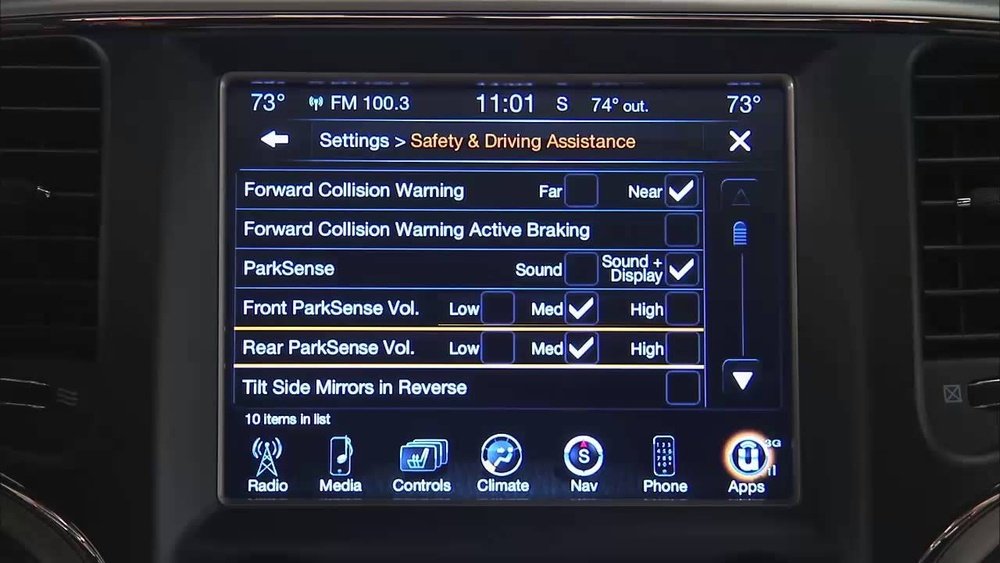
Many Jeep Grand Cherokees let you adjust ParkSense in the Uconnect settings menu.
- Go to the Apps or Settings menu on the touchscreen.
- Select Safety & Driving Assistance.
- Adjust ParkSense volume (Low/Med/High) or turn off visual alerts.
- Some models allow you to turn off just the front or just the rear sensors.
Comparing Parksense Features By Model Year
Here’s how ParkSense features can vary:
| Model Year | Standard ParkSense | Front Sensors | Custom Settings |
|---|---|---|---|
| 2011-2013 | Rear only | No | Limited |
| 2014-2017 | Rear only | Optional | Some |
| 2018-2024 | Rear & Front | Yes | Advanced |
Common Mistakes To Avoid
Even with a smart system, human error can cause problems. Here are mistakes to watch out for:
- Ignoring the button light—remember, light ON means ParkSense is OFF.
- Trusting ParkSense completely—always check mirrors and surroundings.
- Not cleaning sensors—dirty sensors can give false alerts or miss objects.
- Assuming all objects will be detected—thin poles, small curbs, or snow piles may not trigger sensors.
Practical Tips For Best Results
- Move slowly when parking. ParkSense works best at a crawl.
- Stop immediately when you hear a steady tone.
- Test the system in an empty parking lot to learn how the beeps sound at different distances.
- If you need to turn off ParkSense (for example, when towing), press the button and watch for the light to confirm.
Parksense Vs. Other Parking Assist Systems
Some drivers confuse ParkSense with other features like ParkView (rear camera) or Park Assist (automatic steering). Here’s a quick comparison:
| Feature | What It Does | Driver Action Needed |
|---|---|---|
| ParkSense | Beeps/warns about objects | Driver steers and brakes |
| ParkView | Shows camera view behind | Driver watches screen |
| Park Assist | Auto-steers into spaces | Driver controls pedals |

Final Thoughts
ParkSense adds a strong layer of safety to your Jeep Grand Cherokee, but you need to know how to turn it on and use it correctly. Always check the button indicator, clean your sensors, and combine ParkSense with your own driving skills. With these steps, you’ll park more confidently and protect your Jeep from dents and bumps. For more details, you can always check the official Jeep website.
Frequently Asked Questions
How Do I Know If My Jeep Grand Cherokee Has Parksense?
Most models from 2011 and newer include ParkSense, but the feature may be optional on some trims. Look for the ParkSense button on your dashboard, or check your owner’s manual for details.
Can I Turn Off Parksense Permanently?
You can turn ParkSense off using the button, but it may reset to ON each time you start your vehicle. Some models let you change default settings in the Uconnect menu.
Why Does My Parksense Beep When Nothing Is Behind Me?
This usually means the sensors are dirty, blocked, or there is an object like a trailer hitch confusing the system. Clean the sensors and check for anything attached to your bumper.
Does Parksense Stop The Car Automatically?
No, ParkSense only warns you with sounds or visual alerts. You must use the brakes.
Some newer Jeep models offer full automatic braking, but standard ParkSense does not.
Is Parksense Available On Other Jeep Models?
Yes, ParkSense is offered on many other Jeep vehicles, including the Cherokee, Compass, and Wrangler, but features and controls may vary by model.