Night Vision lets you see with a little more clarity on dark stretches of road by picking up on heat signatures of people, animals and objects.
Pop into the Safety menu ( or the Driver Aid menu if you cant find it ) inside the infotainment system and you can turn night vision on in under a minute. This gives you a view that you can see on the instrument cluster and if something suddenly steps into your path, it’ll alert you.
Night Vision is a feature in your Jeep Grand Cherokee that improves your awareness during dark conditions. If you want to know how to turn on Night Vision Jeep Grand Cherokee, the process stays simple and takes a few steps through the central touchscreen.
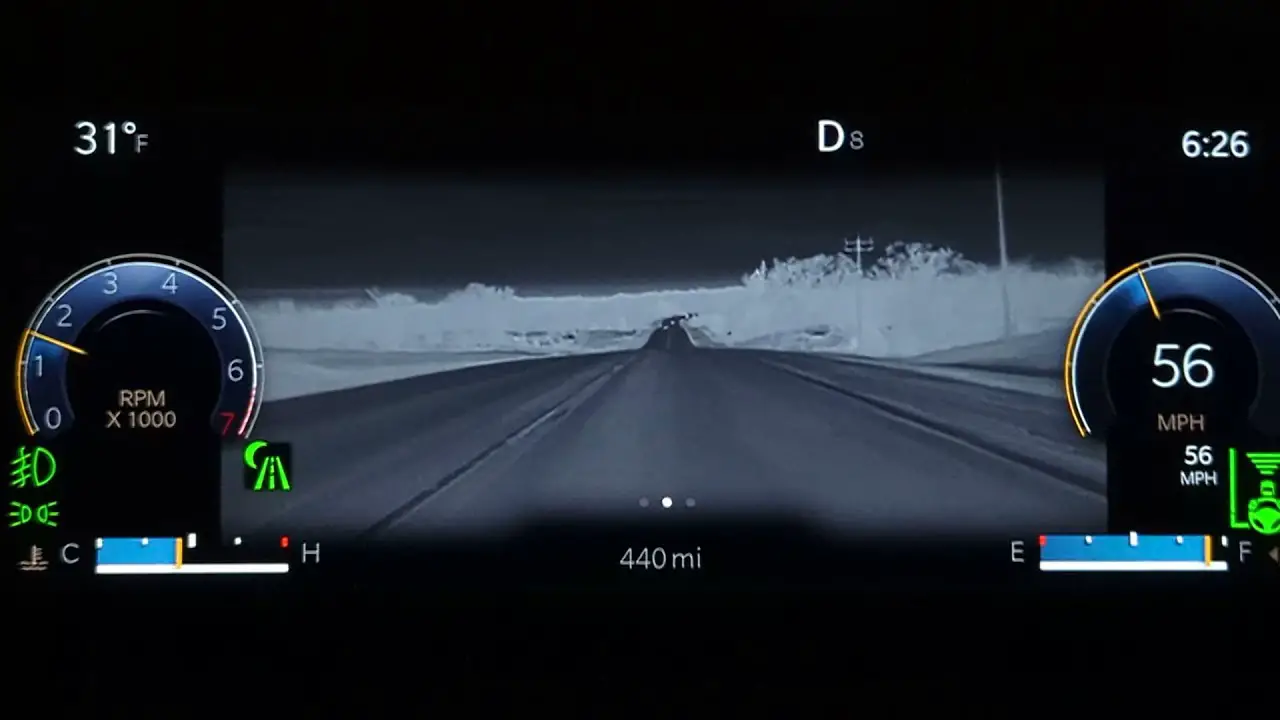
Night Vision gives you an extra window of time when someone moves across the road ahead of your headlights. It works on highways, village roads, country lanes, and forest routes.
Night Vision uses thermal imaging to detect the heat signatures of people, animals, and some objects. You activate the feature from the touchscreen, and the view appears on your instrument cluster.
This guide covers everything you need to know about Night Vision. You learn how to turn the feature on and off. You learn how to adjust sensitivity so you receive alerts only when you need them. You also get a clear explanation of the settings you should use in different driving conditions.
You also learn about common mistakes that cause the system to behave poorly, plus simple maintenance tips that keep the camera accurate. The goal is to give you the confidence to use Night Vision on every night drive.
How Night Vision Works in the Jeep Grand Cherokee
Night Vision relies on a front infrared camera. The camera detects heat signatures. Anything that emits heat becomes visible as a bright shape. This includes people, animals, motorcycles, bicycles, and vehicles with warm engines. The system sends the processed image to your instrument cluster. You also get warning symbols when the system detects something in your path.
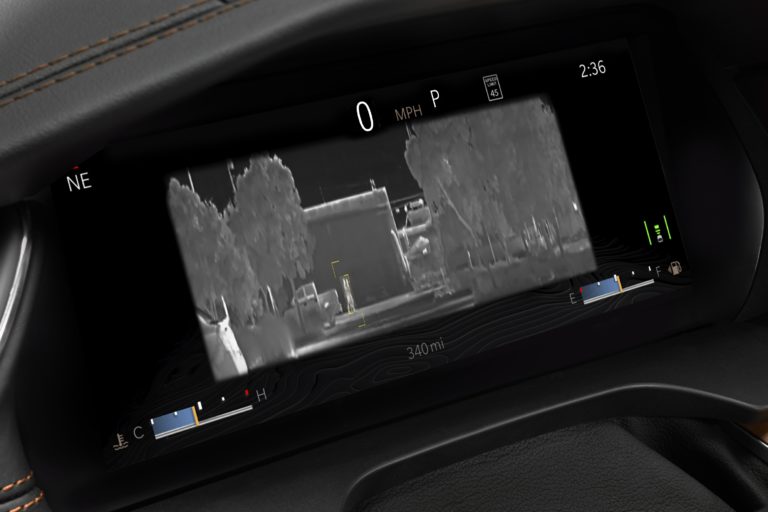
You receive strong benefits during night driving. Your headlights reach a limited distance. The infrared camera reads heat far beyond that distance. You stay aware of hazards sooner. You respond faster. You avoid sudden braking or late reactions. This becomes important in rural roads with no streetlight, forest zones with animal movement, highways where speeds stay higher, and situations where fog or rain reduces visibility.
The system does not depend on visible light. It performs even when the sun glare blocks your sight. Early morning fog also reduces headlight reach. The thermal camera still shows shapes. You get stable information without strain.
Night Vision works best when the front camera stays clean. Dirt, dust, insects, or water drops change clarity. You get sharper thermal outlines when you maintain the camera area.
How to Turn on Night Vision Jeep Grand Cherokee: Step by Step Guide
Step 1: Start your engine
Turn the ignition to ON. Allow all systems to load. Your instrument cluster and center screen complete their checks. Wait a few seconds so the menus respond without delay.
Step 2: Wake the infotainment screen
Tap the display if the sleep mode is active. Newer Grand Cherokee models use the Uconnect system. The screen responds fast. Older models still follow the same steps.
Step 3: Open the Controls section
Look at the bottom of the screen. You see icons for Controls, Climate, Navigation, and Apps. Select Controls. Some older models place Night Vision under Apps. The layout stays similar.
You see a list of features related to driver support. These options include Lane Management, Forward Collision options, Parking sensors, and driver alerts. Look for Safety or Driver Assistance. Open the menu.
Step 5: Select Night Vision
Scroll until you see Night Vision. Tap once to activate. The icon turns solid when active. The system becomes ready within seconds. This action turns on the thermal camera and routes information to your cluster.
Step 6: Check the instrument cluster
Night Vision does not appear on the center screen. It shows on your cluster behind the steering wheel. You see a black and white thermal view. Hot objects look bright. Cool areas look darker. Human shapes appear clearly. Animals show clear outlines. Vehicles show heat near the engine.
Step 7: Adjust alert sensitivity
You get options to modify sensitivity. Higher sensitivity gives faster warnings. Standard sensitivity gives balanced alerts on highways and city roads. Choose High if you drive through forest zones or areas with animal movement. Choose Standard for regular routes.
When You Should Use Night Vision
Night Vision helps in situations where visibility stays low. Use it when your route takes you through:
- Village roads with random crossings
- Night highway travel
- Forest zones with deer or wild animals
- Long rural roads without streetlight
- Early morning fog
- Late night rain where headlights lose reach
- Heavy dust conditions
- Industrial areas with large trucks entering the road
The feature gives value because it offers early detection. You make decisions earlier. You avoid sudden panic braking. You protect yourself and others.
When You Should Avoid Night Vision
Night Vision works best at night or in low light. The system becomes less helpful during bright daylight. You reduce cluster distractions by turning it off when visibility stays strong. Turn it off when:
- Driving through busy daylight traffic
- Driving in city areas with good lighting
- Driving in harsh sunlight where thermal contrast drops
- You prefer a normal cluster layout for shorter trips
Night Vision does not replace headlights or safe driving practices. Use it as a support, not the main source of visibility.
Detailed Feature Breakdown
Thermal detection
The infrared camera detects heat differences. Human and animal bodies emit more heat. They appear brighter on your display. Heat from engines also shows clearly. This helps you read incoming vehicles around corners at night.
Automatic Warnings
The system highlights threats with symbols. A person crossing appears as a bright outline with a warning box. The vehicle does not take control. You still drive. You still brake. The feature gives you early information.
System speed
Night Vision responds fast. The display updates in real time. You see moving shapes without delay. This helps on highways where decisions must be quick.
Range
The infrared camera reads far ahead of headlights. You detect hazards early. This range makes a difference on rural roads.
Tips for Better Results
Clean the camera
Use a microfiber cloth. Avoid strong chemicals. Keep the camera area dry. Dirt or water changes clarity. Even a small layer of dust changes thermal accuracy.
Keep your screen brightness moderate
High brightness strains your eyes during long night drives. Set a medium brightness to reduce fatigue.
Do not activate the feature while moving
Activate the feature when the vehicle stays still. Menu navigation distracts you while driving.
Update software
Your Jeep receives system updates. These updates improve detection accuracy. Keep the system updated from your dealer.
Common Problems and Solutions
Night Vision does not turn on
Your vehicle might be moving. Some trims restrict activation while the gear remains in Drive. Shift to Park and try again.
The Night Vision option is missing
Some Grand Cherokee trims do not include Night Vision. The camera must exist near the front grille. Models without the camera show no menu.
The display looks blurry
The camera lens is dirty or wet. Clean the lens. Fog can also create a temporary blur.
The instrument cluster does not show the feed
Your cluster may be set to another layout. Switch the layout. Some layouts hide the thermal feed.
Alerts feel too frequent
Reduce sensitivity. Standard sensitivity gives fewer alerts.
Maintenance Tips for Long Term Accuracy
Night Vision performs best with steady maintenance. Follow the tips below to keep accuracy high.
Check the camera area weekly
Look at the front grille area. Clean dust. Remove insects. Clear rain marks. The thermal camera reacts strongly to dirt.
Service the system during annual checks
Ask your service center to inspect the camera mount and alignment. A loose bracket changes thermal accuracy.
Protect the vehicle during the monsoon
Heavy rain reduces thermal contrast. Keep the vehicle parked under shelter. Wipe the camera after heavy rainfall.
Avoid covering the grille
Some owners attach aftermarket accessories. These accessories block the camera. Keep the camera open.
Uconnect 5 Systems (Newer Models)
- Start engine
- Open the center screen
- Tap Controls
- Tap Safety
- Tap Night Vision
- Look at the cluster
Uconnect 4 Systems (Older Models)
- Start engine
- Select Apps
- Open Driver Assistance
- Toggle Night Vision
- Check cluster
Some trims include a button that opens the driver assistance page directly. You tap the button near the console, then select Night Vision from the list.
Frequently Asked Questions
Does Night Vision record video?
No. Night Vision does not record or store footage. It only displays thermal images.
Does Night Vision identify animals by type?
No. The system highlights shapes. It does not classify species. You see the outline and heat signature.
Does Night Vision work in the rain?
Yes. But heavy rain reduces heat contrast. You still receive some visibility, but less detail.
Does Night Vision replace headlights?
No. It supports your headlights. Use both at the same time.
Does Night Vision use a lot of battery?
No. The system uses a small amount of power.
Does Night Vision show on the center screen?
No. It shows only on the instrument cluster.
Extra Driving Tips for Night Safety
Reduce speed on dark rural roads
Night Vision helps, but speed affects reaction time. Keep speed steady and safe.
Use high beam on empty roads when safe
High beam combined with Night Vision gives stronger visibility.
Avoid staring at the cluster
Look at the road. Use Night Vision as a quick reference. A glance gives enough information.
Keep the windshield clean
Dirt on the windshield reduces overall vision. Clean the inside and outside.
Long Form Safety Explanation
Driving at night brings a higher risk. Human eyes process light slowly in darkness. Drivers lose depth perception. Headlights reach a limited distance. Corners and turns hide hazards.
Night Vision solves part of these problems by giving thermal awareness ahead of your headlights. Even small animals produce heat. You see them before they appear in your headlights.
Thermal visibility reduces your reaction time. Reaction time consists of perception time, decision time, and physical action. Night Vision improves perception time by giving early information.
You see the hazard before your eyes detect it. This helps your decision time. You decide earlier. You brake earlier. You steer earlier. You reduce panic.
Night Vision also helps senior drivers. Low light affects all eyes. Age increases difficulties. Thermal images reduce strain. The cluster provides clear shapes. This reduces confusion.
Night Vision becomes useful in fog and light rain. Water particles scatter visible light. Your headlights lose distance. The thermal camera does not depend on light. It shows heat shapes even when visibility stays weak.
The feature also helps on long drives. Long hours cause eye fatigue. Your eyes miss details. Night Vision adds a second visual layer. You get more confidence. You avoid surprise hazards.
The system performs well in industrial zones. Large trucks move at night. Workers walk near the road. The system shows heat signatures of people near heavy trucks. You avoid sudden surprises.
You also gain value during early morning drives. Fog and darkness mix. The sun rises slowly. Light stays weak. The thermal camera keeps clarity.
The Best Settings for Different Road Types
Village roads
Use High sensitivity. You deal with pedestrians, bicycles, animals, and sudden movement.
Highways
Use Standard sensitivity. You drive at higher speeds. High sensitivity may give too many alerts.
Forest routes
Use High sensitivity. Animals appear often. Early alerts matter.
City streets
Turn Night Vision off. Streetlight stays strong. The cluster becomes too busy.
Wet season roads
Use Standard sensitivity. Rain reduces thermal contrast slightly.
How to Confirm Night Vision Is Working Right
You know the system works when you see:
- Clear thermal outlines
- Stable refresh rate
- A warning box appears for moving objects
- Brightness remains even across the view
Walk in front of your parked vehicle while someone watches the cluster. Your shape appears bright. This confirms accuracy.
Final Thoughts
Night Vision in the Jeep Grand Cherokee improves awareness during dark and low-light conditions. The activation process stays simple. You open the Controls menu, enter the Safety section, and toggle the Night Vision option.
The thermal view appears on your instrument cluster within seconds. You get early detection of people, animals, and vehicles. You drive with more confidence on rural roads, highways, and forest zones.
This full guide gives you the steps, maintenance advice, troubleshooting, best settings, and detailed explanations to use Night Vision with complete clarity. You stay safer, react earlier, and keep control on every night trip.