Disconnecting the battery on your Jeep Grand Cherokee is sometimes necessary for repairs, maintenance, or safety reasons. While it sounds simple, doing it incorrectly can damage your vehicle’s electronics or even be dangerous.
This guide walks you through the exact steps, explains key safety tips, and highlights common mistakes drivers make.
Whether you need to change the battery, reset the computer, or install new accessories, you’ll find clear, practical advice here.
Why You Might Need To Disconnect Your Battery
Jeep Grand Cherokee owners often need to disconnect the battery for several reasons:
- Replacing the battery: A dying or dead battery will need to be swapped out.
- Electrical repairs: Working on wiring, fuses, or installing components like a new radio.
- Resetting systems: Sometimes, disconnecting the battery can reset trouble codes or the onboard computer.
- Safety: Disconnecting prevents shocks or shorts during repairs.
It’s important to know that disconnecting the battery will reset some settings, like your clock and radio presets.
Tools And Preparation
Before you start, gather these items:
- 10mm wrench (most battery terminals on Grand Cherokees use this size)
- Protective gloves
- Safety glasses
- Clean rag
- Battery terminal puller (optional, for stubborn clamps)
Always work in a well-ventilated area, and avoid open flames or sparks near the battery.
Step-by-step: How To Disconnect The Battery
Follow these steps for a safe, successful disconnect:
- Turn off the vehicle. Remove the key from the ignition and ensure all lights and electronics are off.
- Open the hood. Use the release lever inside the car, then prop the hood securely.
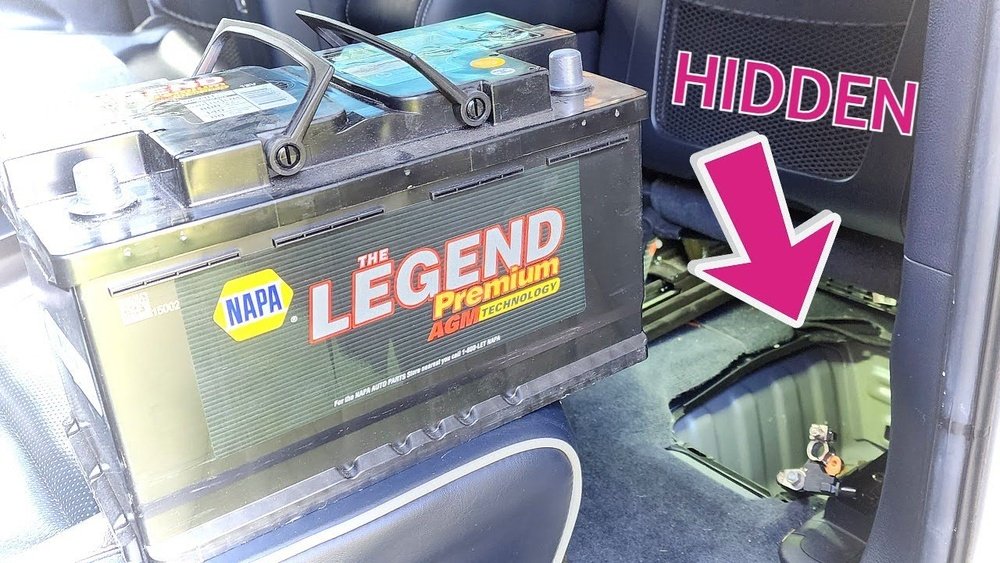
- Locate the battery. Most Grand Cherokees have the battery in the engine bay, but some models (especially 2016 and newer) may place it under the passenger seat. Check your manual if unsure.
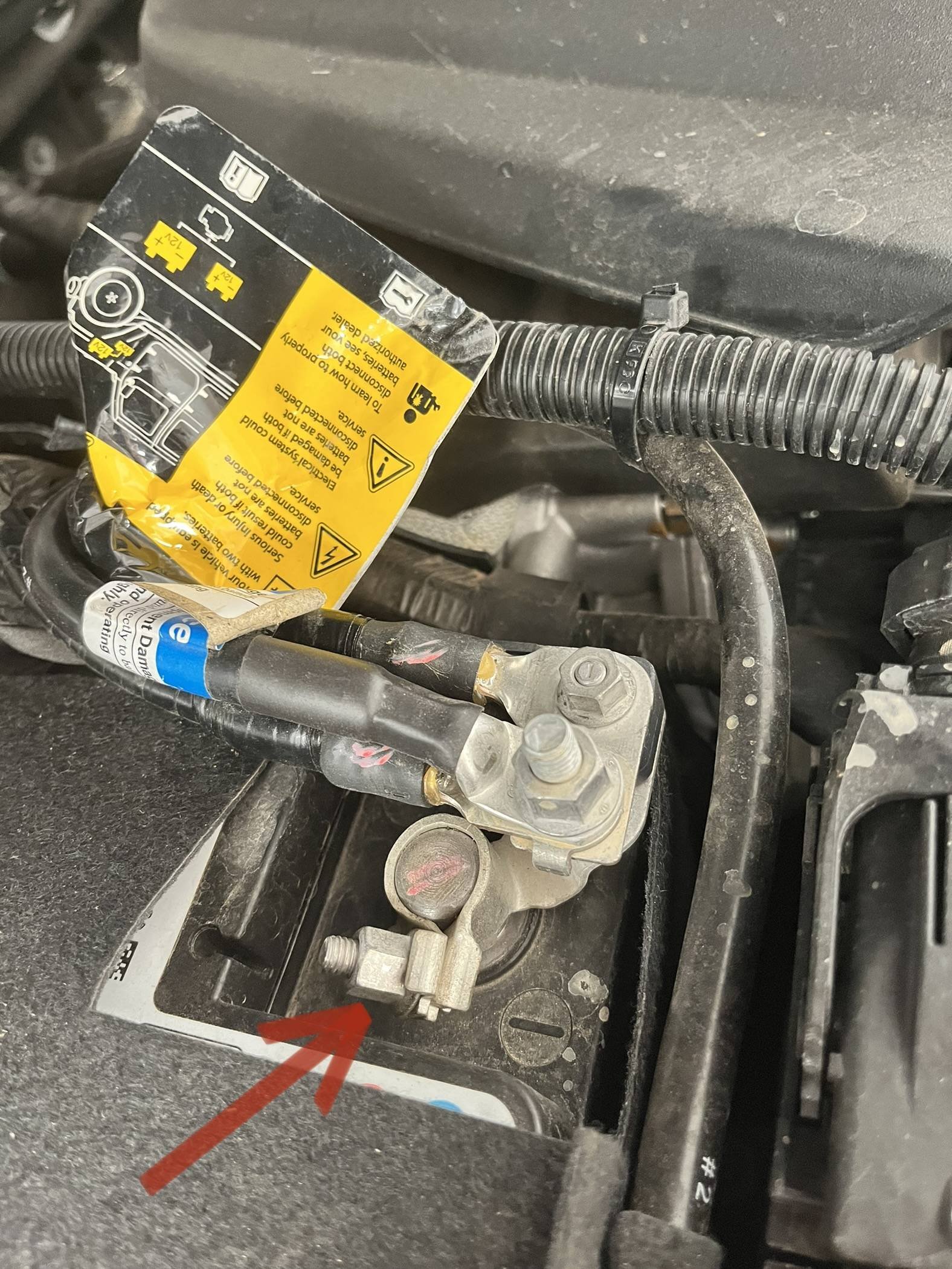
- Identify the terminals. The negative terminal is marked with a minus sign (-) and usually has a black cable. The positive terminal is marked with a plus sign (+) and usually has a red cable.
- Loosen the negative terminal first. Use the 10mm wrench to loosen the nut. Twist and carefully lift the cable off. If it’s stuck, gently wiggle it or use a terminal puller. Tuck the cable away from the battery to avoid accidental contact.
- Loosen the positive terminal. Repeat the process with the positive cable.
- Wait 5–10 minutes. This lets any residual current drain from the car’s electrical system.
Important Order: Negative First
Disconnecting the negative terminal first is a must. This prevents accidental short circuits if your wrench touches metal while removing the positive cable.
What To Watch Out For
Many drivers overlook these critical details:
- Battery memory: When you disconnect, you’ll lose radio settings, clock, and possibly seat memory. Some owners use a “memory saver” plugged into the OBD port to keep these settings.
- Hidden batteries: On newer Grand Cherokees, the battery location is less obvious. Double-check your year and model.
- Corroded terminals: If the clamps are corroded, clean them with a rag or battery cleaner before reconnecting.
Here’s a look at typical battery locations by model year:
| Model Year | Battery Location |
|---|---|
| 2011–2015 | Engine Bay |
| 2016–2021 | Under Passenger Seat |
| 2022+ | Engine Bay/Hybrid Models: Cargo Area |

Tips For Reconnecting The Battery
Once your work is done, reconnecting the battery is just as important as disconnecting it.
- Connect the positive terminal first. Secure it with the nut, but don’t overtighten.
- Connect the negative terminal.
- Double-check connections. Make sure both clamps are tight and secure.
- Start the vehicle. Check for dashboard warning lights. Some systems may need to recalibrate; your check engine light might stay on for a few minutes.
- Reset your clock and radio.
Never reverse the order connecting negative first can cause sparks or damage.
Common Mistakes And How To Avoid Them
Even experienced DIYers make errors. Here are two mistakes beginners often miss:
- Not securing disconnected cables. If a terminal touches the battery post while working, it can spark or short electronics.
- Forgetting about power seats or electronic locks. If your seat is in the wrong position, move it before disconnecting the battery, as you won’t be able to adjust after power is lost.
Also, don’t forget that batteries contain acid and can release explosive gases. Always wear safety glasses and keep the area ventilated.
Battery Types And Replacement Data
If you’re planning to replace your battery, compare specs carefully. Here’s a quick reference for common Grand Cherokee batteries:
| Engine | Battery Group Size | Typical CCA (Cold Cranking Amps) |
|---|---|---|
| 3.6L V6 | Group 94R | 700–800 CCA |
| 5.7L V8 | Group 94R | 800–850 CCA |
| Diesel Models | Group 49 | 900+ CCA |
Choosing the wrong battery type can cause starting problems or reduce the life of your new battery.
Safety Reminders
- Always disconnect the negative terminal first
- Never smoke or create sparks near a battery
- If you see leaking acid or smell rotten eggs, the battery may be damaged—replace it, don’t try to disconnect
If you’re uncomfortable, it’s better to have a professional handle the battery.
Frequently Asked Questions
How Long Should I Wait After Disconnecting The Battery?
Wait 5 to 10 minutes to allow all electrical systems to fully discharge. This prevents accidental shorts and ensures onboard computers reset.
Will Disconnecting The Battery Reset The Check Engine Light?
Sometimes. Disconnecting the battery can clear minor codes and reset the light, but if there’s a real problem, the light will return after a short drive.
Do I Need To Reprogram Anything After Reconnecting?
You may need to reset the clock, radio presets, and sometimes power window calibration. Most features will return to normal automatically.
Can Disconnecting The Battery Harm My Jeep Grand Cherokee?
If you follow proper steps—negative first, positive second—and avoid shorting terminals, there’s little risk. However, on models with complex electronics, sudden power loss may affect some systems. Check your owner’s manual for special instructions.
Where Can I Find More Details For My Specific Grand Cherokee Model?
Check your official owner’s manual or visit the Jeep Official Owner’s Site for model-specific guides and diagrams.
Disconnecting your Jeep Grand Cherokee’s battery is a straightforward process if you follow safety precautions and the correct order. With these steps, you’ll avoid common pitfalls and keep your vehicle’s electronics safe.
For any doubt, consult your manual or a trusted mechanic.



















