Best Veepeak Obd2 Scanner Review covers two Bluetooth OBD-II tools for checking car engine codes and sensor data. Both work with popular third-party apps and connect easily to iOS or Android. The main difference is in compatibility and subtle app support.
After reading, you’ll know which scanner fits your routine and car type best.
Quick Decision Guide For Bluetooth Obd-ii Scanners
- Choose Veepeak BLE Standard if you want basic compatibility with most OBD-II apps and gasoline vehicles after 2001.
- Pick Veepeak BLE Plus for broader app support and better compatibility with diesel cars after 2004 in Europe.
- Use BLE Standard when you mainly check engine codes and monitor sensor data for routine maintenance.
- Go with BLE Plus if you need flexibility for different apps like Car Scanner, OBD Fusion, or advanced BMW coding.
- If your Android device uses Bluetooth Classic, BLE Plus offers that option; BLE Standard is LE only.
Bluetooth Scanner Experience In Everyday Car Diagnostics
Using Veepeak BLE Standard, checking engine codes feels simple. The scanner connects through Bluetooth LE and works well with apps like Car Scanner and Torque. It reads and clears codes reliably, and shows real-time sensor info. The device is small and stays out of the way, and I rarely need to think about it after setup.
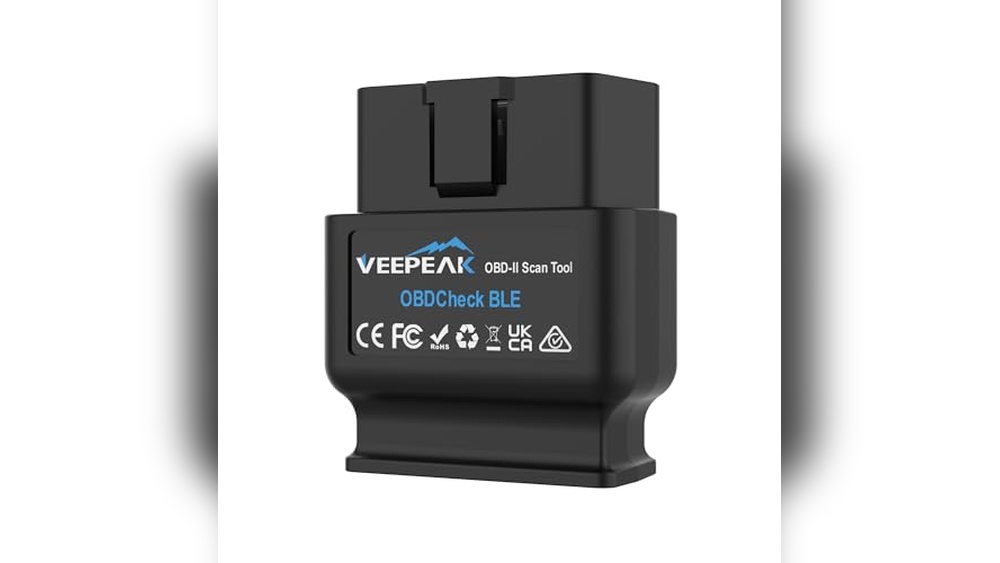
With Veepeak BLE Plus, connecting to both iOS and Android is straightforward. It supports more apps and vehicle types, especially for those needing diesel compatibility or app flexibility. Day-to-day, switching between apps is smooth, and the device handles freeze frames and sensor data efficiently. Users looking for advanced app features or coding options will find this model more versatile.
Veepeak Ble Standard: Everyday Car Diagnostics At A Glance

Where Veepeak Ble Standard Fits Best
- Works well with gasoline vehicles from 2001 onward and most diesel cars after 2004 in Europe.
- Ideal for users who just need to check engine codes and monitor basic sensor data.
- Supports apps like Car Scanner and Torque for routine checks.
- Compact and unobtrusive for day-to-day use.
- Reliable Bluetooth LE connection for iOS and Android.
Where Veepeak Ble Standard Struggles
- Limited compatibility with advanced BMW apps and coding features.
- Does not support Bluetooth Classic mode on Android.
- Some electric vehicles may not be compatible.
- May require checking app limitations for specific models.
Veepeak Ble Plus: Versatile Diagnostics For Multiple Vehicles

Where Veepeak Ble Plus Fits Best
- Supports both gasoline and diesel vehicles in the EU after 2001 and 2004, respectively.
- Works with a wider range of apps, including OBD Fusion, Infocar, BimmerCode, and Carista.
- Allows Bluetooth Classic mode for Android devices.
- Suitable for users needing freeze frame and real-time sensor data.
- Flexible for different app setups and advanced coding needs.
Where Veepeak Ble Plus Struggles
- Not compatible with some specialized apps (Carly, MHD, xHP, ProTool, bootmod3).
- Some BMW models before 2008 may not be supported in coding apps.
- May require separate app purchases for advanced features.
- Not supported on Android head units.
Choosing Between Ble Standard And Ble Plus For Car Diagnostics
In daily use, I compared how quickly each scanner connects and how reliably they clear codes. App flexibility and compatibility with diesel cars were also tested. Switching between apps was important, as was checking engine codes and sensor data. No lab tests—just regular car maintenance routines.
Which Is Easier To Set Up?
| Aspect | Veepeak BLE Standard | Veepeak BLE Plus |
|---|---|---|
| Bluetooth Connection | LE only for iOS/Android | LE and Classic for Android |
| App Pairing | Direct in-app connection | Direct in-app connection |
| Initial Setup | Quick, minimal steps | Quick, with more app options |
| Vehicle Profile Selection | Standard OBD-II profiles | Wider vehicle coverage |
Ratings: Veepeak BLE Standard – 8/10 | Veepeak BLE Plus – 8.5/10
Edge: BLE Plus fits users needing more app flexibility or Android Bluetooth Classic mode.
How Do They Handle App Compatibility?
| Aspect | Veepeak BLE Standard | Veepeak BLE Plus |
|---|---|---|
| Supported Apps | Car Scanner, Torque, BimmerCode | Car Scanner, OBD Fusion, Infocar, BimmerCode |
| BMW Coding Support | Limited (post-2008 E/F/I/R) | Limited, but broader app support |
| App Limitations | Some features require purchase | Some features require purchase |
| Android Head Units | May not be supported | Not supported |
| Specialized Apps | Not compatible with Carly, MHD, etc. | Not compatible with Carly, MHD, etc. |
Ratings: Veepeak BLE Standard – 7.5/10 | Veepeak BLE Plus – 8/10
Edge: BLE Plus suits those who need more app options and flexibility.
Which Works Better For Different Vehicle Types?
| Aspect | Veepeak BLE Standard | Veepeak BLE Plus |
|---|---|---|
| Gasoline Cars | Compatible from 2001+ | Compatible from 2001+ |
| Diesel Cars (EU) | Compatible from 2004+ | Compatible from 2004+ |
| Electric Vehicles | May not support all models | Check app profiles for compatibility |
| Hybrid Cars | Not all supported | Check app profile or contact support |
| BMW Models Pre-2008 | Not supported in BimmerCode | Not supported in BimmerCode/BimmerLink |
Ratings: Veepeak BLE Standard – 7/10 | Veepeak BLE Plus – 7.5/10
Edge: BLE Plus provides extra flexibility for diesel and hybrid users.
How Reliable Are They For Code Reading And Clearing?
| Aspect | Veepeak BLE Standard | Veepeak BLE Plus |
|---|---|---|
| Engine Code Reading | Consistent, fast | Consistent, fast |
| Code Clearing | Reliable for OBD-II | Reliable for OBD-II |
| Freeze Frame Data | Supported | Supported |
| Sensor Monitoring | Real-time data | Real-time data |
| App Integration | Smooth, basic | Smooth, more flexible |
| Bluetooth Dropouts | Rare | Rare |
Ratings: Veepeak BLE Standard – 8/10 | Veepeak BLE Plus – 8/10
Edge: Both are reliable, but BLE Plus handles more app scenarios.
How Do They Fit Into Everyday Maintenance Routines?
| Aspect | Veepeak BLE Standard | Veepeak BLE Plus |
|---|---|---|
| Routine Engine Checks | Quick and easy | Quick and easy |
| App Switching | Basic, limited apps | Smoother, more app options |
| Vehicle Profile Setup | Standard profiles | Wider coverage |
| Bluetooth Modes | LE only | LE and Classic |
Ratings: Veepeak BLE Standard – 7.5/10 | Veepeak BLE Plus – 8/10
Edge: BLE Plus is more flexible for users with multiple vehicles or app needs.
Living With A Bluetooth Obd-ii Scanner Over Time
Learning to use either scanner takes just a few minutes if you’re comfortable with smartphone apps. Over time, both devices build confidence by consistently connecting and reading codes. Once you get used to the app pairing process, the scanners become a routine part of car maintenance.
Trust comes from knowing the device will work each time you need it. Both models give peace of mind for basic diagnostics and engine checks. If you switch apps or cars often, BLE Plus offers more flexibility without extra hassle.
For most users, either model can be counted on for day-to-day reliability.
Deciding Which Veepeak Bluetooth Scanner Suits Your Needs
Choose Veepeak BLE Standard if you want a simple, compact tool for routine engine checks on gasoline vehicles. It fits users who stick with a few basic apps and need reliable code reading and clearing without extra complexity.
Go for Veepeak BLE Plus if you use multiple apps, need compatibility with diesel cars, or want the option for Bluetooth Classic mode on Android. It’s a good fit for people with mixed vehicle types or who want more flexibility in app choices.
Either scanner makes car diagnostics straightforward and helps remove guesswork from routine maintenance.
Best Veepeak Obd2 Scanner Review – Common Buyer Questions
Can I Use Either Scanner On Electric Vehicles?
Some electric vehicles may not be fully compatible. It’s best to check the app’s connection profiles or contact Veepeak support before buying. Not all EVs are supported.
What Apps Work With Veepeak Ble Standard And Ble Plus?
Both support Car Scanner, Torque (Android), BimmerCode (with limitations), and OBD JScan. BLE Plus adds support for OBD Fusion, Infocar, and Carista. Some apps may require separate purchases for advanced features.
Do These Scanners Support Bmw Coding?
They support coding for BMW models after 2008 (E/F/I/R series) in BimmerCode and BimmerLink. Models before 2008 and series G/U are not supported. BLE Plus offers slightly broader app compatibility.
Can I Connect To Android Head Units?
Neither scanner is supported on Android head units. They are designed for phones and tablets only.
Will I Need To Buy Extra Apps?
Basic functions work with free apps, but some advanced features or coding options require paid apps or in-app purchases. Check app details before buying.
Are These Scanners Easy To Use For Beginners?
Yes, both are straightforward to set up and use. Pairing happens in the app, and reading/clearing codes is simple. Minimal technical knowledge is needed.
Can I Switch Between Multiple Vehicles?
Both scanners work with most OBD-II compliant cars. BLE Plus offers more flexibility for diesel and hybrid vehicles in the EU. Just select the correct vehicle profile in your app.