If you own a Jeep Compass 2021, you might want to make your drive more comfortable during cold days. The heated seats feature is designed for this exact purpose, but many people are unsure how to use it. Knowing how to turn on the heated seats can make a big difference in your driving experience, especially in winter. This guide explains every step in simple language, with practical tips and answers to common questions.
Understanding Heated Seats In Jeep Compass 2021
Heated seats are not just a luxury; they add comfort and can even help relax your muscles during long drives. In the Jeep Compass 2021, the heated seats are available in most trims above the base model. The feature is usually standard in Latitude, Limited, and Trailhawk trims.
Not all Compass models have heated seats. If you are unsure, check your vehicle’s window sticker or ask your dealer. The heated seats system works for both the driver and front passenger seats.
How Heated Seats Work
Heated seats use electric heating elements built inside the seat cushions and backrests. When you turn them on, the system warms up quickly, usually within a few minutes.
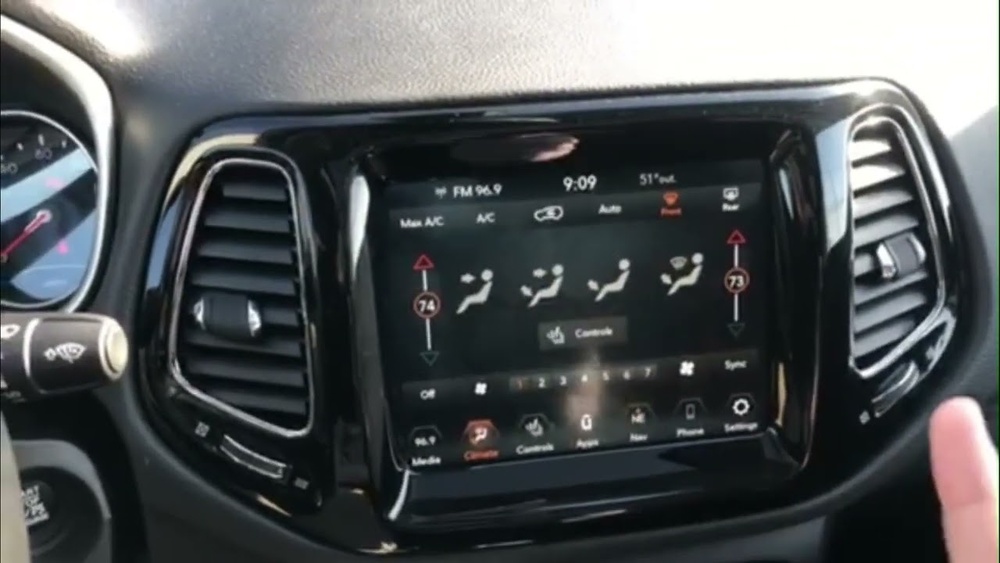
You can control the temperature through the Uconnect touchscreen or, in some models, with physical buttons. The heat levels usually have multiple settings, letting you choose how warm you want your seat.
Step-by-step: Turning On Heated Seats
Follow these steps to activate the heated seats in your Jeep Compass 2021:
- Start the vehicle: The heated seats work only when the ignition is ON.
- Locate the controls: Most Jeep Compass 2021 models use the Uconnect touchscreen. Look for the ‘Controls’ button at the bottom of the screen.
- Access the heated seats option: Tap ‘Controls’. You will see icons for ‘Heated Seat’ for both driver and passenger sides.
- Select the heat level: Tap the ‘Heated Seat’ icon once for high, again for low, and a third time to turn it off.
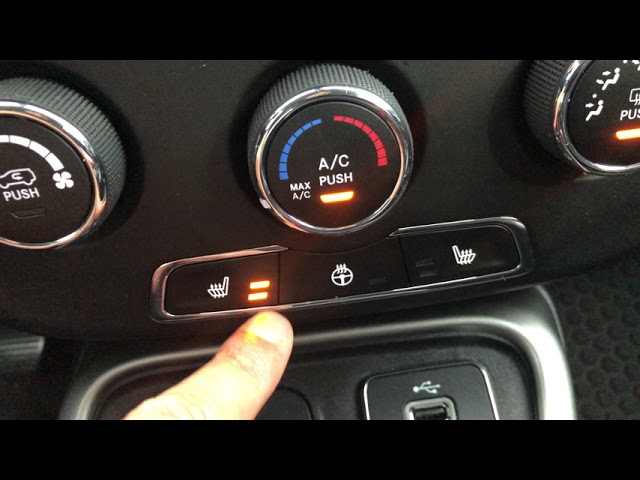
- Physical buttons (if equipped): Some trims may have physical buttons on the center console. Press the button to cycle through heat levels.
Example
If you are driving and feel cold, you can quickly tap the heated seat icon for the driver’s seat on the touchscreen. If your passenger wants warmth, they can do the same for their side.
Here’s a quick comparison:
| Control Type | Location | Heat Level Options |
|---|---|---|
| Uconnect Touchscreen | Center dashboard | High, Low, Off |
| Physical Buttons | Center console | High, Low, Off |
Tips For Best Use
- Turn on before driving: Seats warm up faster than the cabin heater.
- Use low setting for long drives: High heat may become uncomfortable after a while.
- Don’t use with heavy covers: Thick seat covers can block heat and slow down warming.

Common Issues And Solutions
Sometimes, the heated seats may not work as expected. Here are common reasons and solutions:
- Ignition is off: Heated seats need the engine or accessory mode ON.
- Fuse issue: A blown fuse can stop the seats from heating.
- Software glitch: Restart the Uconnect system if the icon is missing.
If you notice the seat stays cold, check the above points before visiting a mechanic. Heated seats rarely fail, but electrical issues can happen after years of use.
Table: Troubleshooting Quick Reference
| Problem | Possible Cause | What to Do |
|---|---|---|
| Seat doesn’t heat | Ignition off | Start engine |
| No icon on screen | Software glitch | Restart Uconnect |
| Heated seat turns off | Overheating protection | Wait, then restart |
Safety And Maintenance
Heated seats are safe for most users, but a few things are worth noting:
- People with sensitive skin: Use the low setting to avoid burns.
- Don’t place sharp objects on the seats, as they may damage the heating elements.
- Check for recalls: Rarely, automakers issue recalls for electrical components. Stay updated through the National Highway Traffic Safety Administration.
Energy Use And Efficiency
Heated seats use about 50–100 watts each. This is less than the cabin heater, so using seat heaters is efficient if you want to save fuel in cold weather. The system turns off automatically when the car is off, so you don’t have to worry about draining the battery.
Table: Heated Seats Vs Cabin Heater Power Use
| Feature | Average Power Used | Effect on Fuel Economy |
|---|---|---|
| Heated Seats | 50–100 watts per seat | Minimal |
| Cabin Heater | 1,000+ watts | Higher |
Two Insights Owners Often Miss
- Automatic climate control doesn’t turn on seat heaters: Even with auto climate, you must activate heated seats manually.
- Memory settings and heated seats: The Compass 2021 remembers seat position, but not heat settings. You need to turn them on each trip.
These details surprise many new owners and can lead to confusion, especially if you are used to other brands.
Closing Thoughts
Turning on heated seats in your Jeep Compass 2021 is easy once you know where to look. The Uconnect touchscreen makes it simple, and the system works quickly. Remember, using your heated seats the right way saves energy and adds comfort. If you ever have trouble, basic troubleshooting can solve most problems. Enjoy your warmer drives and get the most from your Jeep!
Frequently Asked Questions
How Do I Know If My Jeep Compass Has Heated Seats?
Check the window sticker, owner’s manual, or the Uconnect screen for a ‘Heated Seat’ icon. Most trims except the base Sport model include heated seats.
Can I Use Heated Seats While Parked?
Yes, as long as the ignition is in accessory or ON mode. Be careful not to drain the battery if the engine is off for a long time.
How Long Does It Take For The Seats To Heat Up?
Most heated seats feel warm within 2–3 minutes. Maximum warmth is reached in about 5 minutes, depending on outside temperature.
Do Heated Seats Turn Off Automatically?
If you turn off the car, heated seats will shut down. Some models also switch to low setting automatically after a set time to avoid overheating.
Are Heated Seats Safe For Kids And Pets?
Use the low setting for children or pets and avoid leaving them unattended on a heated seat. Always check seat temperature by hand first.




