Many Jeep Grand Cherokee owners find themselves puzzled when the clock on their dashboard displays the wrong time. Whether it’s daylight saving changes, a battery replacement, or simply a missed update, driving with the wrong time can be annoying and even confusing.
Setting the correct time in your Jeep Grand Cherokee is not just a minor detail it can affect how you plan your journeys, reminders, and even radio functions. Luckily, adjusting the clock is simple once you know the right steps.
This guide will walk you through the process for different Jeep Grand Cherokee models and trim levels, explain common mistakes, and help you troubleshoot if the clock won’t update.

Why Accurate Time Matters In Your Jeep Grand Cherokee
Most drivers rely on their vehicle’s clock every day. It helps you arrive on time for meetings, school, or appointments. In the Jeep Grand Cherokee, the dashboard clock also connects to other systems, such as the navigation and entertainment unit. An incorrect clock can lead to problems with scheduled features, reminders, or even Bluetooth phone syncing. For people who cross time zones or travel during daylight saving changes, knowing how to update the clock quickly saves stress.
Identifying Your Jeep Grand Cherokee’s System
Not all Jeep Grand Cherokees use the same infotainment system. The method to change the clock depends on the year and model of your vehicle. Jeep has used several systems:
- Manual analog/digital clocks (older models, pre-2011)
- Uconnect 5.0 (basic touch screen, some 2014–2020 models)
- Uconnect 8.4 (advanced touch screen, most 2014–2021 models)
- Uconnect 4C/5 (latest models, 2021+)
Understanding which system your Jeep uses is important before you start. If you’re not sure, check your owner’s manual or look at the main display in your dashboard.
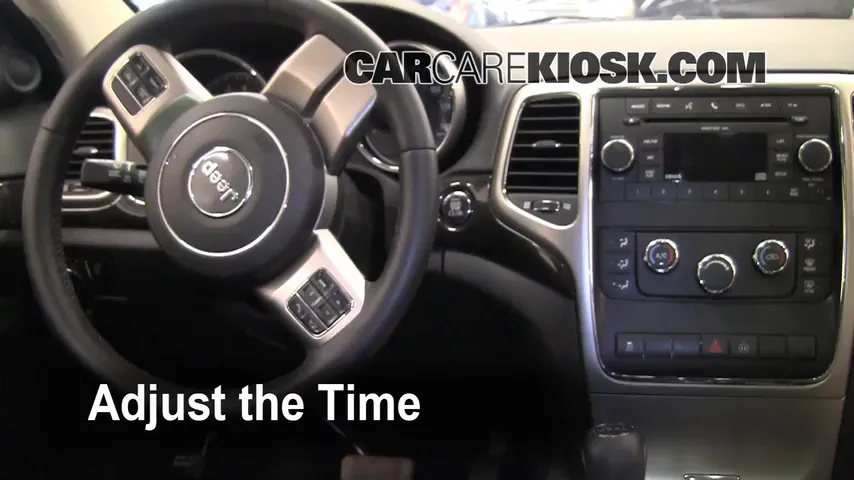
How To Change The Clock: Step-by-step Guides
Below are the steps for the most common Jeep Grand Cherokee systems.
Changing The Clock In Older (pre-2011) Models
Many older Jeeps have a manual clock, either analog or a small digital display.
- Locate the clock adjustment buttons.
- These are usually small, unlabeled buttons near the clock display or radio.
- Press and hold the ‘Time’ or ‘Clock’ button.
- The hour digits should start flashing.
- Adjust the hour.
- Use the Seek or Tune buttons to increase or decrease the hour.
- Set the minutes.
- Press the button again to move to the minutes. Adjust as before.
- Confirm the time.
- Release the buttons to save.
Tip: If your model has an analog clock, turn the small dial next to the clock face.
Changing The Clock On Uconnect 5.0 (2014–2020)
- Turn on the ignition.
- On the touch screen, tap the Settings icon (usually a gear symbol).
- Scroll or swipe to Clock & Date.
- Tap Set Time.
- Adjust the hour and minutes using the plus (+) or minus (–) buttons.
- Choose AM/PM if needed.
- Tap Save or Done to confirm.
Changing The Clock On Uconnect 8.4 (most 2014–2021)
- Start your Jeep and let the Uconnect system load.
- Tap Settings.
- Select Clock.
- Choose Set Time.
- Adjust hours and minutes with the arrows.
- Confirm by selecting Save.
Changing The Clock On Uconnect 4c/5 (2021 And Newer)
These new systems can sync time automatically if GPS is active.
- Go to the Home screen on the Uconnect display.
- Tap the Vehicle or Settings icon.
- Select Clock & Date.
- If Sync with GPS is available, you can turn it on for automatic updates.
- To set manually, turn off GPS sync and adjust the time as in previous steps.
Note: For automatic updates, the vehicle must be in an area with GPS signal.
Comparing Clock Adjustment Steps By Model Year
Here’s a quick comparison of how the process differs across main Jeep Grand Cherokee generations:
| Model Year | System Type | Clock Adjustment Method |
|---|---|---|
| 2005–2010 | Manual/Analog | Physical buttons or dial near clock/radio |
| 2011–2013 | Basic Digital/Uconnect 430 | Radio buttons/menu |
| 2014–2020 | Uconnect 5.0/8.4 | Touch screen: Settings > Clock |
| 2021+ | Uconnect 4C/5 | Touch screen: Settings > Clock (with GPS sync option) |
Common Mistakes And How To Avoid Them
Even with clear instructions, mistakes can happen. Here’s what many owners get wrong:
- Not identifying the correct system: Trying steps for a newer Uconnect on an older radio won’t work. Always check your system first.
- Forgetting to save: On touch screens, sometimes changes are lost if you don’t tap Save or Done at the end.
- Ignoring AM/PM: In 12-hour settings, make sure you select the correct half of the day.
- Not disabling GPS sync: If GPS sync is on, manual changes won’t stick.
- Low battery or system reset: If your Jeep’s battery was recently changed, you may need to re-enter the time.
Insight: Many drivers don’t realize that changing the clock can also affect scheduled features, like automatic lights or reminders. Always double-check scheduled items after updating the clock.
Troubleshooting: When The Clock Won’t Change
Sometimes, even after following all steps, the clock won’t update. Here’s how to troubleshoot:
- Check for software updates: Uconnect systems need periodic updates. Outdated software can cause bugs.
- Restart the vehicle: Turn off the ignition, wait a minute, then restart.
- Disable GPS sync: If your time keeps reverting, turn off GPS time sync and set the time manually.
- Inspect the battery: Low battery voltage can mess with system memory.
- Reset Uconnect system: Hold the volume and tune knobs together for about 10 seconds until the system restarts.
If problems continue, contact your dealer or check the official Jeep Customer Care page for further support.

Using Automatic Time Sync: Pros And Cons
Many newer Grand Cherokees can sync the clock automatically using GPS or cellular data. This feature has benefits but also some drawbacks.
| Advantage | Drawback |
|---|---|
| Always shows the correct local time | Needs GPS or data signal to sync |
| Updates automatically for time zones and daylight saving | May not work in tunnels, garages, or remote areas |
| No manual adjustment needed | Manual changes will be overwritten if sync is on |
Non-obvious insight: If you travel between time zones often, GPS sync is useful. But if you live near a time zone border, your clock may jump back and forth. In such cases, it’s better to turn off automatic sync.
When To Check And Update Your Clock
You might not think about your vehicle’s clock often, but there are specific times when it’s important to check and update it:
- After daylight saving time changes
- When traveling to a new time zone
- After a battery replacement or power loss
- If the infotainment system is reset or updated
- When scheduled features don’t activate as expected
Checking your clock every few months, or after any major service, helps avoid confusion and missed appointments.
What If Your Clock Is Still Wrong?
If you follow all steps and your clock still shows the wrong time, there could be a deeper issue:
- Infotainment system malfunction: Rare but possible, especially after software updates.
- GPS antenna issue: If your clock relies on GPS, a problem with the antenna can prevent syncing.
- Internal memory failure: Sometimes, the system can’t save new settings.
In these cases, a dealer diagnostic is needed. Sometimes, a simple software update or system reset fixes the issue.
Upgrading Or Replacing The Uconnect System
Some older Jeep Grand Cherokees can be upgraded with a newer Uconnect system. This can add features like automatic time sync, better graphics, and improved Bluetooth. However, upgrading is not always straightforward compatibility and installation costs can vary.
Example: Upgrading a 2014 model from Uconnect 5.0 to 8.4 may cost between $500 and $1200, including labor. Always consult a professional before buying aftermarket systems.
Practical Tips For Keeping Your Jeep’s Clock Accurate
- Use automatic sync if you often travel or forget to update.
- Set reminders for daylight saving time changes.
- Double-check after any car service or battery work.
- Keep your Uconnect system updated for best performance.
- If you lend your car, let other drivers know how to adjust the clock.
Non-obvious tip: Some radio stations broadcast a time signal. On a few Jeep models, tuning to these stations for a few minutes can update the clock automatically, though this is rare.
Frequently Asked Questions
How Often Should I Update The Clock In My Jeep Grand Cherokee?
You usually only need to update the clock twice a year (for daylight saving) or after a battery change. If you use automatic GPS sync, your clock updates itself.
Why Does My Jeep Grand Cherokee Clock Keep Resetting?
Common reasons include a weak car battery, software bugs, or GPS sync issues. Make sure your system software is up to date and check battery health if resets continue.
Can I Change The Clock While Driving?
For safety, most Jeep models allow clock changes only when the vehicle is in Park. Some functions lock when driving to prevent distraction.
Does The Clock Affect Other Systems In My Jeep?
Yes. The clock can affect navigation, scheduled reminders, and even automatic lights or climate control in some models. Always keep it accurate to avoid issues.
Where Can I Find More Information Or Support?
The best place is your Jeep owner’s manual or the official Jeep Customer Care site. They provide guides, videos, and troubleshooting steps.
Keeping your Jeep Grand Cherokee clock accurate is a small task that can save you stress and keep your driving experience smooth. With the right steps and a little attention, you’ll never be late because of the dashboard clock again.