Changing the language on your Jeep Grand Cherokee can make driving more comfortable, especially if English is not your first language or if you’ve bought your vehicle in another country. Many owners are surprised at how quick this process can be, but also confused by small differences between models and years. This guide covers all the steps you need, gives tips for different display systems, and helps you solve common problems—so you can set your Jeep Grand Cherokee to your preferred language in just a few minutes.
Understanding Jeep Grand Cherokee’s Language System
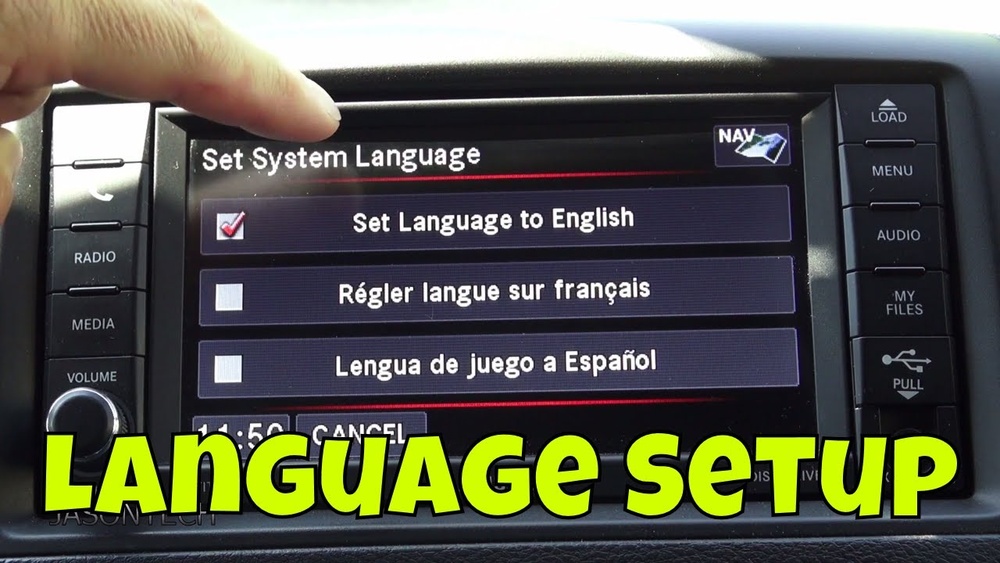
Most modern Grand Cherokees use a Uconnect infotainment system. This system controls navigation, audio, phone, and vehicle settings, including language. The system supports several major languages, and the process is similar across most recent models (2014 and newer). However, older versions and some export models might display menus differently.
Jeep’s language options typically include:
- English (US or UK)
- Spanish
- French
- Portuguese
- Italian
- German
The number of available languages may depend on your specific vehicle’s market.
Step-by-step Guide: Changing The Language
Follow these steps to change the language on your Jeep Grand Cherokee:
- Start the vehicle: Ensure the ignition is in RUN or ON mode, so the dashboard and Uconnect system are powered.
- Access the Uconnect screen: Tap the ‘Settings’ icon on the main screen. This is usually a gear-shaped symbol.
- Navigate to ‘Language’: Scroll through the menu options. Look for ‘Display’ or ‘Language’—the exact path can differ by year.
- Select your preferred language: A list of languages appears. Tap your chosen language.
- Confirm your choice: The system may ask you to confirm. Select ‘Yes’ or ‘OK.’
- Wait for the system to update: The screen may flicker or restart as the new language loads.
Example: 2020 Jeep Grand Cherokee
On a 2020 model, the exact steps are:
- Tap ‘Settings’ → ‘Display’ → ‘Language’ → Choose your language → Confirm.
Important Note
If your screen is already in a language you cannot read, use the position of the menu items or icons rather than relying on words. The gear icon for settings is universal.
Differences By Model Year And Uconnect Version
Not all Grand Cherokees look or work the same inside. Here’s a quick comparison of menu navigation for three common systems:
| Model Year | Uconnect Version | Menu Path to Language Settings |
|---|---|---|
| 2014-2017 | Uconnect 5.0 | Settings > System > Language |
| 2018-2021 | Uconnect 4C/8.4 | Settings > Display > Language |
| 2022+ | Uconnect 5 | Settings > Language |
Older models (pre-2014) may use buttons on the instrument cluster. In that case, look for a button labeled ‘MENU’ near the speedometer, scroll to ‘Language,’ and select with the arrow keys.
What To Do If The Language Won’t Change
Sometimes, the language setting doesn’t update as expected. Here are common reasons and solutions:
- System glitch: Try turning the vehicle off, waiting 30 seconds, and restarting.
- Software update needed: Outdated Uconnect software can cause issues. Visit a Jeep dealer for a software check.
- Export model limitations: Some imported vehicles may have locked languages or limited choices.
- Reset required: If other settings also don’t save, a factory reset may help (but this erases personal data).
If you’re still stuck, your Jeep dealer can help unlock language options or reset the system.
Extra Tips And Insights
- Voice recognition: Changing the display language usually changes the voice command language too. However, some languages may not support all voice features.
- Navigation guidance: If your Jeep has built-in navigation, directions will switch to the selected language. But map labels (street names) remain in the local format.
- Instrument cluster: On newer Grand Cherokees, the digital display between the speedometer and tachometer will also update to your chosen language.
Some drivers miss that language settings are sometimes separate for the touchscreen and the instrument cluster. If you see one part of the display in the wrong language, check both settings menus.
Quick Comparison: Jeep Vs. Other Brands
| Brand | Menu Navigation Steps | Available Languages |
|---|---|---|
| Jeep | 2-3 steps | 6-8 |
| Ford | 3-4 steps | 8-10 |
| Toyota | 3 steps | 5-7 |
| Honda | 2-3 steps | 5-6 |
Jeep’s process is among the simplest, but the number of supported languages is average compared to Ford.

When You Might Need To Change The Language
- Buying a used car: If your Jeep was imported, it may come with a non-English display.
- Traveling abroad: Set the language to match local road signs or your preference.
- Multiple drivers: Families with different language needs can quickly switch.
Many drivers forget to check the language when renting or buying a used Jeep, leading to confusion with alerts and navigation.
How To Reset All Settings
If your Grand Cherokee’s menus have become unreadable or mixed languages, you can reset the system:
- Go to ‘Settings.’
- Scroll to ‘Restore Factory Settings’ or ‘System Reset.’
- Confirm your choice.
Warning: This will erase all paired phones, radio presets, and custom settings. Only use as a last resort.

Frequently Asked Questions
How Do I Change The Language If My Screen Is Stuck In Another Language?
Look for the gear-shaped settings icon. You can count down menu items if you know the order. Check your owner’s manual for graphics if unsure.
The voice guidance and menus change, but street names and map details stay in their local language.
Can I Add New Languages To My Jeep Grand Cherokee?
No, you can only select from the languages installed by the factory. New languages require a software update, which is rare and usually only done by dealers.
Is It Possible To Set Different Languages For The Screen And Instrument Cluster?
On some models, yes. Check both the Uconnect settings and the instrument cluster menu (using steering wheel buttons).
Where Can I Find Official Information On Language Support For My Jeep?
Visit the official Jeep Uconnect support page for up-to-date guidance and manuals.
Switching the language on your Jeep Grand Cherokee is usually simple and quick. With these steps and insights, you’ll feel more at home in your vehicle, no matter where your journey takes you.