Meta description: Learn step-by-step how to program your Jeep Grand Cherokee’s garage door opener, check compatibility, solve common issues, and boost convenience in minutes.
For many Jeep Grand Cherokee owners, using the built-in garage door opener—often called HomeLink—adds real convenience. No more searching for remote controls or worrying about battery replacements. But if you’ve just bought your Grand Cherokee or changed your garage system, programming the opener can be confusing. The process varies by model year and the type of garage door system you have. Here’s how to program your Jeep Grand Cherokee’s garage door opener quickly and safely.
Understanding Your Jeep’s Garage Door Opener
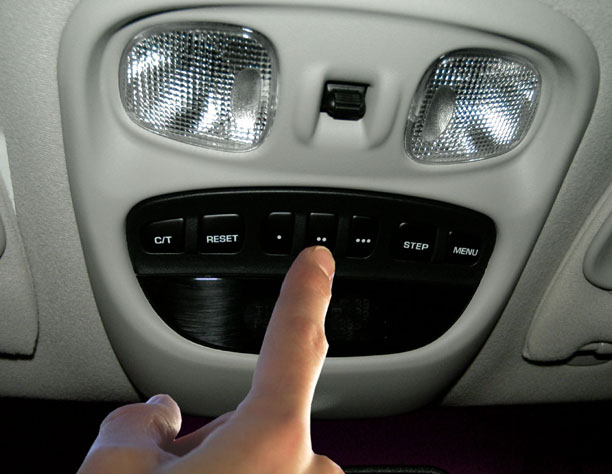
The HomeLink system is standard on many Jeep Grand Cherokee trims, especially from the WK (2005-2010) and WK2/WL (2011-present) generations. It’s usually built into the overhead console. This system can control up to three devices, including garage doors, gates, or home lighting.
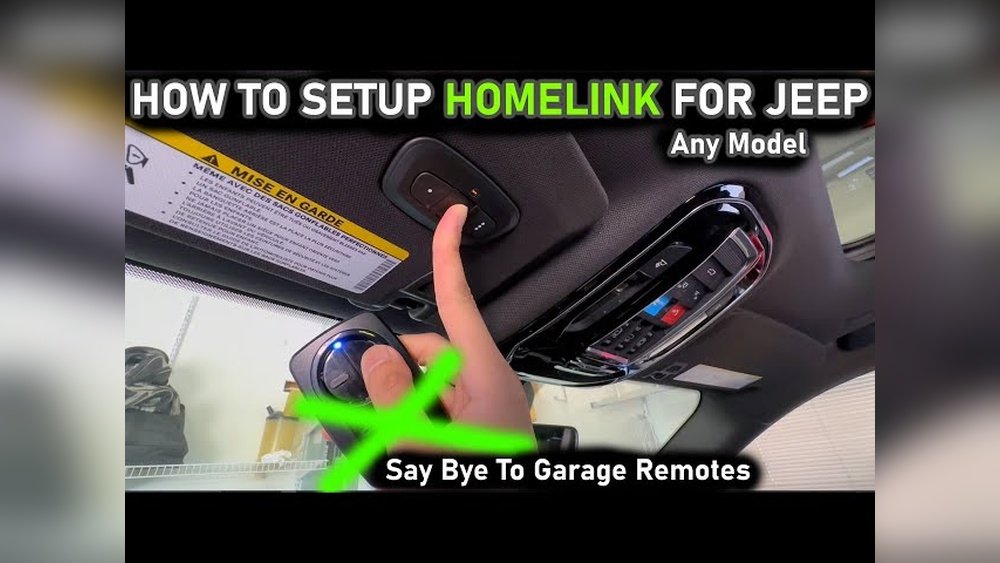
Most 2011+ Grand Cherokees use the latest HomeLink version, which works with nearly all modern garage openers. Older models (like WJ, 1999-2004) may have limited compatibility, especially with newer “rolling code” garage systems.
Compatibility Table: Jeep Grand Cherokee & Garage Door Openers
| Model Year | HomeLink Version | Rolling Code Support | Number of Devices |
|---|---|---|---|
| 1999-2004 (WJ) | HomeLink Gen 2 | Limited | 3 |
| 2005-2010 (WK) | HomeLink Gen 3 | Yes | 3 |
| 2011-2021 (WK2) | HomeLink Gen 4 | Yes | 3 |
| 2022+ (WL) | HomeLink Gen 5 | Yes | 3 |
If you’re unsure which version you have, check your owner’s manual or the overhead console design.
Preparation Before Programming
- Find your garage door remote—you’ll need it for setup.
- Park your Jeep outside your garage. This keeps you safe if the door moves unexpectedly.
- Switch your Jeep to ACC mode (engine off but electronics on).
- Check your garage door opener’s “Learn” or “Program” button location. It’s usually on the opener motor unit above your garage.
Pro tip: If your opener uses “rolling code” (most openers made after 1996), you’ll need to press this button during setup.
Step-by-step Programming Guide
Basic Programming (non-rolling Code)
- Hold the desired HomeLink button (1, 2, or 3) until the indicator light starts to blink slowly.
- While holding, press and hold your garage remote button 2–5 cm from the HomeLink buttons.
- Continue holding both buttons until the HomeLink indicator changes from slow to rapid blinking.
- Release both buttons. The code is now stored.
Rolling Code Systems (most Common)
- Complete steps 1–4 above.
- Go to your garage door opener unit. Press the Learn (or Program) button. You usually have 30 seconds.
- Return to your Jeep. Press and hold the programmed HomeLink button for 2 seconds, release, and repeat up to 3 times. The garage door should move.
Tip: Some newer Jeeps display prompts on the Uconnect touchscreen for easier programming.
Quick Comparison: Homelink Vs. Universal Remotes
| Feature | HomeLink (Built-In) | Universal Remote (Clip-On) |
|---|---|---|
| Integration | Factory-installed | Portable |
| Power Source | Car battery | Replaceable battery |
| Number of Devices | Up to 3 | Usually 1–2 |
| Security | Works with rolling codes | May not support rolling codes |
Common Issues And Troubleshooting
Programming doesn’t always work the first time. Here’s how to handle common problems:
- HomeLink won’t program: Clear all codes by holding the two outer HomeLink buttons for 10 seconds, then try again.
- Garage door only moves once: Repeat the rolling code procedure. You may need to press the HomeLink button 2–3 times.
- Indicator light stays solid: This usually means the code didn’t store. Start over and keep the remote close.
- Compatibility problem: Very old or “smart” openers may need a HomeLink repeater kit (about $30–$50).
Symptoms of a failed programming attempt:
- Garage door doesn’t respond.
- HomeLink light doesn’t blink or stays off.
- Uconnect system gives an error (on 2018+ models).
If troubleshooting fails, consult your dealer or visit the official HomeLink programming guide.
Model Differences: Jk, Jl, Xj, Tj, Wk, Wl
Jeep Grand Cherokee models differ from other Jeeps like Wrangler JK/JL, Cherokee XJ, or TJ. Not all offer HomeLink. For Grand Cherokee:
- WK (2005–2010): Most have HomeLink, but some base trims do not.
- WK2/WL (2011+): Nearly all trims include HomeLink, especially Limited, Overland, Summit, and Trailhawk.
- Older models (WJ, XJ, TJ): Usually do not have HomeLink. You’ll need a separate universal remote.
Engine, transmission, or towing packages do not affect HomeLink compatibility—it’s based on trim and model year.
Resetting Or Erasing Codes
If you buy a used Jeep Grand Cherokee or want to clear old codes:
- Turn the ignition to ACC.
- Hold the two outer HomeLink buttons for 10 seconds until the light blinks rapidly.
- Release. All buttons are now reset.
Important: Erasing codes does not disconnect your garage opener. You must reprogram HomeLink in your Jeep and, if needed, clear codes from your garage opener as well.

Estimated Costs And When To Get Help
Programming is free and takes about 5–10 minutes. If you need a dealer or tech, expect to pay $50–$100 for service. If your HomeLink system is broken, repairs can cost up to $200–$400, depending on parts and labor.
Visit a mechanic or dealer if:
- The HomeLink buttons don’t light up at all.
- Programming fails after several attempts.
- The overhead console or Uconnect system malfunctions.
Frequently Asked Questions
What Garage Door Openers Work With Jeep Grand Cherokee?
Most modern openers are compatible, especially Chamberlain, LiftMaster, and Genie models with rolling codes. For openers made before 1996, check HomeLink’s website for compatibility.
How Do I Know If My Jeep Has Homelink?
Look for three small buttons on the overhead console. The owner’s manual or window sticker will also mention HomeLink if equipped.
Can I Add Homelink To A Jeep Grand Cherokee Without It?
Yes, you can buy a HomeLink kit for $50–$150, but installation requires wiring. Many owners prefer a clip-on universal remote instead.
Why Does My Garage Door Only Open Once, Then Stop Responding?
This often means the rolling code setup was incomplete. Repeat the “Learn” button process and press the Jeep’s HomeLink button several times to sync.
Is It Safe To Program Homelink Myself?
Yes, it’s safe if you park outside and follow instructions. Always keep pets and children away from the moving garage door during setup.
Using your Jeep Grand Cherokee’s garage door opener system adds real convenience to your daily drive. With the right steps and a little patience, you’ll enjoy seamless access to your home without extra remotes or hassle.
Internal link anchor text suggestions:
- Jeep Grand Cherokee towing capacity
- Common Jeep Grand Cherokee problems
- Jeep Grand Cherokee trim levels explained