Connecting Android Auto to your Jeep Compass can make driving more enjoyable and safer. You can access your favorite apps, navigation, music, and even messages directly from the car’s infotainment screen. Many Jeep Compass owners, especially first-time users, find the setup tricky. If you follow the right steps and know what to check, you’ll be ready to use Android Auto in less than 10 minutes.
What You Need Before Starting
Before you connect, make sure you have:
- A Jeep Compass (2018 model or newer recommended)
- An Android phone running Android 6.0 (Marshmallow) or higher
- The Android Auto app (may be pre-installed or available from Google Play Store)
- A quality USB cable (preferably original or certified)
- Mobile data enabled on your phone
Some Jeep Compass trims offer wireless Android Auto, but wired connection is still more reliable and preferred by most drivers.
Step-by-step Guide: Connecting Android Auto To Jeep Compass
- Check Infotainment System Compatibility
- Your Jeep Compass needs the Uconnect infotainment system (version 4 or higher).
- If unsure, check your vehicle manual or the display interface for Android Auto icon.
- Older models may require a software update from Jeep.
- Prepare Your Phone
- Make sure Bluetooth and Wi-Fi are on.
- Update your phone software and the Android Auto app.
- Enable mobile data, as Android Auto uses internet for navigation and streaming.
- Connect Using USB Cable
- Plug the USB cable into your phone and the Compass’s USB port. Usually, the main port is under the dashboard.
- A notification will pop up on your phone asking you to allow access. Tap Allow.
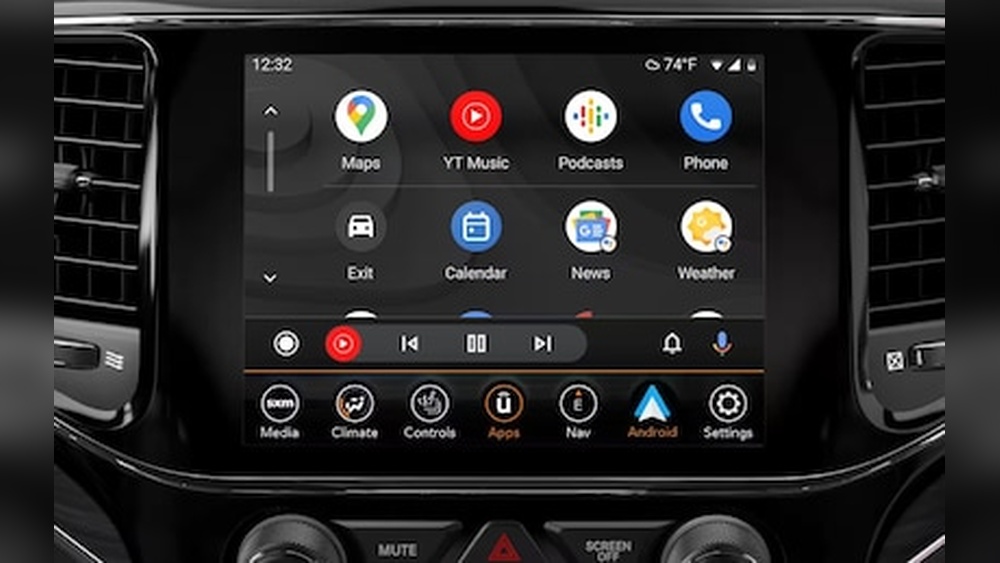
- The infotainment screen should now show the Android Auto interface.
- Initial Setup on Infotainment Screen
- Accept all prompts on the Jeep’s screen (location access, safety agreements).
- Choose Android Auto as the preferred mode if prompted.
- Using Android Auto Features
- Access Google Maps, Spotify, WhatsApp, and other apps directly.
- Use voice commands with the steering wheel button.
- Some features, like texting, require voice for safety.
- Wireless Android Auto (If Supported)
- If your Compass supports wireless, disconnect the USB cable.
- Pair your phone via Bluetooth and Wi-Fi.
- Follow the on-screen instructions to finish pairing.
Common Setup Problems And Solutions
Many users face issues during setup. Here are solutions to the most frequent problems:
- Android Auto not showing: Update your phone and infotainment system. Try a different USB cable.
- Apps not appearing: Check app permissions on your phone.
- Connection drops: Use a short, high-quality USB cable. Avoid cheap cables.
Key Features: Android Auto Vs Jeep Compass Uconnect
Here’s a comparison of Android Auto and Uconnect features in Jeep Compass:
| Feature | Android Auto | Uconnect System |
|---|---|---|
| Navigation | Google Maps, Waze | Built-in GPS |
| Music Streaming | Spotify, YouTube Music | FM/AM Radio, Bluetooth |
| Voice Control | Google Assistant | Siri/Voice Commands |
| Messaging | WhatsApp, SMS | SMS Only |
| App Integration | Third-party apps | Limited apps |
Android Auto brings more flexibility, especially for navigation and messaging.
Useful Tips For Reliable Connection
- Use the original USB cable for best results.
- Keep your phone’s battery above 20% before connecting.
- Don’t use phone power-saving mode, as it may limit Android Auto features.
- If using wireless, keep your phone close to the infotainment system.
Jeep Compass Android Auto Compatibility By Year
Here’s a quick reference for Android Auto support in Jeep Compass:
| Year | Android Auto Support | Wireless Option |
|---|---|---|
| 2017 | No | No |
| 2018 | Yes | No |
| 2019–2020 | Yes | No |
| 2021+ | Yes | Some trims |
Check your owner’s manual for exact features in your trim.

Safety And Privacy: What You Need To Know
When using Android Auto, your phone’s data and location are shared between the phone and the vehicle. Always:
- Log out or disconnect before handing your car to someone else.
- Set privacy settings in Android Auto app.
- Avoid reading messages while driving—use voice commands.
Surprising Insights
Many beginners forget that app permissions on their phone can block Android Auto from showing apps like Maps or WhatsApp. Always allow location, contacts, and messages for smooth experience.
Another mistake is ignoring the USB port type. Some ports in Jeep Compass are only for charging, not data. Use the port labeled with a phone or media icon.

Troubleshooting: Quick Solutions
If Android Auto stops working:
- Restart your phone and the Jeep’s infotainment system.
- Try another USB cable.
- Clear cache in Android Auto app (Settings > Apps > Android Auto > Storage > Clear Cache).
- Update both phone and car software.
If issues persist, check Jeep’s official support site or your dealer.
Frequently Asked Questions
How Do I Know If My Jeep Compass Supports Android Auto?
Most Jeep Compass models from 2018 onward support Android Auto. Check your infotainment screen for the Android Auto icon, or refer to the owner’s manual.
Can I Use Android Auto Wirelessly In My Jeep Compass?
Wireless Android Auto is available only on some newer trims (2021 and up). You need both Bluetooth and Wi-Fi enabled, and your phone must support wireless Android Auto.
Why Does Android Auto Keep Disconnecting In My Compass?
Frequent disconnections are usually caused by a faulty USB cable, low phone battery, or software bugs. Try using an original cable and update all software.
Android Auto uses Google Maps and Waze, which are updated frequently and show real-time traffic. Uconnect’s built-in GPS is reliable but less flexible.
Where Can I Find Official Help For Android Auto In Jeep Compass?
For official information and troubleshooting, visit the Jeep Uconnect website.
Connecting Android Auto to your Jeep Compass makes every drive smarter and safer. With the right cable, updated software, and proper permissions, you’ll enjoy hands-free access to navigation, music, and messaging. If you face issues, remember that most problems are solved with simple checks—so don’t hesitate to try again and explore all the features Android Auto offers.