If your Jeep Cherokee Bluetooth isn’t connecting or pairing with your phone, you’re not alone. Many drivers face issues like dropped connections, failed pairings, or devices not showing up at all. Bluetooth problems can be frustrating, especially when you rely on hands-free calls or streaming music. The good news? Resetting your Cherokee’s Bluetooth is a straightforward process, and it solves most common problems quickly. This guide explains each step in clear, simple language, so you can fix your Bluetooth and get back on the road.
Common Reasons Bluetooth Stops Working
Bluetooth issues in the Jeep Cherokee usually happen because of:
- Software glitches in the Uconnect system
- Outdated phone or car software
- Too many paired devices in the system
- Incorrect settings on your phone or vehicle
Many drivers don’t realize that even small updates or changes, like a new phone or app, can cause Bluetooth failures. Also, pairing too many devices can overload your system. Understanding these causes helps you fix problems faster.
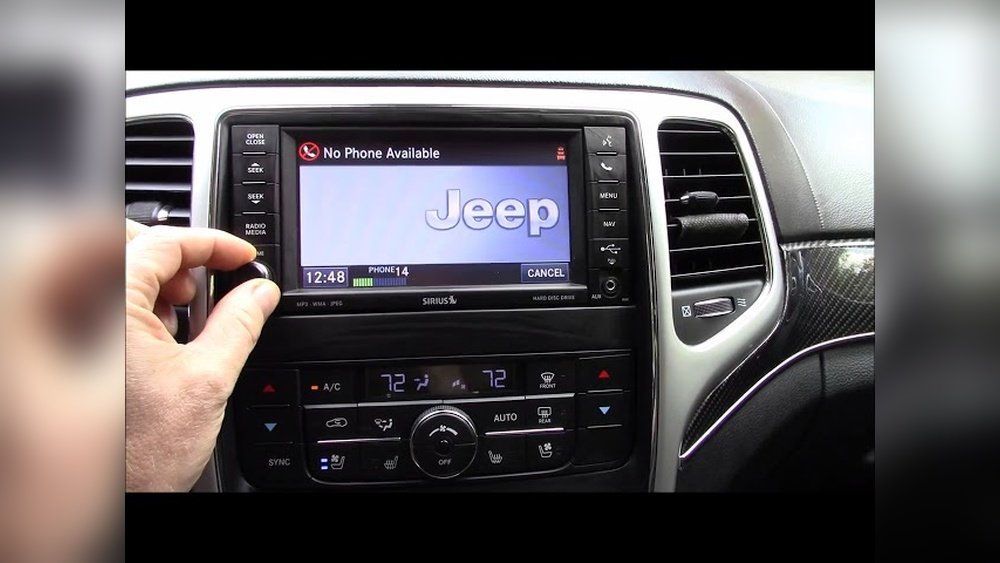
Step-by-step: How To Reset Jeep Cherokee Bluetooth
You don’t need special tools or deep tech knowledge. Just follow these steps:
1. Remove All Paired Devices
Begin by deleting all devices from your Uconnect system:
- Press the “Phone” or “Settings” button on your Jeep’s touchscreen.
- Select “Bluetooth” or “Paired Devices.”
- Tap each device and choose “Delete” or “Remove.”
- Confirm removal.
This clears old connections and prevents conflicts. Many beginners only delete their phone, but it’s better to remove all devices.
2. Restart The Uconnect System
A simple restart can fix hidden software bugs.
- Turn your Jeep off completely.
- Wait at least 60 seconds.
- Restart your vehicle.
Some users skip this step, but it’s important. Waiting lets the system reset fully.
3. Reset Bluetooth On Your Phone
Now, reset Bluetooth settings on your smartphone:
- Turn Bluetooth off and on.
- For Android, go to Settings > Bluetooth > “Forget” your Jeep.
- For iPhone, tap the “i” next to your Jeep and “Forget This Device.”
- Restart your phone.
Pairing works best when both devices are reset.
4. Pair Your Phone Again
Once both systems are reset:
- Enable Bluetooth on your phone.
- On your Jeep’s Uconnect screen, select “Add Device.”
- Choose your phone from the list.
- Enter the pairing code shown on the screen, if needed.
- Confirm connection on both devices.
After pairing, test by making a call or playing music.
5. Update Software If Needed
If problems continue, check for software updates:
- On your phone, update to the latest version.
- On your Jeep, visit the Uconnect website or dealership for system updates.
Updated software fixes bugs and improves compatibility.
Cherokee Bluetooth Features Compared
Different Jeep Cherokee models offer unique Bluetooth functions. Here’s a quick comparison:
| Model Year | Bluetooth Version | Hands-Free Calling | Audio Streaming | Voice Control |
|---|---|---|---|---|
| 2014–2016 | Bluetooth 4.0 | Yes | Yes | Limited |
| 2017–2019 | Bluetooth 4.2 | Yes | Yes | Improved |
| 2020–2024 | Bluetooth 5.0 | Yes | Yes | Advanced |
Newer Cherokees have better range and faster pairing. If you drive an older model, you may notice slower connections.
Quick Troubleshooting Tips
Some Bluetooth issues aren’t fixed by a reset. Try these:
- Move your phone closer to the touchscreen.
- Turn off Wi-Fi and other wireless devices nearby.
- Remove phone cases that block signals.
- Make sure your phone’s contacts are synced for hands-free calls.
These small adjustments often make a big difference.
When To Visit The Dealership
If your Bluetooth still won’t reset after all steps, the problem may be deeper:
- Faulty Bluetooth module
- Corrupted Uconnect system
- Electrical issues
Dealership technicians have tools to diagnose and repair these problems. It’s rare, but sometimes hardware needs replacement.
Bluetooth Troubles: Statistics And Insights
According to a 2023 survey by AAA, 27% of drivers report Bluetooth problems in their vehicles each year. The Jeep Cherokee ranks among the top 10 models for Bluetooth complaints, mostly due to software bugs in the Uconnect system.
| Issue | Percentage of Drivers | Resolution Success |
|---|---|---|
| Connection Failure | 15% | 80% |
| Audio Dropout | 8% | 75% |
| Pairing Problems | 4% | 85% |
Most issues are solved with a simple reset, but some need extra steps.
Best Practices To Keep Bluetooth Working
To avoid future problems, follow these tips:
- Keep your phone and Uconnect software updated.
- Limit paired devices to 3–4.
- Pair your phone with the engine running, not just ignition on.
- Don’t use Bluetooth while charging your phone wirelessly.
Many users overlook the importance of software updates. Regular updates prevent most bugs.
Frequently Asked Questions
How Often Should I Reset My Jeep Cherokee Bluetooth?
Reset only when you notice connection problems. Regular resets are not necessary unless you switch phones often.
Does Resetting Bluetooth Delete Contacts Or Messages?
No, resetting Bluetooth only removes paired devices. Your contacts and messages stay safe.
Can I Pair More Than One Phone With My Jeep Cherokee?
Yes, you can pair multiple phones. However, only one can be active for calls or audio at a time. Too many devices can cause conflicts.
Is There A Way To Reset Bluetooth Without Deleting All Devices?
For Jeep Cherokee, a full reset usually requires removing all devices. Some models allow a “soft reset,” but it’s less effective.
Where Can I Find Official Jeep Cherokee Bluetooth Instructions?
You can visit the official Jeep website or check your owner’s manual. For detailed guides, see Jeep Uconnect.
Resetting your Jeep Cherokee Bluetooth is easy when you follow these steps. Most issues are fixed in minutes, and you don’t need advanced skills or tools. If problems continue after a reset, a dealership can help. With a little care, your Bluetooth will stay reliable for hands-free calls, music, and navigation.