If you own a Jeep, you might know how important it is to have control over your vehicle’s settings. The Flashcal is a popular tool that helps Jeep owners adjust things like tire size, gear ratio, and TPMS (tire pressure monitoring system). If you’ve upgraded your tires or made other changes, using Flashcal can help your Jeep’s systems work correctly and show accurate information. Let’s explore how to use Flashcal for Jeep vehicles step by step, so you can get the most out of your ride.
What Is Flashcal And Why Do Jeep Owners Use It?
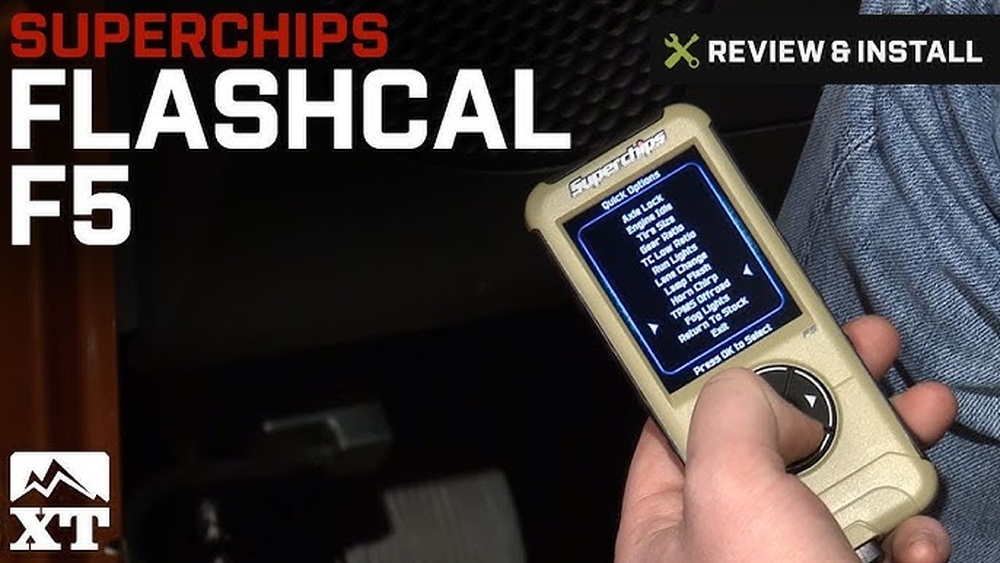
The Flashcal is a handheld programmer made by Superchips. It allows you to adjust your Jeep’s computer settings without visiting a dealership or a mechanic. Many Jeep owners use it after making upgrades, such as installing larger tires or changing the axle ratio.
Here are some benefits of using Flashcal:
- Corrects speedometer when tire size changes
- Adjusts gear ratio to match modifications
- Disables or adjusts TPMS warnings
- Reads and clears trouble codes
- Enables features like daytime running lights
These adjustments make sure your Jeep’s performance and dashboard info stay accurate after modifications.
Getting Started: What You Need
Before you start, make sure you have:
- The Flashcal device for your Jeep model (JL, JK, Gladiator, etc.)
- The OBD-II port location (usually under the dashboard)
- A list of your Jeep’s current modifications (tire size, gear ratio, etc.)
- A fully charged battery (never program with low battery)
If your Flashcal is not updated, connect it to your computer and use Superchips’ software to get the latest version. This avoids software errors and ensures compatibility with your Jeep.

How To Use Flashcal For Jeep: Step-by-step
Using Flashcal is simple if you follow these steps:
- Turn your Jeep’s ignition to the ON position (do not start the engine).
- Plug the Flashcal into the OBD-II port.
- Wait for the device to power up and select your Jeep model/year from the menu.
- Choose the function you want (e.g., tire size, gear ratio, TPMS).
- Enter the new value (for example, your new tire diameter in inches).
- Follow on-screen prompts to confirm and apply the changes.
- After programming, unplug the device and turn off the ignition for 10-15 seconds.
It’s important to only change one setting at a time. If you try to adjust multiple things at once, you may trigger an error.
Here’s a quick comparison of what you can adjust:
| Feature | Default Setting | Flashcal Adjustment |
|---|---|---|
| Tire Size | Stock (e.g., 32″) | Up to 42″ |
| Gear Ratio | Factory (e.g., 3.21) | 2.73 – 5.38 |
| TPMS Warning | Factory threshold | Adjustable/Off |
Practical Examples: Common Flashcal Uses
Flashcal is most useful when you’ve changed your Jeep’s wheels or tires. If you put on larger tires, your speedometer will read lower than your actual speed. Flashcal can fix this in minutes.
Example 1: Adjusting for Larger Tires
Say you upgrade to 35-inch tires. The speedometer now shows 55 mph when you’re actually going 60 mph. By using Flashcal, you enter the new tire size, and the speedometer recalibrates to match your real speed.
Example 2: Changing Gear Ratio
If you change your Jeep’s axles to a lower ratio (for better off-road performance), your transmission shift points may feel off. Flashcal lets you set the new ratio, so your Jeep shifts smoothly.
Example 3: Turning Off TPMS Warning
Some Jeep owners with off-road tires prefer low air pressure. Flashcal allows you to lower or turn off the TPMS light, so it doesn’t bother you on the trail.

Key Tips For Best Results
- Always update the Flashcal software before use.
- Write down your factory settings in case you need to revert.
- Make only one change at a time and test your Jeep after.
- If you get an error, turn off the ignition, wait, and restart the process.
- Avoid programming in extreme temperatures—electronics can behave unpredictably.
Here’s a quick look at some do’s and don’ts:
| Do | Don’t |
|---|---|
| Use with a charged battery | Program with low battery |
| Update firmware regularly | Skip software updates |
| Change one setting at a time | Adjust multiple settings at once |
Non-obvious Insights Beginners Miss
- Backup Factory Settings: Many new users forget to record their original settings. If you ever want to sell your Jeep or undo changes, you’ll need these numbers.
- Device Locking: Once you use Flashcal on your Jeep, it often locks to that vehicle’s VIN number. This means you can’t use it on another Jeep until you return all settings to stock and unlock the device.
These small details can save you headaches down the road.

Troubleshooting Common Problems
Sometimes things don’t go as planned. Here’s what to do if you run into trouble:
- Device won’t turn on: Check your OBD-II port and ensure your battery is good.
- Error message: Turn off the ignition, unplug Flashcal, wait 30 seconds, and try again.
- Settings not saving: Make sure you’re following the prompts and waiting for the device to finish.
If you need more help, the Superchips website has a detailed user guide and support forum: Superchips Official Site.
Frequently Asked Questions
How Do I Find The Obd-ii Port On My Jeep?
The OBD-II port is usually under the dashboard, near the driver’s left knee. It’s a small, rectangular plug.
Will Flashcal Void My Jeep’s Warranty?
Most of the time, adjusting simple settings like tire size does not void your warranty. However, always check your warranty terms before making changes.
Can I Use Flashcal After Other Jeep Modifications?
Yes, you can use Flashcal after installing lift kits, tires, or gears. Just make sure to update the settings to match your changes.
What Happens If I Enter The Wrong Tire Size?
If you enter the wrong size, your speedometer and odometer will be inaccurate. You can always reprogram with the correct value.
Is It Safe To Leave Flashcal Plugged In?
No, after programming, unplug the device. Leaving it connected can drain your battery and is not necessary.
With the right steps, Flashcal helps your Jeep run smoothly after modifications. Just follow the instructions, take your time, and enjoy the improved driving experience.