If you own a Jeep Renegade, you know how important it is to keep your dashboard time accurate. Whether you’ve crossed into a new time zone, switched to daylight saving, or replaced your vehicle battery, the clock may need resetting. An incorrect time can be annoying and, in some cases, confusing—especially if you rely on your car’s clock for daily routines. Fortunately, changing the time on a Jeep Renegade is simple if you follow the right steps. This guide will help you adjust the clock correctly, avoid common mistakes, and understand some unique details about your Jeep’s infotainment system.
Understanding Your Jeep Renegade’s Clock System
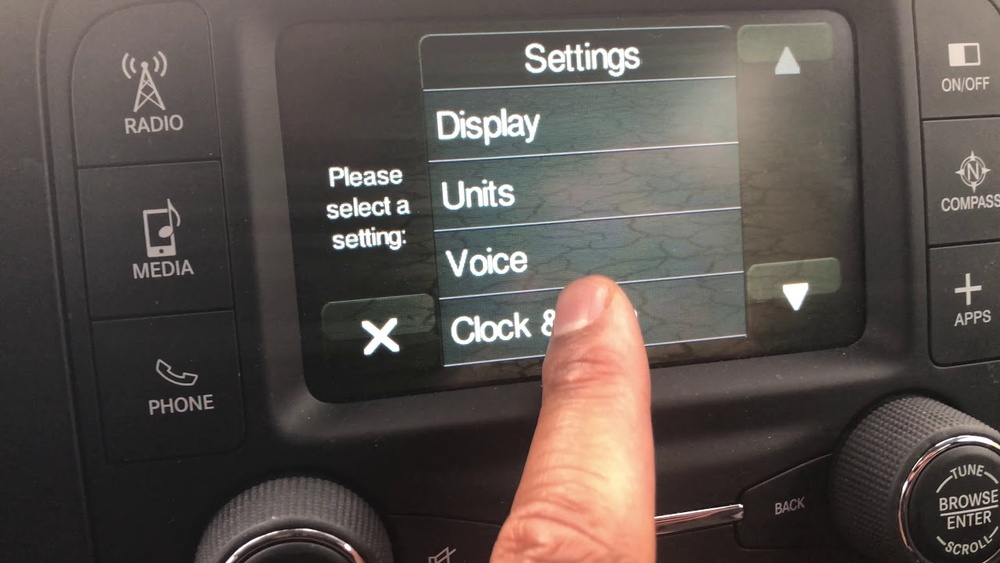
Most Jeep Renegade models (2015 and newer) use the Uconnect infotainment system. This system manages many car functions, including audio, navigation, Bluetooth, and the clock. However, the steps to change the time may vary a little depending on your model year and whether you have the 5-inch, 7-inch, or 8.4-inch touchscreen.
Here’s a quick comparison of common clock settings features in different Jeep Renegade models:
| Model Year | Infotainment System | Auto Time Sync | Manual Time Set |
|---|---|---|---|
| 2015-2017 | Uconnect 5.0 | No | Yes |
| 2018-2021 | Uconnect 7.0/8.4 | Yes | Yes |
| 2022+ | Uconnect 4C/5 | Yes | Yes |
If your Jeep supports automatic time sync (using GPS or your phone’s connection), the clock might update itself, but manual setting is still possible and sometimes necessary.
Step-by-step: How To Change Time On Jeep Renegade
Adjusting the clock takes only a few minutes. Here’s how to do it, focusing on the most common systems.
For Uconnect Touchscreen Models (most 2018+ Renegades)
- Start your Jeep and make sure the infotainment screen is on.
- Tap the “Settings” icon (it looks like a gear).
- Scroll down and select “Clock & Date”.
- If “Set Time Automatically” is enabled, disable it to allow manual changes.
- Tap “Set Time”. Use the plus and minus symbols to adjust the hour and minutes.
- Choose AM/PM if needed.
- Confirm your changes and exit.
- Turn the ignition to the “on” position.
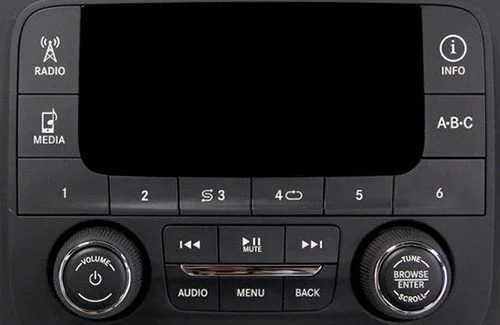
- Locate the Menu/Settings button (usually on the dashboard or near the radio).
- Press Menu until you see “Clock” or “Time” on the display.
- Use the Up/Down buttons to adjust hours and minutes.
- Press Menu or OK to save.
For Models With Automatic Time Sync
- If your clock is incorrect despite auto-sync, check your system’s time zone and daylight saving settings.
- You can usually find these in the same Clock & Date menu.
Quick Reference
This summary shows the main methods based on system type:
| System Type | Main Steps |
|---|---|
| Touchscreen | Settings > Clock & Date > Set Time |
| Button | Menu > Clock > Adjust with Up/Down |
| Auto Sync | Settings > Clock & Date > Set Time Automatically |
Common Issues And Troubleshooting
Changing the time is usually smooth, but here are problems some owners face:
- Time keeps resetting: This can happen if your Jeep’s battery is weak or has been disconnected. Sometimes, the system needs a few minutes to sync again.
- AM/PM confusion: The 12-hour format is not always obvious. Make sure you check if the system is set to 24-hour (military) time or 12-hour.
- Touchscreen not responding: Occasionally, the Uconnect system may freeze. Restarting the car or performing a soft reset can help.
If your system does not save the new time, check your owner’s manual or contact your local Jeep dealer for software updates.
Practical Tips For Accurate Time Setting
- Update After Daylight Saving: Remember to check your clock after daylight saving changes, as some systems don’t adjust automatically.
- Sync With Phone: If your Jeep supports it, pair your smartphone via Bluetooth to help auto-sync the time.
- Check Time Zone: If you travel across regions, your Jeep may not update the time zone automatically. Adjust it in the settings.
- Battery Issues: If your clock resets often, have your battery checked. Low voltage can cause system reboots.
Beginners often miss that the system might require the car to be in Park for changes. Also, after setting the time, give the system a moment—some models take a few seconds to save changes.
Why Keeping The Correct Time Matters
An accurate clock isn’t just about convenience. It can also affect scheduled maintenance reminders, some navigation features, and even Bluetooth call logs. For example, if your Jeep’s clock is off by even a few minutes, your scheduled alerts for oil changes or tire rotations could be incorrect.
Here’s a look at how time accuracy impacts different Renegade features:
| Feature | Effect of Incorrect Time |
|---|---|
| Navigation ETA | May display wrong arrival time |
| Service Reminders | Alerts may come too early/late |
| Bluetooth Calls | Call logs may be out of order |
When To Seek Professional Help
Most owners can change the clock themselves, but sometimes you may need professional help. If you can’t access the clock settings, your system freezes, or your clock resets after every restart, it may be a software or hardware issue. In these cases, visit your Jeep dealer or a trusted mechanic. They can check for Uconnect updates or battery faults.
For more details, the official Jeep website offers updated information and manuals—see Jeep Support.

Frequently Asked Questions
Why Does My Jeep Renegade Clock Keep Changing By Itself?
If your Renegade’s clock changes on its own, automatic time sync might be enabled. The system may update the time using GPS or your phone’s connection. If the time is always wrong, check the time zone or disable auto-sync.
Can I Change The Time While Driving?
No. For safety, most Uconnect systems only allow clock changes while parked. Always stop your vehicle before adjusting any settings.
My Touchscreen Is Frozen—how Can I Fix The Clock?
If your touchscreen is unresponsive, try restarting your Jeep. If that fails, perform a soft reset by pressing and holding the volume and tuner knobs for about 10 seconds. This usually reboots the system.
What If My Renegade Doesn’t Have A Touchscreen?
If your model uses buttons, follow the steps for early models: use the Menu and Up/Down buttons near the radio to adjust the time.
Does The Jeep Renegade Adjust For Daylight Saving Time?
Some newer models with auto-sync features will adjust for daylight saving automatically. If yours does not, you’ll need to update the clock manually when the time changes.
Setting the right time on your Jeep Renegade is a quick job that makes your drives smoother and ensures all your car systems work as they should. With these tips, you’ll never be late because of your dashboard clock again.