Connecting your Jeep Cherokee to your garage door can make life easier. You won’t need to carry remote controls or get out of your car to open the door. Many Jeep Cherokee models come with HomeLink, a built-in system for linking your vehicle to garage doors, gates, and other home devices. This guide will walk you through the steps, explain common mistakes, and show how to get the most from your Jeep’s smart features. Even if you’re new to this process, you’ll find clear instructions and tips to make setup quick and smooth.
Understanding Homelink In Jeep Cherokee
HomeLink is a wireless control system found in many modern vehicles, including the Jeep Cherokee. It allows you to operate your garage door opener from inside your car. The buttons are usually located on the overhead console or in the sun visor.
Key HomeLink features:
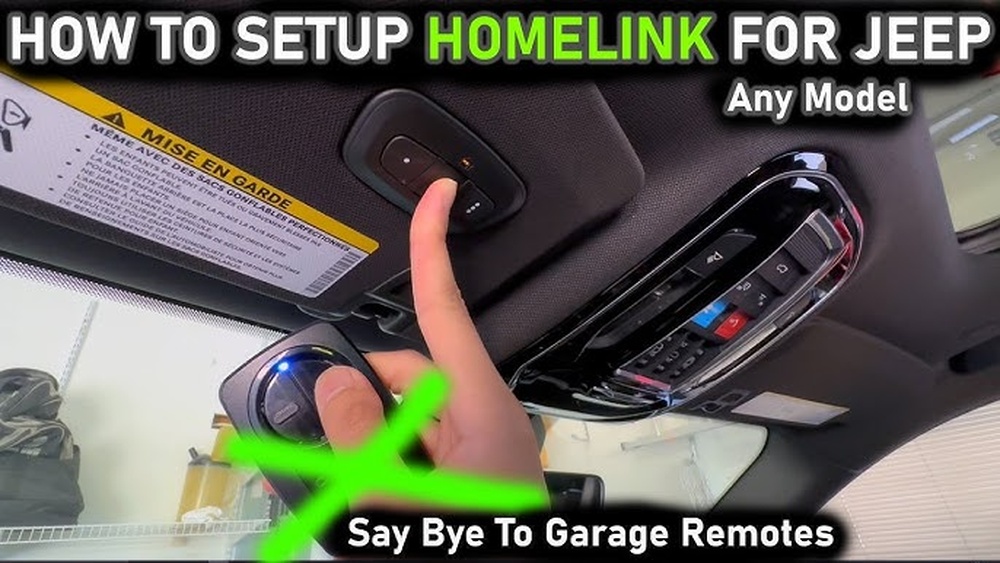
- Can control up to three devices (garage doors, gates, lights).
- Works with most garage door brands.
- Stores your device codes securely.
If you have an older Jeep Cherokee or a model without HomeLink, you’ll need a portable remote instead. But for most 2014 and newer Cherokees, HomeLink comes standard.
Preparing For Setup
Before you start, check these points:
- Garage door opener compatibility: Most brands are compatible, but some newer models use “rolling code” technology. Check your opener’s manual or label for the type.
- Jeep Cherokee model: Find your HomeLink buttons, usually marked with a house icon.
- Original remote control: You’ll need this to “teach” your Jeep the code.
- Garage door opener power: Make sure the opener and remote both have working batteries.
Here’s a quick comparison of common garage door opener types:
| Type | Compatibility | Programming Difficulty |
|---|---|---|
| Fixed Code | High | Easy |
| Rolling Code | Medium | Moderate |
| Smart WiFi | Low (needs bridge) | Advanced |
If your opener uses rolling code, the process will include an extra step called “training” with the opener.
Step-by-step: Connecting Jeep Cherokee To Garage Door
- Clear Previous HomeLink Settings
- Hold the two outer HomeLink buttons (usually 1 and 3) for about 20 seconds.
- Release when the indicator light starts blinking.
- This wipes old codes, avoiding conflicts.
- Position Your Remote
- Hold your garage door remote 1–3 inches from the HomeLink buttons.
- Make sure the remote is working and the batteries are fresh.
- Press and Hold the HomeLink Button
- Pick the button you want to use (1, 2, or 3).
- Press and hold the chosen HomeLink button and the remote button at the same time.
- Wait until the indicator light changes from slow to fast blinking (usually 30 seconds).
- Test the Programming
- Release both buttons.
- Press the HomeLink button you programmed. If your garage door moves, setup is complete for fixed code openers.
- Extra Step for Rolling Code Openers
- Go to your garage door opener unit (usually in the garage ceiling).
- Press the “learn” or “smart” button on the opener (you may need a ladder).
- Within 30 seconds, return to your Jeep and press the HomeLink button for two seconds.
- Repeat pressing the button up to three times to complete programming.
This table shows the main steps and how long each usually takes:
| Step | Time Needed | Difficulty |
|---|---|---|
| Clear codes | 20 seconds | Easy |
| Remote positioning | 1 minute | Easy |
| Button programming | 30 seconds | Easy |
| Rolling code training | 2–3 minutes | Moderate |
Common Mistakes And Troubleshooting
Many people struggle with these issues:
- Dead batteries: Always check the batteries in your remote before starting.
- Wrong button pressed: Make sure you press the correct HomeLink button and remote button together.
- Distance problems: Keep the remote close, but not touching the HomeLink panel.
- Rolling code confusion: For rolling code openers, you must press the “learn” button on the opener, not just the remote.
If your Jeep Cherokee won’t connect, try resetting HomeLink and starting over. If your garage door opener is very new (WiFi-enabled), you may need an adapter or bridge device.
Practical Tips For A Smooth Setup
- Park close to your garage door during programming. Some signals work better with less distance.
- If you have multiple garage doors, label each HomeLink button for easy remembering.
- Don’t rush the process. Sometimes, the timing for rolling code openers is tight—have someone help if possible.
- After setup, test the system several times to make sure it works from different spots in your driveway.
A little-known tip: Some garage door openers “lock out” new codes if you press the learn button too often. If your opener stops responding, unplug it for 30 seconds and try again.
Security And Safety Considerations
Your Jeep Cherokee’s HomeLink is secure, but you should take a few precautions:
- Only program HomeLink when you’re at home and safe.
- Don’t leave your vehicle unlocked with HomeLink programmed—someone could use it to access your garage.
- If you sell your Jeep, clear the HomeLink codes before handing it over.
Statistics from HomeLink show over 90% of US homes with garage doors can use this system. For extra safety, consider changing your garage door opener code every few years.
When To Seek Professional Help
If you try several times and your garage door opener doesn’t connect, it might be time to call a professional. Some newer opener brands require special steps or extra hardware. You can find certified HomeLink technicians through your Jeep dealer or garage door manufacturer.
For official guidance, visit the HomeLink programming site.
Frequently Asked Questions
How Do I Know If My Jeep Cherokee Has Homelink?
Most Jeep Cherokees from 2014 onward have HomeLink, usually on the overhead console or sun visor. Look for three buttons with a house symbol.
Can Homelink Control More Than One Garage Door?
Yes, you can program up to three different devices. Each button can be linked to a separate garage door or gate.
What If My Garage Door Opener Uses Rolling Code Technology?
You must press the “learn” button on the opener unit and then the HomeLink button within 30 seconds. This extra step helps keep your system secure.
Will Homelink Work With Wifi-enabled Garage Door Openers?
Some smart openers need a bridge or adapter. Check your opener’s manual or contact the manufacturer if your Jeep can’t connect directly.
How Do I Erase Homelink Codes Before Selling My Jeep?
Hold the two outer HomeLink buttons for 20 seconds until the indicator light blinks. This clears all programmed codes and keeps your home safe.
Connecting your Jeep Cherokee to your garage door is a simple way to add convenience and safety. With careful setup and the right steps, you’ll enjoy hands-free access every day. If you run into trouble, don’t hesitate to get help—sometimes a quick reset or expert advice is all you need.