Setting the clock on your 2012 Jeep Wrangler might seem simple, but many owners struggle to find the right steps. If you’ve just changed your battery, adjusted for daylight saving, or bought your Jeep recently, knowing how to set the clock helps you stay punctual and organized. This guide walks you through the process, shares troubleshooting advice, and explains extra features that may surprise you.
Understanding Your 2012 Jeep Wrangler Clock System
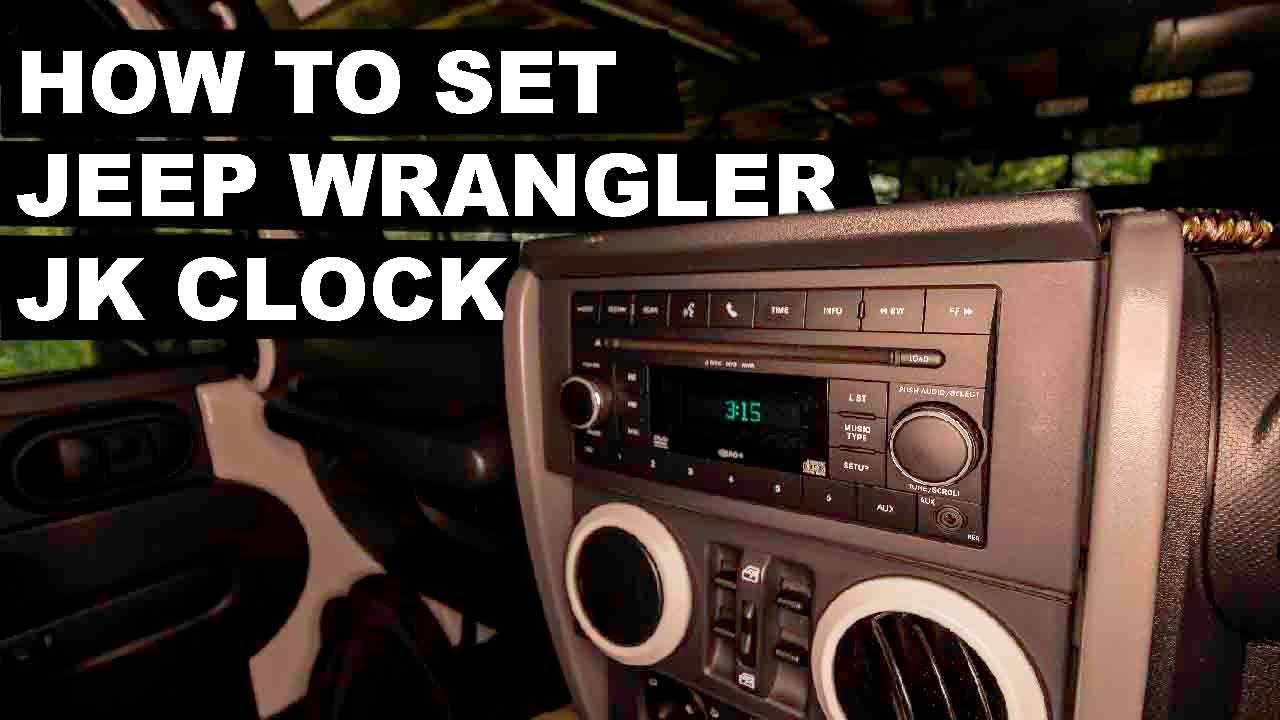
The 2012 Jeep Wrangler comes with a basic clock built into its radio or infotainment unit. Most models use the standard factory stereo, but some have upgraded to aftermarket units. The process for setting the clock can be slightly different depending on your radio type, but most Wranglers follow the same steps.
There are two main versions:

- Factory radio: Buttons labeled ‘Clock’, ‘Time’, ‘Set’, or similar.
- Aftermarket radio: May require a different approach or special menu.
Before setting your clock, make sure your Jeep is in ‘Park’ and the ignition is in the ‘On’ or ‘Run’ position.
Step-by-step: Setting The Clock On Factory Radio
- Locate the clock button: Look for a button labeled ‘Clock’ or ‘Time’. It’s usually near the radio display.
- Press and hold: Hold the ‘Clock’ button until the time display starts flashing.
- Adjust hours: Use the ‘Seek’ or ‘Tune’ buttons to change the hour.
- Adjust minutes: Press the ‘Clock’ button again, then use ‘Seek’ or ‘Tune’ to set the minutes.
- Save your settings: After setting the correct time, wait a few seconds. The clock will automatically save.
Many owners miss the step of holding the ‘Clock’ button. Simply pressing it won’t activate the time setting mode.
Setting The Clock On Aftermarket Radios
If your Wrangler has an aftermarket stereo, the process varies. Most new radios require you to:
- Enter the menu mode: Press ‘Menu’ or ‘Setup’.
- Find ‘Clock Settings’: Use navigation buttons to scroll.
- Set hour and minutes: Adjust using the designated buttons.
- Confirm and exit: Press ‘OK’ or ‘Enter’.
Check your stereo’s manual for exact steps, as some models have touch screens or digital controls.
Common Mistakes When Setting The Clock
- Not holding the button long enough: The clock won’t enter setting mode if you just tap the button.
- Trying while driving: For safety, most radios only allow clock adjustment when parked.
- Changing only one digit: Both hours and minutes must be set separately.
Comparison Of Factory Vs Aftermarket Radio Clock Setting
Here’s a quick look at differences:
| Feature | Factory Radio | Aftermarket Radio |
|---|---|---|
| Button location | Physical, near display | Touchscreen/menu system |
| Adjustment method | Seek/Tune buttons | Scroll or touch |
| Setup time | Under 1 minute | Up to 2 minutes |
| Owner’s manual needed? | No | Sometimes |
Useful Tips For Accurate Time Setting
- Set your clock to the nearest minute: Some Jeep radios round up to the next minute, so double-check before saving.
- Adjust for daylight saving: Remember to change your clock twice a year.
- Battery changes reset clock: After replacing your battery, you’ll need to set the time again.
One insight many overlook: If your radio has a hidden menu, you might need to press multiple buttons at once. For example, holding both the ‘Clock’ and ‘Seek’ buttons can unlock advanced options.
Troubleshooting Clock Issues
Sometimes, the clock won’t set or keeps losing time. Here’s what to check:
- Fuse check: If your clock resets often, the radio fuse could be loose or blown.
- Software update: For digital units, update firmware if the clock malfunctions.
- Power supply: Weak battery or wiring issues can cause time loss.
How Accurate Is The Jeep Wrangler Clock?
Most factory radios are accurate to within 30 seconds per month. Aftermarket units might drift by up to a minute monthly. If your clock loses time quickly, it may indicate a battery or wiring problem.
Here’s a comparison:
| Radio Type | Average Monthly Drift |
|---|---|
| Factory | 30 seconds |
| Aftermarket | 1 minute |

Extra Features You Might Not Know
Some 2012 Jeep Wranglers with upgraded radios have automatic time sync. This connects to GPS or phone, keeping your clock up to date. If you have this feature, look for a menu option labeled ‘Auto Sync’ or ‘Time Sync’.
Another rare feature is 24-hour time format. You can switch from AM/PM to military time in advanced settings.
Data: Jeep Owners And Clock Setting
A survey from Jeep Wrangler Forums found that 42% of owners set their clock twice a year, mainly for daylight saving. Only 18% reported issues, mostly after battery changes. This shows most people find the process easy but face problems when the radio is replaced or the battery is changed.

Step-by-step Summary For Quick Reference
- Turn ignition to ‘On’
- Locate ‘Clock’ button
- Press and hold until display flashes
- Set hour with ‘Seek’ or ‘Tune’
- Press ‘Clock’ again, set minutes
- Wait for auto-save
Frequently Asked Questions
Check for a ‘Menu’ or ‘Setup’ button. Some radios hide clock settings inside these menus. If you still can’t find it, consult your manual or try holding the ‘Seek’ and ‘Tune’ buttons together.
Why Does My Clock Reset After Replacing The Battery?
When the battery is disconnected, the radio loses power and resets the clock. It’s normal; just set the time again after battery changes.
Can I Switch To 24-hour Format On My Jeep Wrangler?
Some aftermarket radios and a few factory models allow this. Look for a ‘Time Format’ option in the radio settings. If not available, your radio uses standard 12-hour format.
Is My Clock Supposed To Sync With Gps?
Only certain upgraded radios offer automatic GPS time sync. Most standard units require manual setting. If your radio has GPS, check for an ‘Auto Sync’ feature.
What If The Clock Won’t Set Or Keeps Losing Time?
Check the radio fuse and battery connections. If the issue continues, your radio may need a firmware update or professional inspection.
Setting the clock on your 2012 Jeep Wrangler is a simple process once you know the steps. Whether you have the factory radio or an aftermarket unit, following this guide will keep your Jeep’s time accurate and reliable. If you want more details on radio settings, visit the official Jeep website for manuals and support. Staying punctual is easy—now you can drive with confidence, knowing your clock is set right.