Replacing the battery in your Jeep Compass key fob is a simple task, but many owners feel unsure about where to start. A dead key fob can leave you locked out, unable to start your car, or struggling with remote features. Luckily, you don’t need special skills or tools. With a little guidance, you can change the battery yourself in minutes. This article will walk you through each step, highlight common mistakes, and answer the questions most Jeep Compass owners have. Whether you drive a newer or older model, you’ll find the information you need to keep your key fob working reliably.
Why Key Fob Battery Matters
The key fob battery powers all remote functions—unlocking doors, starting the engine, and activating the panic alarm. When the battery runs low, you might notice reduced range or delayed response. In some cases, your Jeep Compass won’t recognize the fob at all. According to a survey by AAA, over 25% of drivers have experienced key fob issues due to battery failure. Regular battery replacement helps you avoid unexpected lockouts and keeps your vehicle secure.
Identifying Your Jeep Compass Key Fob
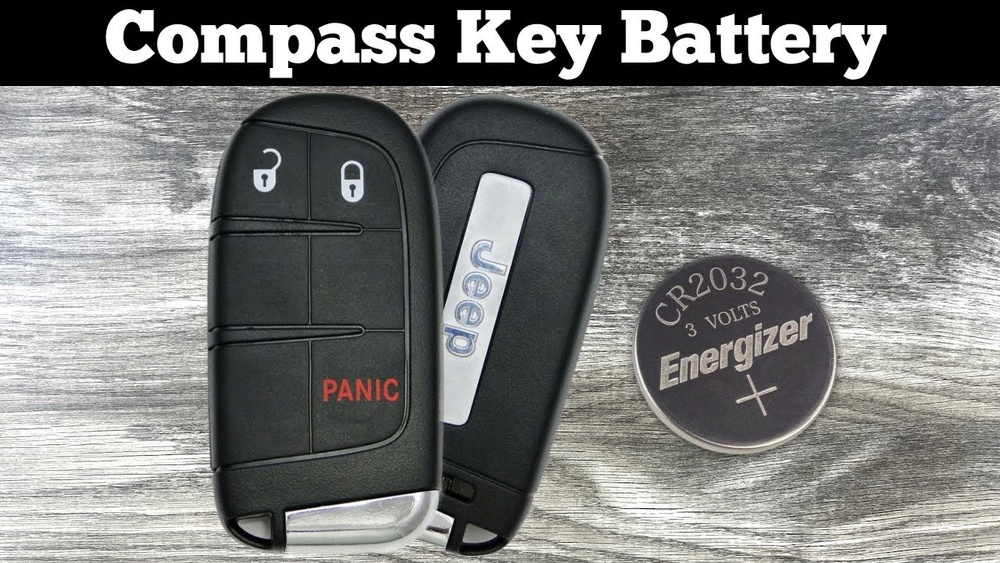
Jeep Compass models use two main types of key fobs:
| Year Range | Key Fob Type | Battery Type |
|---|---|---|
| 2011–2016 | Classic Remote | CR2032 |
| 2017–Present | Smart Key (Push Button Start) | CR2032 |
Both fob types use the CR2032 battery, a coin-cell lithium model found in most electronics stores. Before you start, check the fob shape and buttons to confirm which version you have.

Tools And Materials Needed
To change your Jeep Compass key fob battery, gather the following:
- 1 new CR2032 battery
- Small flathead screwdriver
- Clean cloth (to protect surfaces)
- Optional: Tweezers for battery removal
Avoid using sharp objects like knives, which can damage the plastic shell or internal contacts.
Step-by-step Battery Replacement
Follow these steps for a safe and successful battery swap:
1. Remove The Key Blade
If your fob has a physical key, press the release latch and pull it out. Set it aside.
2. Open The Fob Case
Locate the seam along the fob’s edge. Insert the flathead screwdriver gently, twisting to pop the two halves apart. Work slowly to avoid cracking the plastic.
3. Access The Battery Compartment
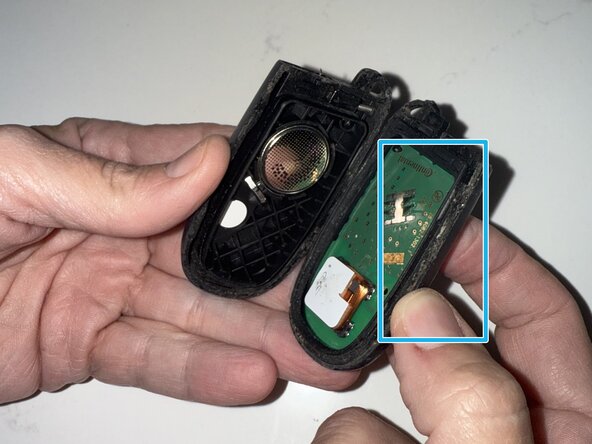
With the fob open, you’ll see the round battery. Note the orientation—usually, the positive (+) side faces up.
4. Remove The Old Battery
Use your fingers or tweezers to lift the battery out. Avoid touching the metal contacts with your tools.
5. Insert The New Battery
Place the new CR2032 battery in the slot, matching the original orientation. Press it down until it sits firmly.
6. Reassemble The Fob
Align the two halves and snap them together. If you removed the key blade, slide it back into place.
7. Test The Fob
Stand near your Jeep Compass and press the unlock button. Check all functions—lock, unlock, trunk, and panic alarm.
If your fob doesn’t respond, double-check the battery placement and contact points.

Common Mistakes And How To Avoid Them
Changing a key fob battery seems easy, but beginners often make mistakes:
| Mistake | Result | Prevention |
|---|---|---|
| Wrong battery type | Fob fails to work | Check battery number before buying |
| Incorrect battery orientation | No power to fob | Match the + side as shown |
| Damaging contacts | Permanent fob failure | Use gentle tools, avoid force |
| Not snapping case fully | Water or dust enters fob | Press edges firmly until closed |
One overlooked tip: If your fob still doesn’t work after replacing the battery, try cleaning the contacts with a dry cloth. Dirt or corrosion can block power.
How Often Should You Change The Key Fob Battery?
Most CR2032 batteries last between 2–3 years under normal use. However, harsh weather, frequent use, or leaving the fob inside the car can drain the battery faster. If you notice the range dropping or need multiple button presses, replace the battery promptly. Keeping a spare CR2032 in your glove compartment is a smart precaution, especially if you rely on push-button start.
Cost Comparison: Diy Vs Dealership
Changing the battery yourself is affordable. Here’s a quick comparison:
| Method | Cost | Time Required |
|---|---|---|
| DIY | $3–$7 (battery only) | 5–10 minutes |
| Dealership | $20–$50 (labor + battery) | 30+ minutes (wait time) |
Unless your fob is damaged or needs reprogramming, DIY replacement is the best option for most Jeep Compass owners.
Practical Tips For Long-lasting Key Fob
- Keep your fob dry. Moisture can cause battery drain and internal damage.
- Avoid dropping the fob, as impact can loosen connections.
- Store the fob away from electronics, which can interfere with signals.
- Test all buttons after changing the battery to ensure full functionality.
Many Jeep Compass drivers overlook the importance of handling the fob gently. Rough treatment can break the plastic clips, making future battery changes difficult.
Frequently Asked Questions
What Battery Does A Jeep Compass Key Fob Use?
The Jeep Compass key fob uses a CR2032 lithium coin cell battery. This battery is common and can be found at most electronics or automotive stores.
How Can I Tell If My Key Fob Battery Is Low?
Common signs include reduced range, delayed button response, or needing multiple presses to unlock your car. Some newer models may display a dashboard warning.
Will Changing The Battery Erase My Fob’s Programming?
No, replacing the battery does not affect programming. Your key fob will retain all original settings and functions after battery replacement.
Can I Use A Different Battery Type?
Always use a CR2032 battery. Using other types may damage the fob or cause it to malfunction. Check the manual or the old battery for confirmation.
Where Can I Find Official Instructions?
The official Jeep owner’s manual has step-by-step guidance. You can also visit Jeep’s website for model-specific instructions and support.
Changing your Jeep Compass key fob battery is a quick and easy way to avoid unexpected car troubles. By following the right steps and tips, you save money, avoid dealership waits, and keep your vehicle secure. With just a few minutes of effort, your key fob will work like new—ready for every drive.