Installing a backup camera on your Jeep Wrangler is a practical upgrade that can improve both safety and convenience. Whether you’re reversing out of tight spots or navigating tricky off-road trails, a clear rear view helps you avoid accidents and obstacles. Many Wrangler models, especially older ones, don’t come with a factory backup camera. Fortunately, adding one yourself is possible with some basic tools and careful planning.
Why Install A Backup Camera On A Jeep Wrangler?
Jeep Wranglers are known for their rugged design and off-road capabilities, but their rear visibility can be limited. The spare tire, high tailgate, and small rear windows make it hard to see what’s behind you. According to the Insurance Institute for Highway Safety, rearview cameras can reduce backup accidents by about 17%. For families, pet owners, and outdoor enthusiasts, this upgrade offers peace of mind.
Choosing The Right Backup Camera
Not all backup cameras are the same. Some are designed specifically for Wranglers, while others are universal. Here’s a quick comparison of common types:
| Camera Type | Installation Difficulty | Display | Estimated Cost |
|---|---|---|---|
| License Plate Frame | Easy | Aftermarket Screen | $40 – $100 |
| Spare Tire Mount | Moderate | Factory or Aftermarket | $80 – $200 |
| Factory Replacement | Hard | Factory Screen | $150 – $400 |
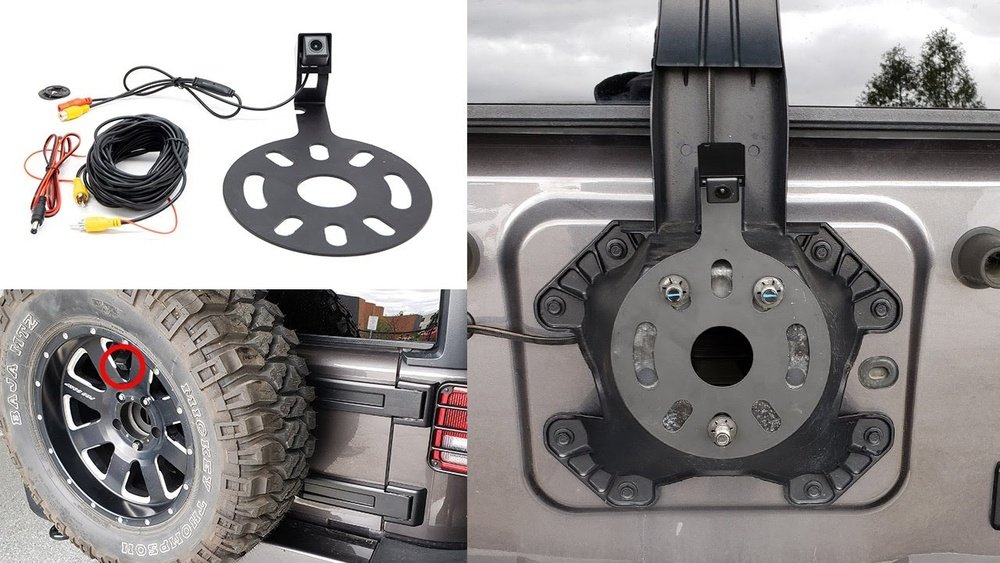
For most Jeep owners, a spare tire mount camera offers the best view and doesn’t require drilling into the body. Make sure the camera you choose is waterproof and supports night vision.
Tools And Materials You’ll Need
Gather these before starting:
- Backup camera kit (compatible with Jeep Wrangler)
- Wiring harness (if not included)
- Screwdriver set
- Wire stripper and crimper
- Electrical tape
- Zip ties
- Test light or multimeter
- Trim removal tool (optional)
Some kits include everything, but double-check so you don’t pause mid-installation.
Step-by-step Installation Guide
Here’s a clear, step-by-step process for installing a spare tire mount backup camera on a Jeep Wrangler.
1. Prepare Your Vehicle
Park your Jeep on a flat surface. Disconnect the negative battery terminal to avoid electrical shorts. Open the rear tailgate and remove the spare tire using the appropriate socket.
2. Mount The Camera
Attach the camera bracket to the spare tire carrier. Most brackets fit behind the wheel, using the existing bolts. Adjust the camera angle to point slightly downward for the best rear view.
3. Run The Camera Wiring
Route the camera’s video and power wires through the tailgate’s rubber grommet. This keeps the installation clean and protects the wires. Use zip ties to secure the wiring along the factory harness, making sure nothing hangs loose.
4. Connect Power And Video
Most backup cameras need power from the reverse light circuit. Use a test light or multimeter to find the correct wire—usually a white or green wire in the tailgate harness.
- Strip and connect the camera’s power wire to the reverse light wire.
- Ground the camera’s ground wire to a clean metal surface.
Run the video cable to the dashboard or the location of your display unit.
5. Install The Display
If your Wrangler has a factory touchscreen, you may need an integration module. For aftermarket displays, mount the screen where it doesn’t block your view. Connect the video cable to the display input.
6. Test The Camera
Reconnect the battery. Shift into reverse—your display should show the camera’s view. Adjust the angle if needed. Check that the image is clear and centered.
7. Reassemble And Secure
Reinstall the spare tire. Double-check that all wires are secured with zip ties and nothing touches moving parts. Replace any panels you removed during wiring.

Common Mistakes To Avoid
Many first-time installers make these errors:
- Skipping the battery disconnect: This can cause electrical shorts or blown fuses.
- Loose wiring: Unsecured wires can catch on moving parts or wear through, causing failures.
- Wrong power source: Connecting to the wrong wire means the camera won’t turn on at the right time.
- Poor camera angle: If the camera points too high or low, you’ll miss important blind spots.
Jeep Wrangler Backup Camera Features Comparison
Here’s a quick overview of what to compare when picking a camera for your Wrangler.
| Feature | Basic Model | Premium Model |
|---|---|---|
| Night Vision | No | Yes |
| Parking Guidelines | No | Yes |
| Waterproof Rating | IP65 | IP68 |
| Wireless Option | No | Yes |
Advanced models may cost more but offer better clarity, durability, and extra features like parking guidelines.

Two Insights Most Beginners Miss
- Factory integration can be tricky. If your Jeep has a factory touchscreen, you might need a special wiring harness or programming tool. This is often missed, leading to frustration during installation.
- Weatherproofing is critical. The Jeep’s rear area is exposed to water and dust. Seal all connections with electrical tape and use waterproof connectors to avoid future problems.
Final Checks And Tips
Before finishing, inspect your work:
- Test the camera in both daylight and at night.
- Make sure all connections are tight and secure.
- Check that the tailgate and spare tire move freely.
If you’re unsure about any wiring, consult the camera’s manual or ask a professional. For more detail on wiring and integration, the Crutchfield guide is a reliable reference.
Adding a backup camera to your Jeep Wrangler is a smart way to boost safety and convenience. With careful planning and patience, you can complete the installation in about two hours and enjoy a much safer driving experience.

Frequently Asked Questions
How Long Does It Take To Install A Backup Camera?
Most DIY installations take 1.5 to 3 hours. It depends on your Jeep’s model year, camera type, and your experience with wiring.
Do I Need To Drill Holes In My Jeep?
Usually, no. Spare tire mount cameras use existing bolts. Only some universal kits require drilling, but most Wrangler-specific kits do not.
Will Adding A Backup Camera Affect My Jeep’s Warranty?
If you use a plug-and-play kit and don’t cut factory wiring, your warranty should be safe. Always check with your dealer before installation.
Can I Install A Wireless Backup Camera?
Yes, wireless cameras are available. They’re easier to install but may have signal delays or lower image quality compared to wired options.
What If My Jeep Already Has A Display Screen?
If your Wrangler has a factory screen, you may need an adapter or programming to display the camera feed. Check your camera kit’s compatibility before buying.