If you’ve just bought or rented a 2024 Jeep Grand Cherokee, you might be surprised by how advanced the lighting system has become. Many drivers expect the usual manual headlight switch, but the new Grand Cherokee uses a mix of digital controls, sensors, and settings. This can make a simple task—like turning off the headlights—feel confusing. Understanding your vehicle’s lighting controls is important for saving battery, staying safe, and avoiding unwanted attention at night. Here’s a clear, step-by-step guide to help you turn off the headlights and manage their features confidently.
Understanding Headlight Controls In The 2024 Jeep Grand Cherokee
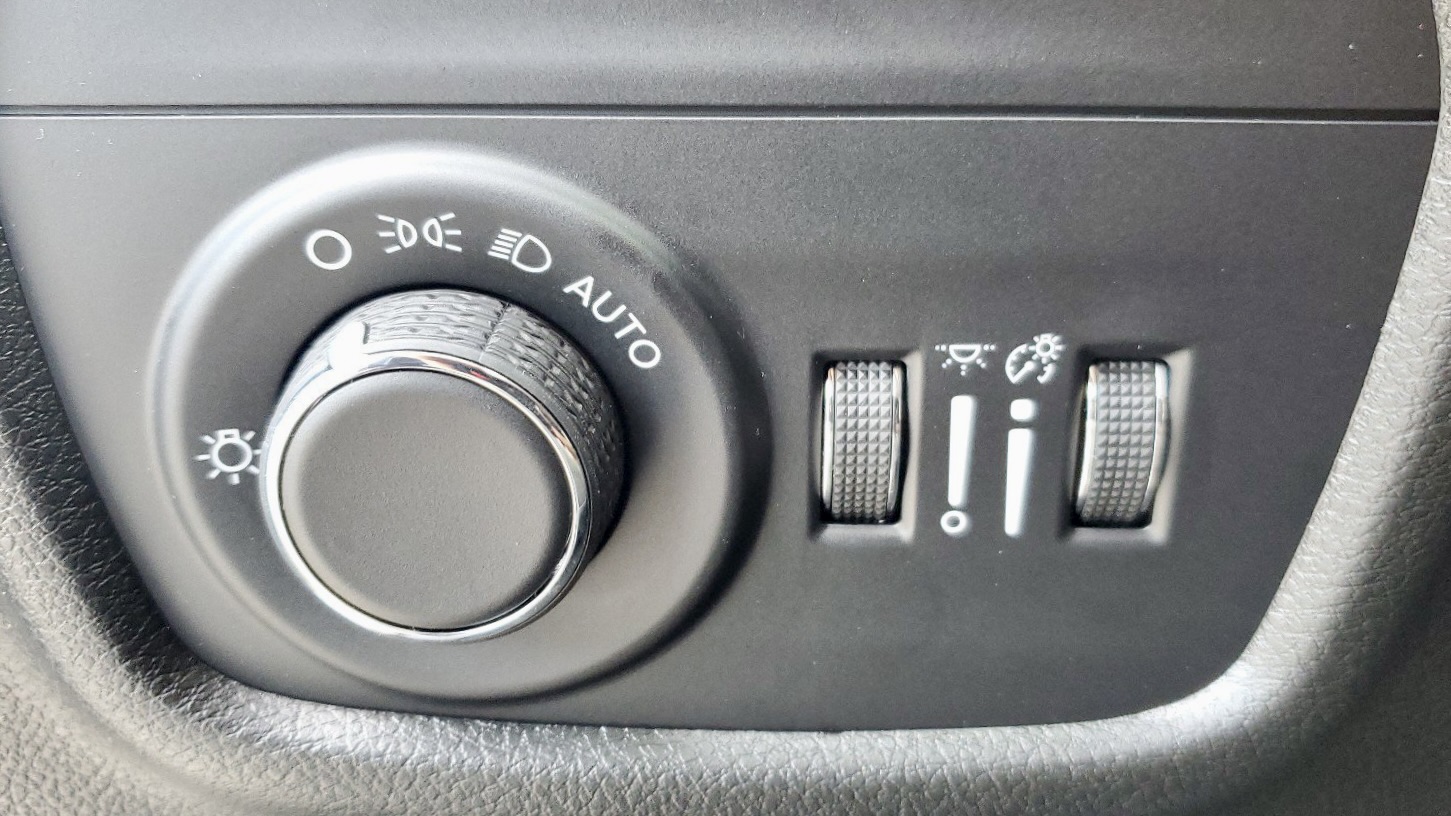
Jeep has moved toward automatic headlight systems in recent models. The traditional knob has evolved into a combination of rotary dials, push buttons, and digital menus. Let’s look at the main control types you’ll find in the 2024 model:
| Control Type | Location | Function |
|---|---|---|
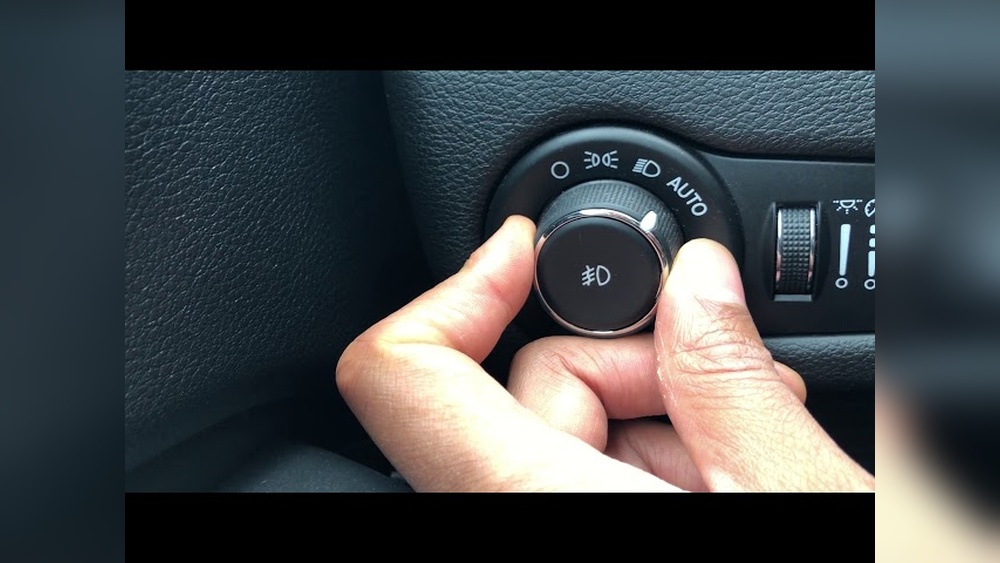
| Rotary Dial | Dashboard (left side) | Manual ON/OFF, parking lights, auto mode |
| Push Button | Near rotary dial | Fog lights, high beams |
| Digital Menu | Touchscreen (Uconnect system) | Advanced settings, timer options |
Not all trims have every feature. For example, entry-level models may lack some advanced digital settings.
How To Turn Off The Headlights: Step-by-step
For most owners, turning off the headlights is done manually or by adjusting auto settings. Here’s how:
- Locate the rotary dial to the left of your steering wheel.
- Turn the dial to the “O” position (marked for “Off”). This should immediately switch off the headlights unless the vehicle is set to “Auto.”
- If the lights stay on, check if Auto mode is active. The “Auto” position uses sensors to control when lights turn on or off. Move the dial from “Auto” to “O.”
- Some trims have a headlight delay. After you park and lock the car, the lights may stay on for 30–90 seconds. This is normal and can be adjusted or disabled in the settings menu.
Special Case: Daytime Running Lights (drl)
Daytime Running Lights are a safety feature and may stay on even after turning the main headlights off. Unfortunately, DRLs are often always-on in U.S. models for safety reasons.
- To turn off DRLs: Go to the Uconnect touchscreen > “Settings” > “Lights” > Uncheck “Daytime Running Lights” if the option appears. Not all trims allow disabling this feature.
Using The Uconnect System For Light Settings
The 2024 Jeep Grand Cherokee uses the Uconnect 5 system for many vehicle settings. Here’s how to access and adjust lighting options:
- Turn on the ignition but keep the engine off (for safety).
- On the touchscreen, press “Vehicle” from the home menu.
- Select “Settings” > “Lights.”
- Here you can find:
- Headlight Off Delay (adjust how long lights stay on after locking)
- Auto High-Beam (enable or disable)
- Daytime Running Lights (if supported)
- Adjust as needed. Changes save automatically.
| Setting | Default | Adjustable? | Location |
|---|---|---|---|
| Headlight Off Delay | 30 seconds | Yes | Uconnect Settings |
| Auto High-Beam | Enabled | Yes | Uconnect Settings |
| Daytime Running Lights | Enabled | Sometimes | Uconnect Settings |
If you cannot find a setting, consult your owner’s manual or contact your dealer. Not all features are available on every trim.
What If The Headlights Won’t Turn Off?
Sometimes, the headlights stay on even after you follow the steps above. This can happen for a few reasons:
- Headlight delay is active; the lights turn off automatically after a short time.
- The car is in Auto mode and senses it’s dark outside.
- DRLs remain on for safety reasons.
- A software glitch is preventing the system from turning off.
If the lights never turn off or you suspect a fault, try restarting the vehicle or a “soft reset” of the Uconnect system. If problems continue, a visit to your dealership may be necessary.
Advanced Tips And Insights
Many owners miss these details:
- Leaving the dial in Auto: If you always leave the dial in “Auto,” your lights will turn on/off as needed—great for convenience but can confuse you if you expect full manual control.
- Battery drain risk: If you turn the headlights on manually and forget, they can drain the battery. The Grand Cherokee has a feature to turn off lights after a period, but it’s best not to rely solely on this.
- Software updates: Jeep sometimes updates the Uconnect system to improve lighting features. Check for updates if you notice strange behavior or missing options.
- Some trims have “Welcome Lighting” that briefly turns on the headlights when you unlock the car in the dark. This is not the same as leaving headlights on.
| Scenario | What Happens | Solution |
|---|---|---|
| Car locked, lights stay on | Headlight delay active | Wait 30-90 sec or adjust delay in settings |
| Lights on during daytime | DRLs active | Disable in settings (if possible) |
| Headlights never turn off | Possible system fault | Restart car, check for updates, visit dealer |
Common Mistakes To Avoid
- Forgetting about Auto mode: Many drivers think they’ve turned off the lights when they’re still in Auto mode.
- Overlooking DRLs: Some owners don’t realize DRLs can’t always be turned off.
- Ignoring the settings menu: Advanced options are often hidden in the Uconnect system, not on the main dashboard.

Frequently Asked Questions
How Do I Know If My Headlights Are Really Off?
Check the light indicator on the dashboard. If the headlight symbol is off, your main headlights are off. For extra assurance, exit the vehicle and check the front.
Can I Disable Automatic Headlights Completely?
No, the 2024 Grand Cherokee does not allow you to fully disable the automatic function for safety reasons, but you can set them to manual mode using the rotary dial.
Why Do My Headlights Stay On After I Park And Lock The Car?
This is likely the headlight off delay feature. You can adjust or disable it in the Uconnect system under “Settings” > “Lights.”
Are Daytime Running Lights Always On?
In most US models, DRLs are always on for safety. Some trims let you turn them off via the Uconnect settings menu.
Where Can I Find More Help If My Headlights Won’t Turn Off?
Your owner’s manual covers all the basics. For in-depth guidance, visit the official Jeep Grand Cherokee page or ask your local Jeep dealer.
Mastering your 2024 Jeep Grand Cherokee’s headlight system takes a little practice, but once you understand the controls, it’s easy to stay in charge and avoid common headaches. Always check your manual if unsure, and use the Uconnect system for extra settings and options.