If your Jeep Grand Cherokee’s Uconnect system starts acting strangely, such as freezing, lagging, or failing to connect with devices, you’re not alone. Many drivers face these issues, especially after software updates or heavy use. Resetting Uconnect can fix most problems and restore smooth operation. But before you reach out to a dealership, you can try a reset yourself. This guide will walk you through the safest methods to reset Uconnect, explain when you should try them, and help you avoid common mistakes.
Why Resetting Uconnect Matters
The Uconnect system controls your navigation, Bluetooth, radio, climate, and more. When it malfunctions, it can make driving stressful or even unsafe. Most issues come from software glitches, memory overload, or failed updates. Resetting can:
- Restore Bluetooth pairing
- Fix navigation errors
- Solve screen freezing or lag
- Clear minor bugs after updates
In most cases, a reset solves the problem without deleting your settings or personal data.
Methods To Reset Jeep Grand Cherokee Uconnect
There are three main ways to reset Uconnect: soft reset, hard reset, and factory reset. Each method suits different situations. Here’s a breakdown:
| Reset Type | Use Case | Data Loss |
|---|---|---|
| Soft Reset | Minor glitches | No |
| Hard Reset | System freezes | No |
| Factory Reset | Persistent issues | Yes (settings erased) |
Soft Reset
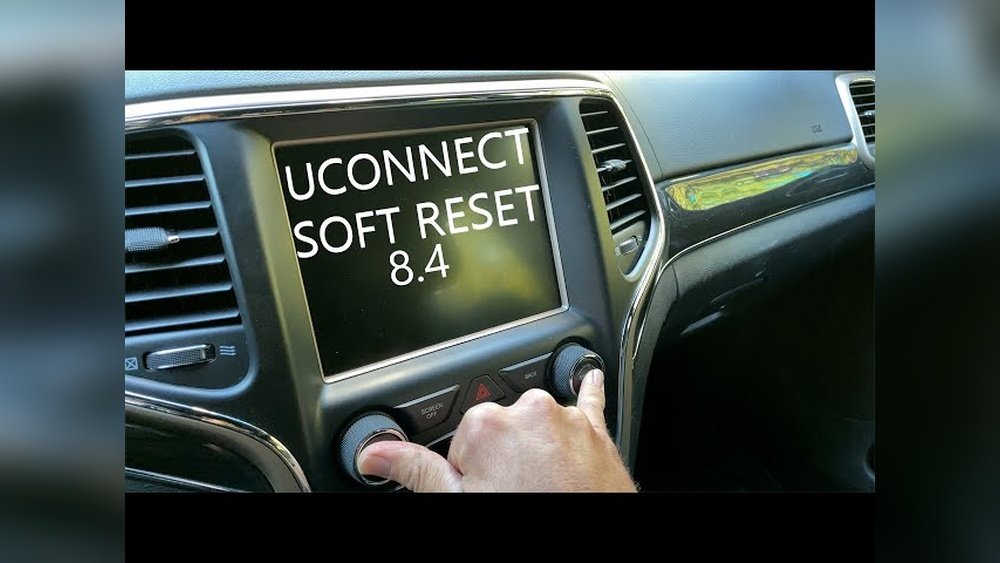
This is the easiest method and is safe for all users. It’s ideal for temporary issues like lag or unresponsive screens.
Steps:
- Turn the ignition to Run (but don’t start the engine).
- Press and hold both the volume and tune buttons on the Uconnect screen for about 10 seconds.
- The screen will go black, then restart automatically.
- Wait until the system fully reloads.
Most drivers see results after a soft reset, especially for Bluetooth or audio problems.
Hard Reset
Hard resets are needed when the system won’t respond or is stuck on a screen. This process varies slightly by model year.
Steps:
- Turn off the vehicle and open the driver’s door.
- Wait for the system to shut down (about 1 minute).
- Close the door and restart the engine.
- If Uconnect remains frozen, repeat the soft reset steps.
Some Grand Cherokees require disconnecting the battery for a few minutes. However, this is rarely needed unless the screen is completely unresponsive.
Factory Reset
A factory reset erases all data, returning Uconnect to its original state. Only use this if soft and hard resets fail.
Steps:
- Go to Settings on the Uconnect touchscreen.
- Select System Information or Restore Factory Defaults.
- Confirm when prompted.
- The system will reboot and erase all paired devices, radio presets, and custom settings.
Always back up your contacts and navigation favorites before a factory reset.
Common Problems Solved By Resetting
Resetting Uconnect can fix a variety of issues. Here’s a quick comparison:
| Problem | Reset Type | Success Rate |
|---|---|---|
| Bluetooth won’t connect | Soft | High |
| Screen frozen | Hard | Medium |
| Navigation not updating | Soft/Factory | Medium/High |
| Audio skips or lags | Soft | High |
| Won’t accept voice commands | Factory | High |
Most issues are minor and fixed with a soft reset. Only major glitches or repeated failures need a factory reset.
Helpful Tips Before And After Resetting
Resetting Uconnect is safe, but a few tips can help you avoid trouble:
- Remove USB drives and SD cards before resetting.
- Write down your radio presets and Bluetooth devices if planning a factory reset.
- After resetting, check for available Uconnect software updates on the official Jeep website.
- If your system fails to reboot or acts strangely after a reset, consult your dealer.
Many drivers miss the importance of checking for updates after resetting. Updated software can prevent future glitches and improve performance.
When To Seek Professional Help
If your Uconnect system won’t reset or the screen stays black after multiple attempts, don’t keep trying. Persistent hardware failures, like a dead screen or speaker, need expert attention. Also, some 2021 and newer Grand Cherokees have advanced Uconnect versions that may require a dealer’s diagnostic tool for deep resets.
You should visit your dealer if:
- The screen is cracked or won’t turn on
- Error messages keep appearing after resets
- System is stuck in boot loop
- Security features (like keyless entry) stop working
Uconnect Reset Myths
Many online forums suggest tricks that don’t work, such as removing fuses or using special codes. In reality, modern Uconnect systems are protected by security measures. Only official reset methods are safe and effective.
Another common myth is that resets erase all data. Only factory resets do this. Soft and hard resets are safe and will not delete your personal information.
Data And Model Year Differences
Jeep Grand Cherokee models from 2014–2023 have different Uconnect hardware and software. Some features, like Apple CarPlay and Android Auto, are only available in newer models. Here’s a summary:
| Model Year | Uconnect Version | Reset Procedure |
|---|---|---|
| 2014–2017 | Uconnect 3/4 | Volume & Tune button |
| 2018–2020 | Uconnect 4C | Volume & Tune button |
| 2021–2023 | Uconnect 5 | Touchscreen settings |
Always check your Jeep’s manual for the exact reset steps, as small differences exist between trims and years.
Frequently Asked Questions
How Often Should I Reset My Uconnect System?
You should only reset Uconnect when you notice problems like freezing or Bluetooth failure. Regular resets are not needed and won’t improve performance.
Will Resetting Uconnect Erase My Contacts And Settings?
Soft and hard resets will not erase your data. Only a factory reset removes contacts, presets, and custom settings.
Can I Update Uconnect Myself After Resetting?
Yes. Visit the Jeep official site or FCA’s Uconnect website for update instructions. Download updates to a USB drive and follow on-screen prompts.
What If My Uconnect Screen Stays Black After A Reset?
This usually means a hardware fault or failed update. Contact your dealer for professional diagnostics and repair.
Is It Safe To Disconnect The Battery For A Hard Reset?
For most Grand Cherokees, it’s safe if you follow proper steps: turn off the engine, wait for shutdown, and only disconnect for a few minutes. Avoid this method unless other resets fail.
Resetting your Jeep Grand Cherokee’s Uconnect system is easy for most drivers and can solve frustrating problems. Follow the right steps for your model and problem, and you’ll restore smooth operation without losing your settings. If issues persist, don’t hesitate to get expert help.