If you own a Jeep Wrangler, you know how much the touchscreen means for daily driving. From navigation to music, the screen is your command center. But sometimes, the system can freeze, act slow, or display errors. Whether you use Uconnect or another infotainment system, learning how to reset your Jeep Wrangler’s screen can save time, money, and frustration.
Let’s explore the right way to reset your Jeep Wrangler screen, understand when a reset is helpful, and avoid common mistakes. This guide covers simple steps, tips for different models, and answers to questions many owners ask.
When Should You Reset Your Jeep Wrangler Screen?
Most people try to reset their screen when they see unresponsive touch controls, glitchy graphics, or persistent error messages. But not all problems need a reset. Here are common signs that a reset can help:
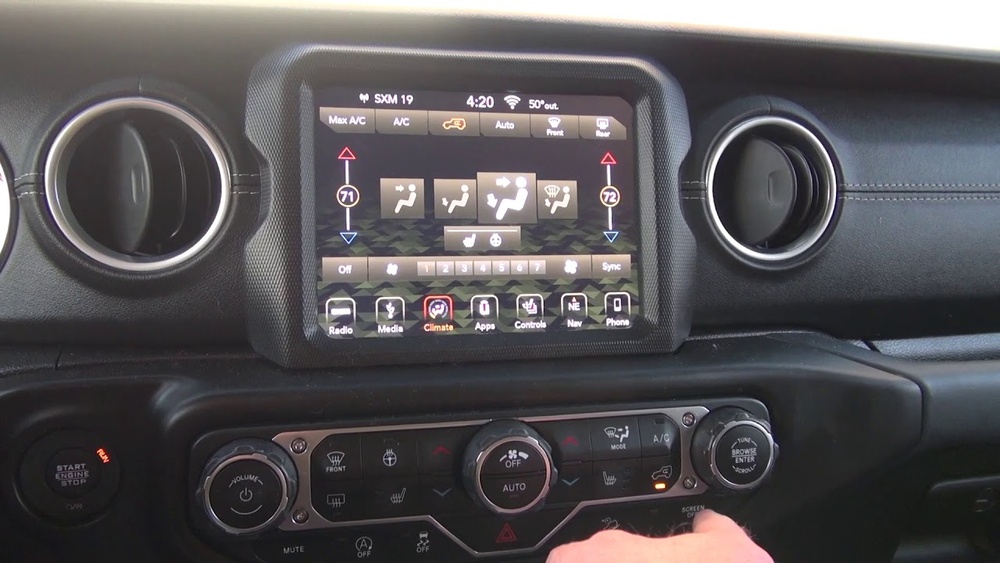
- The screen is completely frozen and does not respond to touch.
- Navigation or radio apps keep crashing.
- Bluetooth connection fails again and again.
- The system reboots on its own or shows a blank screen.
If your screen has physical damage or shows cracks, a reset will not help. In that case, you need professional service.
Types Of Jeep Wrangler Screens
Jeep Wranglers come with different infotainment systems based on the model year and trim. Most recent models use Uconnect, but older vehicles may have other systems. Here’s a quick comparison:
| System Name | Screen Size | Model Years | Main Features |
|---|---|---|---|
| Uconnect 3 | 5.0 or 7.0 in | 2018–2020 | Bluetooth, basic navigation |
| Uconnect 4 | 7.0 or 8.4 in | 2018–2023 | Apple CarPlay, Android Auto |
| Uconnect 5 | 8.4 in+ | 2021–present | Faster processor, wireless updates |
Knowing your system helps you pick the right reset method.

How To Soft Reset Jeep Wrangler Screen
A soft reset is usually enough to fix most problems. It reboots the system but keeps your saved data like radio presets and navigation addresses.
Soft Reset For Uconnect 4 And 5
- Turn the ignition ON but do not start the engine.
- Press and hold the volume knob and the tune/browse knob at the same time.
- Keep holding both knobs for about 10–20 seconds.
- The screen will turn off, then show the Jeep logo as it restarts.
This process works for most 2018 and newer models. If you have an older system or a different button layout, check your owner’s manual for the correct keys.
Soft Reset For Uconnect 3 And Older Systems
Some older screens use a different combination:
- Turn the ignition to the ON position.
- Press and hold the mute button and the browse/enter button together for about 10 seconds.
- Wait for the system to restart.
If the problem continues, try a hard reset.
How To Hard Reset Jeep Wrangler Screen
A hard reset erases personal settings and brings the system back to factory defaults. Use this if a soft reset does not solve your problem.
Steps For Hard Reset
- Go to the Settings menu on your screen.
- Tap System Information or Reset (the exact menu may vary).
- Choose Restore Factory Defaults.
- Confirm your choice. The system will reboot and erase personal data.
Important: This will remove all paired devices, saved addresses, and preferences. Make a note of important settings before you reset.
Troubleshooting Common Issues
If your screen does not reset or the problem returns quickly, something else may be wrong. Here are possible causes:
- Software updates needed: Check if your Uconnect system has a pending update.
- Loose battery connection: A weak battery can cause the screen to malfunction.
- Faulty wiring: Damaged or loose wires behind the dash can affect the screen.
Check your battery status and look for recalls or software updates on the official Jeep website.
Resetting Screen For Specific Jeep Wrangler Models
Different model years may have slightly different reset steps. Here’s a simple breakdown:
| Model Year | Reset Method | Special Notes |
|---|---|---|
| 2018–2020 | Volume + Tune Knobs | Hold for 10–20 seconds |
| 2021–2023 | Volume + Tune Knobs (Uconnect 5) | Screen may restart faster |
| 2017 and earlier | Mute + Browse Buttons | Some models need dealer reset |
Always double-check your manual if unsure.
What If The Screen Still Does Not Work?
If the screen remains blank or glitches after multiple resets, you may have a hardware failure. In rare cases, the display or control module is damaged. Do not try to remove the screen yourself—modern systems include security screws and delicate wiring.
Instead, contact your Jeep dealer or a certified technician. Screens under warranty are often replaced at no charge.
Two Insights Most Owners Miss
- Battery Health Matters: A weak battery can cause the screen to freeze or restart often. Many owners replace the screen, but a simple battery test can solve the issue.
- Software Updates Fix Many Bugs: Jeep regularly releases updates for Uconnect systems. These updates often solve freezing and Bluetooth issues without a reset. Visit your dealer or check the official website for instructions. More info can be found at the Jeep Uconnect page.
Frequently Asked Questions
How Often Should I Reset My Jeep Wrangler Screen?
Most owners never need to reset their screen unless there’s a problem. Frequent resets are not normal and may point to a bigger issue, like outdated software or a weak battery.
A soft reset keeps your saved addresses. But a hard (factory) reset erases all personal settings, including navigation, radio presets, and paired phones.
Can I Reset The Screen While Driving?
No. For safety, always reset your Jeep Wrangler screen while the vehicle is parked with the engine off or in the ON position (not running).
My Screen Is Blank And Will Not Turn On. What Should I Do?
Check your car battery and fuses first. If both are fine, the screen may need professional diagnosis. Sometimes, a deep power cycle (disconnecting the car battery for 10 minutes) helps, but only if you are comfortable doing this.
Is There A Way To Update My Jeep Wrangler Screen Software Myself?
Some updates are available for download on the Jeep website. For major updates, especially for newer Uconnect systems, visiting your dealer is safest.
A working screen makes your Jeep Wrangler more enjoyable and safer to drive. Knowing how to reset it can avoid a trip to the dealership. If resets do not solve your problem, do not hesitate to seek expert help—sometimes, a small issue can become a big headache if ignored.