Many Mercedes owners eventually look for their own diagnostic tool to save time and money. But there’s a common mistake: picking a scanner that lacks the right reset functions or doesn’t match their car’s systems. It’s easy to be drawn in by long feature lists without checking real compatibility. Some tools feel advanced but can be frustrating if they miss crucial functions for your model. By the end, you’ll see which Best Mercedes Diagnostic Tool suits your needs and what to expect from daily use.
Quick Decision Map For Mercedes Scan Tools
- Pick iCarsoft Bidirectional Diagnostic Tool for Most Mercedes-Benz/Sprinter/Smart from if you want maximum reset functions and bi-directional tests.
- Choose iCarsoft MB V2.0 OBD2 Scanner for Most Mercedes when you prefer focused DIY maintenance with core resets.
- Go with iCarsoft Bidirectional Diagnostic Tool for Most Mercedes-Benz/Sprinter/Smart from for broader system compatibility across newer and older models.
- Prefer iCarsoft MB V2.0 OBD2 Scanner for Most Mercedes if you need simple, clear code reading and battery checks.
- ICarsoft Bidirectional Diagnostic Tool for Most Mercedes-Benz/Sprinter/Smart from makes more sense for users who value lifetime updates and graph data review.
- ICarsoft MB V2.0 OBD2 Scanner for Most Mercedes is the safer bet for first-timers wanting guided reset functions.
Does The Icarsoft Mb V3.0 Really Cover All Systems For Mercedes Owners?
It depends. The iCarsoft MB V3. 0 covers a wide range of Mercedes, Sprinter, and Smart vehicles from 1996 to 2023. However, not all models have every ECU or support every listed function. Compatibility checks are important before buying, especially for newer Sprinter models where some functions are diagnostic-only.
In daily use, the tool feels thorough and practical for advanced troubleshooting. It offers up to 38 reset services, code reading across many modules, and bi-directional testing for things like windows or ABS pumps. The interface makes system scans and battery tests straightforward.
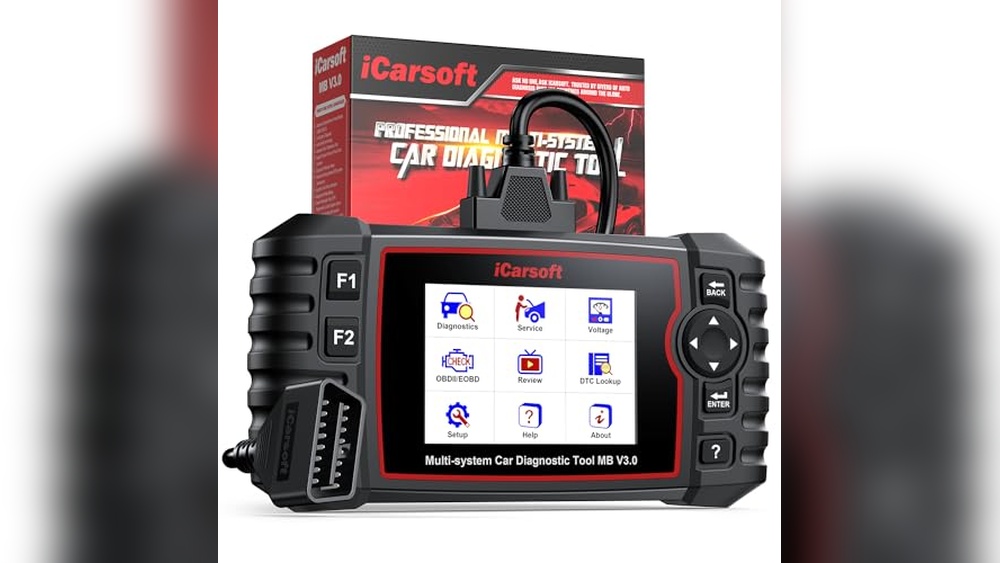
Data recording and graphing work well for tracking issues over time. I noticed the ability to print and review data is handy when discussing repairs with others.

Where The Mb V3.0 Stands Out For Mercedes Diagnostics
- Supports up to 38 reset and maintenance services, useful for deeper system work.
- Full-system OBD2 scanning: Engine, ABS, SRS, TPMS, fuel pump, suspension, and more.
- Bi-directional testing lets you activate components directly for troubleshooting.
- Real-time data graphing and history recording are built-in for tracking problems.
- Multi-language support and printable reports for sharing with mechanics or records.
- Lifetime free software updates keep it relevant as new models arrive.
What Buyers Should Know About The Mb V3.0
- Some functions may not work on every Mercedes, especially on newer Sprinter models.
- ECU and reset coverage varies—always check your VIN for compatibility before buying.
- First-time setup may require a software update for full features.
- Not all reset functions are available on every vehicle variant.
A Practical Fit For Mercedes Owners Wanting Depth
For Mercedes owners who want advanced system access and full bi-directional controls, this tool removes much of the guesswork in diagnostics. It’s suitable for those with some experience but doesn’t overwhelm beginners thanks to clear menus. After buying, you stop worrying about hidden faults or return trips to the shop for basic resets. One tip: update the tool right away to unlock its full feature set.
In my experience, the MB V3. 0 brings peace of mind by letting you handle most issues at home. Beginners may need a few sessions to get comfortable, but regular users will find value in the service coverage and data logs.
Is The Mb V2.0 Best For Diy Maintenance And Routine Mercedes Diagnostics?
Yes, for most DIY owners, the iCarsoft MB V2. 0 offers the essential functions needed for regular upkeep and troubleshooting. It supports in-depth scans across many systems and includes 9 core reset services—enough for common tasks like oil changes, brake pad resets, and battery registration.
The auto VIN and live data features simplify initial setup and ongoing checks.
Using it day-to-day is straightforward. The tool is designed to guide you through resets, and the interface keeps things simple. While it doesn’t cover as many specialized resets as the V3. 0, it’s less likely to confuse beginners. The MB V2.
0 is a practical choice for owners focused on maintenance rather than deep diagnostics. I like how the tool balances essential features without overcomplicating the process for routine users.

What The Mb V2.0 Delivers For Routine Owners
- Full-system diagnostics for Mercedes, Sprinter, Smart, and Maybach vehicles.
- 9 pro-level reset functions cover common maintenance needs.
- Auto VIN and auto scan make it quick to identify your vehicle and start checks.
- Live data and freeze frame review help spot intermittent issues.
- Basic OBD2 functions for engine codes and readiness checks.
What To Watch For With The Mb V2.0
- Some older models need a separate 38-pin adapter (not included).
- Reset function availability depends on your car’s year and trim.
- Does not cover as many resets or bi-directional tests as the V3.0.
- Compatibility should be checked before purchase, especially for less common models.
Best For Owners Focused On Maintenance And Simplicity
The MB V2.0 suits Mercedes owners who want to handle routine tasks and basic troubleshooting. It reduces stress for DIYers by guiding you through resets with clear instructions. Beginners will find it easier to use compared to deeper diagnostic tools, but it still has the range for experienced users doing regular upkeep. A practical tip: keep the manual handy for the first uses, as reset names can be technical.
Long-term, it brings confidence by covering the main tasks you’ll encounter during ownership. In my experience, it’s a straightforward option for those who want results without digging into every vehicle module.
The Questions That Settle Mercedes Diagnostic Tool Choices
Which scanner covers the systems in my specific Mercedes, including older or newer models? How many reset and maintenance functions do I actually need? Will I use bi-directional controls for repairs, or just basic resets? Do I prefer a tool that’s easy for beginners, or am I comfortable with more advanced features?
Is lifetime software support important for me, or will core functions suffice? How much am I willing to learn to get the most out of my diagnostic tool?
How These Mercedes Diagnostic Tools Compare In Daily Use
The main differences come down to the depth of diagnostics, reset coverage, and ease of use. Both tools handle full-system scans, but the MB V3. 0 leans toward advanced users needing more controls. The MB V2. 0 is more approachable for routine maintenance.
Day-to-day, the choice affects how much you can do yourself and how much guidance you want from the tool.
Which Tool Handles More Reset And Service Functions?
The MB V3. 0 offers up to 38 reset services, covering a wide range of maintenance and system resets. The MB V2. 0 focuses on 9 core services, enough for most routine tasks but not as deep. For owners who want to manage everything from suspension to turbocharger resets, the V3.
0 reaches further.
| Metric | iCarsoft Bidirectional Diagnostic Tool for Most Mercedes-Benz/Sprinter/Smart from | iCarsoft MB V2.0 OBD2 Scanner for Most Mercedes |
|---|---|---|
| Total reset services | Up to 38 | 9 core resets |
| Specialized resets | Wide range (e.g., NOx sensor, AdBlue) | Standard maintenance (oil, EPB, BMS, etc.) |
| Software updates | Lifetime, free | Free updates |
| Print/data review | Supported | Supported |
Ratings: iCarsoft Bidirectional Diagnostic Tool for Most Mercedes-Benz/Sprinter/Smart from – 9/10 | iCarsoft MB V2.0 OBD2 Scanner for Most Mercedes – 7/10
So what? Owners needing deep resets for complex repairs will care most about this difference.
Which Is Easier For Beginners To Use?
The MB V2. 0 keeps things simple, with guided resets and auto VIN. MB V3. 0 is more complex but offers more advanced options. If you’re just starting, the V2. 0 will feel less intimidating.
| Decision point | iCarsoft Bidirectional Diagnostic Tool for Most Mercedes-Benz/Sprinter/Smart from | iCarsoft MB V2.0 OBD2 Scanner for Most Mercedes |
|---|---|---|
| Initial setup | Requires software update for new features | Plug and play for core tasks |
| Menu complexity | More advanced options and modules | Straightforward for routine maintenance |
| Learning curve | Moderate for new users | Lower, especially for DIYers |
| Guided resets | Available, but more technical | More user-friendly |
Ratings: iCarsoft Bidirectional Diagnostic Tool for Most Mercedes-Benz/Sprinter/Smart from – 7/10 | iCarsoft MB V2.0 OBD2 Scanner for Most Mercedes – 9/10
So what? DIYers and first-timers will appreciate the V2. 0’s simplicity.
How Do They Compare For Bi-directional Control?
Bi-directional controls (active tests) are more extensive on the MB V3. 0. This allows you to command modules directly to test actuators and components. The MB V2. 0 covers basics but doesn’t have the same reach for advanced troubleshooting.
| Use case | iCarsoft Bidirectional Diagnostic Tool for Most Mercedes-Benz/Sprinter/Smart from | iCarsoft MB V2.0 OBD2 Scanner for Most Mercedes |
|---|---|---|
| Actuator testing | Available for EVAP, ABS, windows, sunroof, etc. | Limited |
| Component relearn | Supported after repairs | Some functions, not all |
| Depth of module control | Higher | Moderate |
| Diagnostic focus | Advanced repairs | Routine checks |
Ratings: iCarsoft Bidirectional Diagnostic Tool for Most Mercedes-Benz/Sprinter/Smart from – 9/10 | iCarsoft MB V2.0 OBD2 Scanner for Most Mercedes – 6/10
So what? Owners who do their own repairs or modifications benefit from the MB V3. 0’s capabilities.
What About Compatibility With Older And Newer Mercedes Models?
Both tools cover a wide range, but the MB V3. 0 supports more systems and has broader compatibility. The MB V2. 0 requires a separate adapter for some older models.
| Metric | iCarsoft Bidirectional Diagnostic Tool for Most Mercedes-Benz/Sprinter/Smart from | iCarsoft MB V2.0 OBD2 Scanner for Most Mercedes |
|---|---|---|
| Model years covered | 1996–2023 (many variants) | 1996–2023 (some older models need adapter) |
| Sprinter/Smart/Maybach support | Yes, with some limits on newer Sprinters | Yes, with model-dependent coverage |
| VIN compatibility check | Recommended before purchase | Recommended before purchase |
| Reset function variance | Based on ECU presence | Based on vehicle and adapter |
Ratings: iCarsoft Bidirectional Diagnostic Tool for Most Mercedes-Benz/Sprinter/Smart from – 8/10 | iCarsoft MB V2.0 OBD2 Scanner for Most Mercedes – 7/10
So what? If you own several different Mercedes models, MB V3. 0 provides more flexibility.
Which Offers Better Long-term Value?
Both offer lifetime software updates. MB V3. 0 adds lifetime hardware repair, which is useful if you plan to keep the tool for years. MB V2. 0 focuses on free updates and customer support.
| Decision point | iCarsoft Bidirectional Diagnostic Tool for Most Mercedes-Benz/Sprinter/Smart from | iCarsoft MB V2.0 OBD2 Scanner for Most Mercedes |
|---|---|---|
| Software updates | Lifetime, free via PC | Lifetime, free |
| Hardware support | Extra lifetime hardware repair | Standard warranty |
| Service longevity | High | High for core functions |
| Peace of mind | Higher with extra hardware coverage | Solid for typical use |
Ratings: iCarsoft Bidirectional Diagnostic Tool for Most Mercedes-Benz/Sprinter/Smart from – 8/10 | iCarsoft MB V2.0 OBD2 Scanner for Most Mercedes – 7/10
So what? Long-term owners and frequent users may value the MB V3. 0’s hardware guarantee.
Which Mercedes Diagnostic Tool Is The Right Fit For You?
Pick the iCarsoft Bidirectional Diagnostic Tool for Most Mercedes-Benz/Sprinter/Smart from if you want advanced reset functions, need bi-directional control for repairs, or own multiple Mercedes models with varying systems. It’s a practical fit for drivers who want to go beyond basic maintenance and value long-term software and hardware support.
Choose the iCarsoft MB V2. 0 OBD2 Scanner for Most Mercedes if your focus is on routine DIY maintenance, straightforward resets, and a more beginner-friendly interface. This tool is best for owners who want to handle common upkeep without digging into every system.
If you’re still unsure, let your comfort level with diagnostics and interest in advanced features be your tie-breaker. Both options help you avoid unnecessary shop visits and bring more control over your car’s health.
Best Mercedes Diagnostic Tool: Common Questions And Answers
Does The Icarsoft Mb V3.0 Work For Every Mercedes Model And Year?
No, it covers most models from 1996 to 2023, but not every function is available on every vehicle. Always check your VIN and required services with the seller for compatibility.
Will I Need Extra Adapters For Older Mercedes Vehicles?
For the MB V2. 0, some older models require a separate 38-pin adapter that’s not included. This mostly affects vehicles built before the early 2000s.
How Hard Is It To Update The Diagnostic Tool’s Software?
Both tools support free lifetime updates via PC. The process is straightforward and helps you access new features and vehicle support over time.
Can A Beginner Use These Tools Without Prior Experience?
The MB V2. 0 is more beginner-friendly, with guided resets and a simple interface. The MB V3. 0 offers more functions but may take a few sessions to get used to if you’re new to diagnostics.
Are All Reset Functions Guaranteed To Work On My Car?
No, reset function availability depends on your vehicle’s ECU and model year. Some advanced resets only work on select cars with the needed systems installed.
What’s The Main Advantage Of Bi-directional Controls?
Bi-directional controls let you activate parts like windows or pumps for direct testing. This is valuable for advanced troubleshooting and verifying repairs.
Is There Any Ongoing Cost For Software Updates Or Support?
No, both options include lifetime free updates. The MB V3. 0 also offers extra lifetime hardware repair support, which can be reassuring for long-term users.