If you drive a 2012 Jeep Grand Cherokee, connecting your phone to Bluetooth can make your rides safer and more enjoyable. Imagine making hands-free calls or streaming your favorite music without fumbling with cords.
But if you’re wondering how to get your Jeep’s Bluetooth system to recognize your phone, you’re not alone. This guide will walk you through each simple step to pair your device with your Grand Cherokee’s Uconnect system. By the end, you’ll know exactly how to set it up and troubleshoot common issues—so you can focus on the road ahead, not your tech.
Keep reading to get connected quickly and easily.

Prepare Your Jeep And Phone
Getting ready to connect Bluetooth in your 2012 Jeep Grand Cherokee is simple. You must prepare both your Jeep and your phone first. This ensures a smooth and quick pairing process. Follow these steps carefully to avoid any connection issues.
Turn On Ignition And Radio
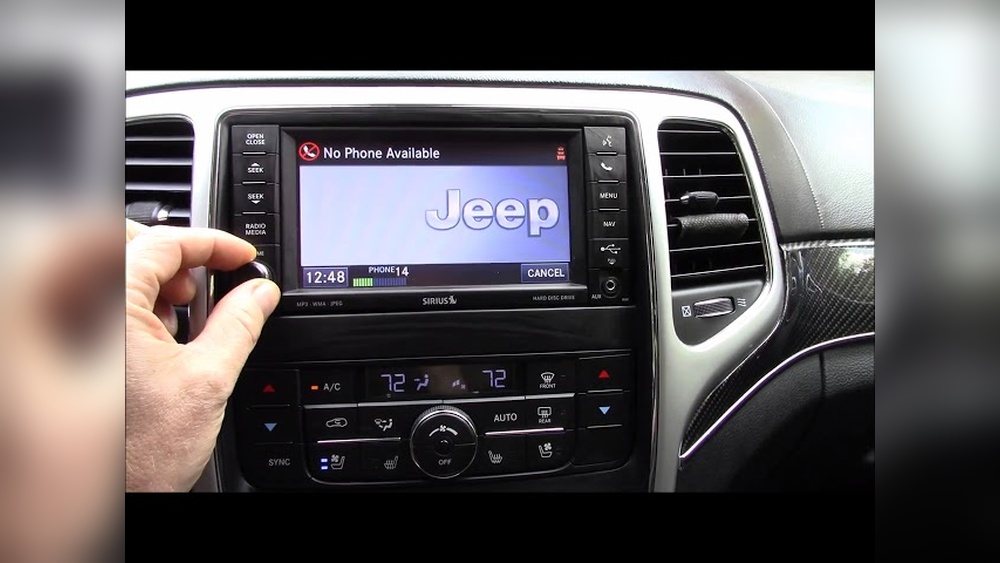
Start by turning your Jeep’s ignition to the “ON” or “ACC” position. This powers up the electrical system without starting the engine. Next, turn on the radio. The Uconnect system must be active to find your phone. For touchscreen radios, tap the “Phone” button on the screen. This opens the phone menu. For non-touchscreen radios, press the physical Phone button to activate Bluetooth pairing mode.
Enable Bluetooth On Your Phone
Open the settings app on your phone. Locate the Bluetooth option and turn it on. Make sure your phone is set to be discoverable or visible to other devices. This step allows your Jeep to detect your phone. Keep the Bluetooth menu open so your phone can scan for available devices. Your Jeep’s system will appear as “Uconnect” or “Jeep Grand Cherokee” in the list. Select this to start pairing.
Pairing With Touchscreen Radios
Pairing your phone with the Jeep Grand Cherokee 2012 touchscreen radio is simple and quick. This lets you make hands-free calls and stream music safely while driving. Follow the easy steps below to connect your phone using the Uconnect system.
Start by turning on your Jeep’s ignition. Make sure the radio is on and the screen is active. Tap the Phone icon on the Uconnect touchscreen. This opens the phone menu where you can manage Bluetooth devices.
Add A New Device
In the phone menu, look for Settings or Add Device. Select Add Device to begin pairing. The system will now search for nearby Bluetooth devices.
Select Jeep From Phone Bluetooth List
On your mobile phone, open Bluetooth settings and scan for devices. Find and tap Jeep or Uconnect in the list. This starts the connection process between your phone and the vehicle.
Confirm Pairing And Download Contacts
The Uconnect system shows a pairing code on the screen. Confirm this code matches the one on your phone. Approve the connection and allow the system to download your contacts. Your phone is now paired and ready to use hands-free features.
Pairing With Non-touchscreen Radios
Pairing a Bluetooth device with a 2012 Jeep Grand Cherokee that has a non-touchscreen radio involves simple steps. These radios rely mainly on physical buttons and voice commands for setup. This section explains how to connect your phone to the vehicle’s audio system without a touchscreen.
Start by turning on your Jeep’s ignition and radio. Press the Phone button, usually marked with a phone icon. Wait for a beep sound, which means the system is ready. Then say, “Pair a phone.” The system will enter pairing mode. It listens for nearby Bluetooth devices to connect.
Use clear voice commands to guide the system. This method works well if you prefer hands-free control. It also avoids the need to navigate menus on a screen.
Search And Connect Via Phone Bluetooth Settings
On your phone, open the Bluetooth settings menu. Make sure Bluetooth is turned on and your device is visible to other devices. Search for new devices nearby. Look for the name “Uconnect” or similar to your Jeep’s system.
Select the correct device name to start pairing. Your phone and Jeep will exchange a code or prompt to confirm the connection. Accept the prompt on both devices. Once paired, your phone can make hands-free calls and stream audio through the Jeep’s system.

Troubleshooting Common Issues
Connecting Bluetooth to your 2012 Jeep Grand Cherokee should be simple. Sometimes, issues arise that stop the connection process. Troubleshooting helps solve common problems fast. Follow these steps to fix typical Bluetooth issues.
Check Phone Compatibility
Not all phones work with the Jeep’s Bluetooth system. Older phones might not support the needed Bluetooth version. Visit the Mopar Uconnect website to see if your phone is listed. Using a compatible phone reduces pairing problems.
Restart Devices And Retry Pairing
Turn off your Jeep’s ignition and your phone’s Bluetooth. Wait a few seconds. Turn them back on and try pairing again. Restarting clears temporary glitches that block connections. This simple step often fixes pairing failures.
Update Uconnect Software
Old Uconnect software can cause Bluetooth issues. Check the Jeep website for software updates. Download and install any available updates. Updated software improves system stability and fixes bugs.
Clear Old Bluetooth Connections
Too many saved devices can slow or stop pairing. Delete old or unused devices from your Jeep’s Bluetooth list. Also, clear saved connections on your phone. This frees up space and helps the system find your phone faster.
Tips For Better Bluetooth Experience
Enhance your Jeep Grand Cherokee 2012 Bluetooth connection with simple tips. These small steps improve call quality and audio streaming. Enjoy a smoother, more reliable Bluetooth experience every drive.
Follow these easy tips to make your Bluetooth connection better and safer.
Keep Devices Within Range
Bluetooth works best when your phone stays close to the vehicle. Keep your device within 30 feet of the Jeep. Walls or windows can block the signal, so avoid placing your phone in the glove box or trunk. Staying close avoids dropped calls and poor sound.
Avoid Interference From Other Electronics
Other electronics can disturb your Bluetooth signal. Devices like Wi-Fi routers, other Bluetooth gadgets, and even some chargers cause interference. Turn off or move away from these devices during calls. This reduces noise and improves connection stability.
Regularly Sync Contacts And Media
Keep your phone’s contacts and media synced with your Jeep’s system. This ensures easy access to your favorite playlists and phone numbers. Update your contacts often to avoid missing calls or messages. Syncing also helps the system recognize your device faster.
Use Voice Commands For Safety
Using voice commands keeps your hands on the wheel and eyes on the road. Your Jeep supports voice control for calls and music. Speak clearly to activate the system. This improves safety and keeps distractions low while driving.

Frequently Asked Questions
How To Set Up Bluetooth On A 2012 Jeep Grand Cherokee?
Turn on your 2012 Jeep Grand Cherokee and enable Bluetooth on your phone. Press the Uconnect Phone button, select Add Device, then pair your phone from the Bluetooth menu. Confirm pairing and allow contact download to complete the setup.
How To Pair Bluetooth To Jeep Grand Cherokee?
Turn on your Jeep Grand Cherokee and enable Bluetooth on your phone. Press the Uconnect Phone button, select Add Device, then pair your phone from the Bluetooth menu. Confirm the connection and allow contact access for hands-free use.
How To Connect Bluetooth To An Old Jeep Cherokee?
Turn on your Jeep and enable Bluetooth on your phone. On the Uconnect screen, press Phone > Add Device. Select your Jeep on your phone’s Bluetooth list to pair.
Why Is My Bluetooth Not Working In My Jeep Grand Cherokee?
Bluetooth in your Jeep Grand Cherokee may not work due to disabled Bluetooth, pairing issues, outdated software, or phone compatibility problems. Ensure Bluetooth is enabled on both devices, restart the system, update Uconnect software, and verify your phone supports Jeep’s Bluetooth profile.
Conclusion
Connecting Bluetooth to your 2012 Jeep Grand Cherokee is simple and quick. Just follow the steps carefully, and you will be ready to enjoy hands-free calls and music. Make sure your phone’s Bluetooth is turned on before pairing. Remember to keep your vehicle in park for safety during setup.
If you encounter any issues, double-check your phone’s compatibility and try restarting both devices. With Bluetooth connected, your driving experience becomes safer and more convenient. Enjoy the freedom of wireless connection every time you hit the road.