Have you ever found yourself wondering how to turn the lights off in your Jeep Wrangler quickly and easily? Whether you’re parking your Jeep for the night or just want to save battery power, knowing the right steps can save you time and frustration.
This simple action might seem obvious, but many Jeep owners miss a few key tips that make the process smooth and hassle-free. Keep reading, and you’ll discover exactly how to control your Jeep Wrangler’s lights like a pro—making your driving experience safer and more convenient.
Credit: wranglertjforum.com
Locate The Light Controls
Finding the light controls in your Jeep Wrangler is the first step to turning the lights off. The controls are designed for easy access and clear use. Knowing where they are helps you manage your vehicle’s lighting without confusion or delay.
Jeep Wranglers have light controls placed in two main areas. These areas are the dashboard and the steering column. Each location has specific switches or knobs for different light functions. Understanding these places makes it simple to find and use the right control quickly.
Dashboard Switches
The dashboard holds the main light switch in most Jeep Wranglers. It is usually on the left side of the steering wheel. This switch controls headlights, parking lights, and sometimes fog lights. The switch often turns or pulls to change light settings. Turning it to the “off” position switches off the lights completely.
Some models show symbols next to the switch. These symbols guide you on which setting is active. The dashboard switch is easy to reach and easy to see. This design helps drivers turn lights off without taking their eyes off the road for long.
Steering Column Features
The steering column also has light controls on many Jeep Wranglers. This control is often a stalk on the left side of the steering wheel. It usually controls high beams and sometimes turn signals. Pulling or pushing the stalk can switch the high beams on or off.
Some models include an automatic light feature controlled here. This feature turns lights off when the engine stops. The stalk is simple to use with one hand. It allows quick light changes while driving or parking.
Turning Off Interior Lights
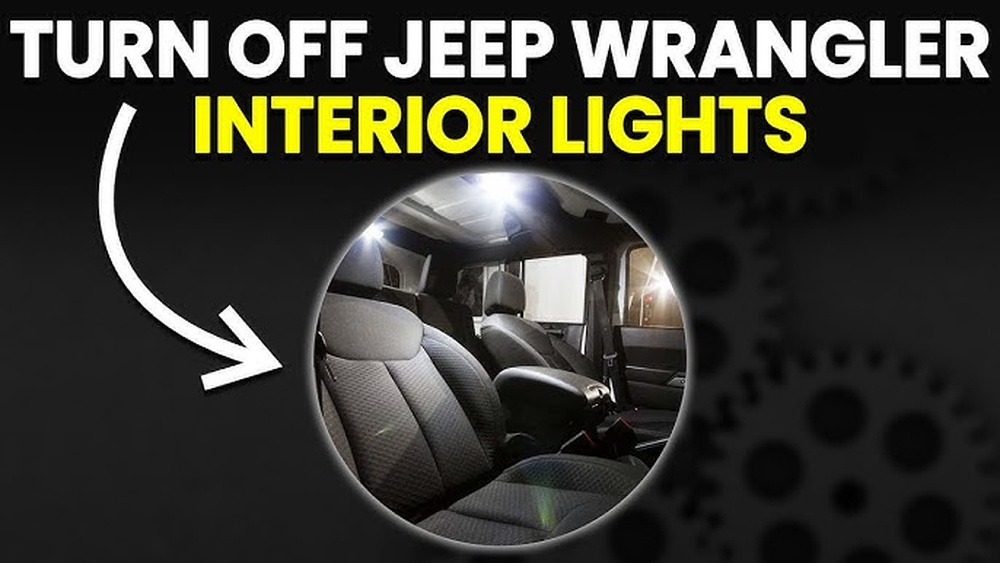
Turning off the interior lights in your Jeep Wrangler helps save battery power. It also prevents unwanted light inside the cabin at night. Knowing how to control these lights is simple and quick.
Jeep Wranglers offer different settings for interior lights. You can adjust dome lights and ambient lighting separately. This gives you control over the light brightness and timing.
Dome Light Settings
The dome light is the main interior light in your Jeep. To turn it off, use the switch near the light or on the dashboard. You can set it to stay on, turn off, or come on only when doors open.
Choose the “off” position to keep the dome light off all the time. The “door” setting lets the light turn on only when you open a door. Use the “on” setting for constant light inside the vehicle.
Ambient Lighting Options
Ambient lights add soft lighting inside the Jeep. They create a cozy atmosphere without bright light. To turn off ambient lights, check the control panel or touchscreen.
Use the menu to find lighting settings. Then, select ambient lights and turn them off or adjust brightness. You can also choose different colors or turn the lights on only during driving.
Switching Off Exterior Lights
Switching off the exterior lights of your Jeep Wrangler is simple. It helps save battery power and keeps your vehicle safe. Knowing the correct controls avoids confusion and ensures you do it right every time.
Headlight Controls
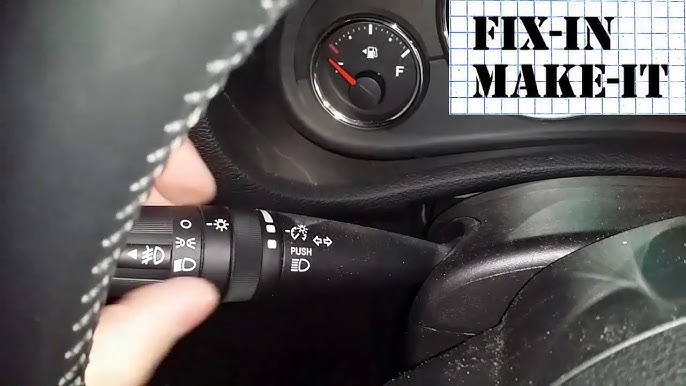
The headlight controls are on the left side of the steering wheel. Turn the dial to switch off the headlights. The dial has several positions, including off, parking lights, and headlights. Make sure the dial points to the off position to turn off all exterior lights. Check your dashboard to confirm the lights are off.
Fog Light Adjustment
Fog lights have a separate switch near the headlight dial. Press or pull the fog light button to turn them off. Fog lights only work when the headlights are on, so turning off headlights also disables fog lights. Always check the fog light indicator on the dashboard to ensure they are off.

Credit: www.reddit.com
Using The Automatic Light System
The Jeep Wrangler’s automatic light system helps control your vehicle’s lights without much effort. It turns the lights on and off based on outside light conditions. This feature improves safety and saves battery power. Using this system is simple and convenient for daily driving.
Understanding how to activate and adjust the system lets you make the most of it. The automatic lights respond to darkness and bright conditions, switching on headlights as needed. This reduces the chance of driving without proper lighting.
Auto Mode Activation
To activate the automatic light system, turn the light switch to the “AUTO” position. This setting lets sensors detect light levels outside. The headlights will turn on at dusk or in tunnels. They will switch off when there is enough daylight. This hands-free mode helps you focus on driving, not the lights.
Manual Override Tips
You can override the automatic system anytime. Turn the light switch away from “AUTO” to manual settings. Use this option if you want control over the lights. For example, turn on fog lights in bad weather. Remember to return to “AUTO” for normal use. Manual override ensures you have full control when needed.
Troubleshooting Light Issues
Troubleshooting light issues in a Jeep Wrangler can be simple. Lights may not turn off due to common problems or settings that need resetting. Identifying the cause helps fix the issue quickly. This guide covers common light problems and how to reset light settings.
Common Light Problems
Sometimes lights stay on after turning off the engine. This may happen because of a stuck switch or a faulty sensor. A blown fuse can also cause lights to behave oddly. Wiring problems might make lights flicker or stay on. Door switches that do not detect open doors can keep interior lights on.
Check the headlight switch first. Make sure it is in the “off” position. Look for any broken bulbs or damaged wires. Inspect fuses related to the lighting system. Replace any faulty parts to restore normal function.
Resetting Light Settings
Resetting light settings can clear errors in the system. Start by turning off the engine and removing the key. Wait a few minutes to let the system reset. Some Jeep Wranglers have a light control module that resets automatically.
To manually reset, disconnect the battery for about 10 minutes. Reconnect it and start the Jeep. This can reset electronic settings and fix light problems. Check the owner’s manual for specific reset instructions for your model.
Credit: www.youtube.com
Energy Saving Tips
Saving energy in your Jeep Wrangler helps keep the battery strong and lasts longer. Lights use power even when the engine is off. Turning them off properly saves energy and avoids unexpected battery drain.
Preventing Battery Drain
Always check your lights before leaving the Jeep. Make sure all interior and exterior lights are off. Leaving lights on can drain the battery overnight. Use the dashboard indicator to see if any lights remain on. If your Jeep has an automatic light-off feature, use it. This helps stop battery drain by turning lights off after you lock the vehicle.
Smart Light Usage
Use lights only when needed. Avoid keeping headlights or cabin lights on for long periods. Use daytime running lights to save energy during the day. Dim the dashboard lights at night to reduce power use. Switch off fog lights when not necessary. Smart light use helps save energy and extends battery life.
Frequently Asked Questions
How Do I Turn Off Jeep Wrangler Headlights Manually?
To turn off Jeep Wrangler headlights, rotate the headlight switch to the “OFF” position. This switch is usually on the dashboard or near the steering column.
Yes, some Jeep Wrangler models have a dedicated button or dial to control the lights. Check your vehicle’s manual for the exact location and operation.
Why Won’t My Jeep Wrangler Lights Turn Off?
If lights won’t turn off, the switch might be stuck or faulty. Also, check if the automatic light sensor or delay timer is active.
How To Disable Jeep Wrangler Daytime Running Lights?
Daytime running lights usually turn on automatically and can’t be disabled manually. Check your Jeep’s settings or consult the manual for exceptions.
Conclusion
Turning off the lights in your Jeep Wrangler is simple and quick. Just find the light switch and move it to the off position. This helps save your battery and keeps your vehicle safe. Remember to check your lights before leaving the car.
Knowing this small step can make a big difference. Keep your Jeep ready for any trip by managing the lights well. Easy to do, and it protects your vehicle every time.